

-
 Pick up from the Woodmart Store
-
 Courier delivery
-
 DHL Courier delivery
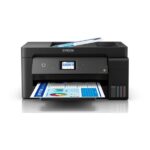
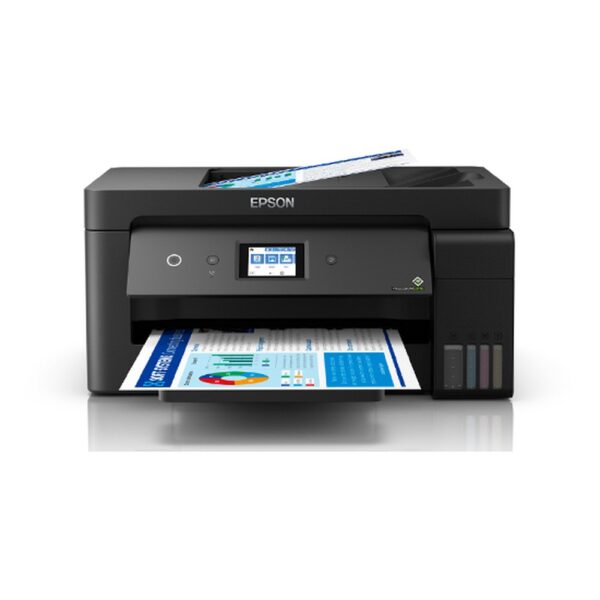
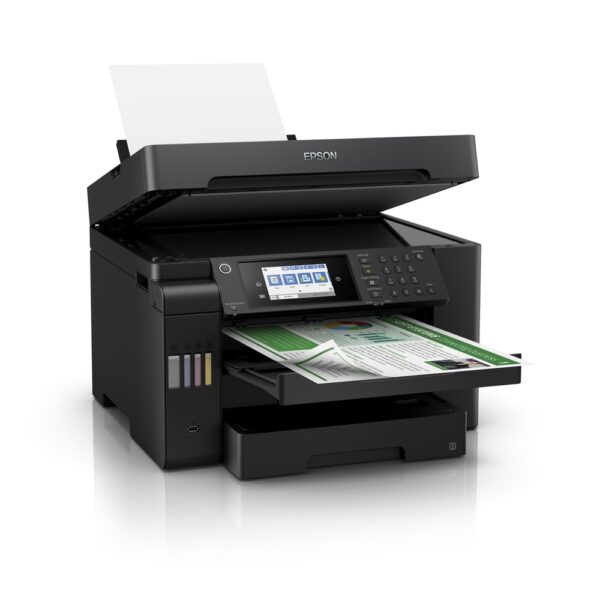
Epson EcoTank L15150 A3+ Wi-Fi Duplex All-in-One Colour Ink Tank Printer
1. Epson EcoTank L15150 A3+ Wi-Fi Duplex Printer Overview
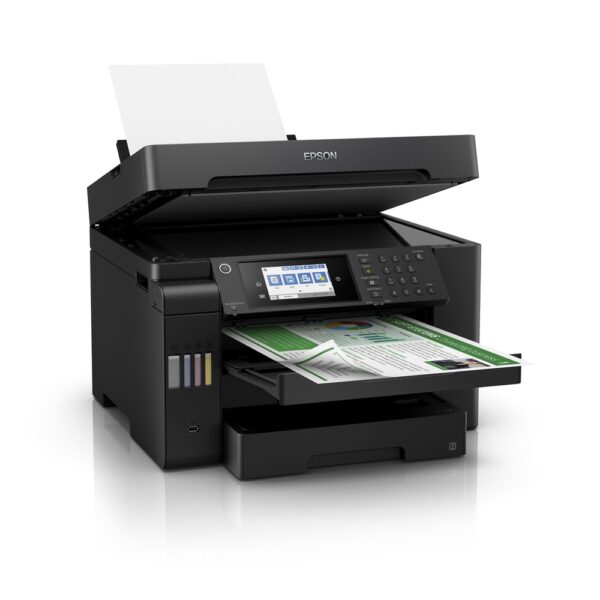
The Epson EcoTank L15150 A3+ Wi-Fi Duplex All-in-One Colour Ink Tank Printer is a powerful multifunction printing solution designed for professional offices, educational institutions, businesses and organisations that regularly handle documents in different formats.
Combining printing, scanning, copying and faxing in a single machine, the Epson L15150 provides the flexibility required for modern office operations. Its A3+ single-sided printing capability allows users to produce larger documents, while automatic A3 duplex printing helps simplify two-sided document production.
The printer features Epson PrecisionCore Heat-Free Technology and genuine DURABrite ET pigment inks, delivering detailed black-and-white and colour documents.
With high-capacity paper trays, a 50-sheet automatic document feeder, a colour touchscreen and comprehensive connectivity options, the L15150 is designed to support productive office workflows.
Customers can explore printers and office printing solutions through Aadinath Peripherals & Consumables.
2. Advanced A3+ Printing for Professional Workspaces
One of the most important advantages of the Epson EcoTank L15150 is its ability to print on A3+ paper.
A3+ offers additional space compared with standard A4 or A3 documents, making it useful for presentation materials, large charts, diagrams, educational illustrations and detailed business reports.
Professionals preparing complex layouts can print on larger sheets instead of dividing a document across multiple A4 pages.
This is particularly useful for architectural concept drawings, marketing layouts, training materials and visual presentations.
The Epson L15150 supports A3+ single-sided printing, while its automatic two-sided printing capability extends up to A3.
Customers should distinguish between printing, scanning and copying formats, as they are not necessarily identical.
The L15150 is particularly suitable for organisations that regularly produce A4 documents but also require larger-format output for specific projects.
3. Multifunction Print, Scan, Copy and Fax Capabilities
The Epson EcoTank L15150 combines four essential office functions into one integrated system.
It supports black-and-white and colour printing, flatbed and automatic document feeder scanning, document copying and traditional fax communication.
This multifunction design is convenient for offices handling quotations, invoices, purchase orders, contracts and general correspondence.
For example, an employee can print a customer quotation, scan an approved purchase order, copy supporting documents and fax paperwork when necessary.
Using one multifunction printer can also reduce the number of separate machines required in a workspace.
The printer’s A3 scanning and copying capability provides additional flexibility beyond standard A4 multifunction printers.
Businesses with a wide range of administrative tasks may benefit from combining these functions within one connected device.
4. PrecisionCore Printhead Technology
The Epson L15150 features Epson PrecisionCore printhead technology, developed to support efficient printing and precise ink placement.
Its nozzle configuration includes 800 black nozzles and 256 nozzles for each of the cyan, magenta and yellow colours.
This technology helps reproduce text, diagrams, charts and coloured illustrations on compatible paper.
A high-density printhead is useful when producing documents containing detailed information and combinations of text and graphics.
For businesses, clear printing is important for reports, presentations, purchase records and other customer-facing materials.
The printhead uses controlled ink droplets to create the requested image.
Actual output quality depends on the condition of the printer, genuine compatible inks, suitable paper and the selected printing settings.
For manufacturer details, customers can visit the official Epson EcoTank L15150 product page.
5. Epson Heat-Free Printing Technology
The Epson EcoTank L15150 incorporates Epson Heat-Free Technology.
Unlike conventional thermal inkjet mechanisms that heat ink during droplet generation, Epson’s piezoelectric printing system does not require heat for the ink ejection process.
This design supports efficient operation and contributes to the printer’s comparatively low operating power requirements.
Epson specifies approximately 19 watts of power consumption during its published operating test condition.
For organisations using a printer throughout the working day, energy consumption is an important component of ongoing equipment expenditure.
Heat-Free Technology supports Epson’s approach to efficient office inkjet printing while maintaining high printing speeds.
The technology should not be interpreted as meaning that the printer produces absolutely no heat during normal operation.
Customers can learn more about this technology through Epson India’s official website.
6. Detailed Printing Resolution for Business Documents
According to Epson India’s June 2025 technical brochure, the EcoTank L15150 supports a maximum print resolution of 4800 × 1200 dpi.
This resolution provides the capability to reproduce detailed black-and-white text, charts, tables and colour illustrations.
Businesses may use high-quality settings when preparing customer presentations, proposals, illustrated reports and other important documents.
Educational institutions can produce diagrams, learning materials and large educational charts.
The printer also incorporates variable-sized droplet technology, with a minimum specified droplet volume of 3.8 picolitres.
Users should select the print-quality setting appropriate for the document.
Draft printing may be useful for internal paperwork, while higher-quality printing can improve the appearance of final presentation materials.
The original document resolution and paper quality also affect the printed result.
7. Fast Black-and-White Draft Printing
The Epson EcoTank L15150 supports draft printing speeds of up to 32 pages per minute in black.
This is particularly useful for businesses that regularly print internal reports, letters, working documents and administrative paperwork.
Draft printing can help users prepare documents quickly when the highest print quality is not necessary.
For example, a procurement department may print a working purchase list, while an accounts team may prepare reference copies of financial records.
Under the ISO 24734 standard, Epson specifies a black A4 simplex printing speed of up to 25 images per minute.
ISO speed and maximum draft speed are different measurements.
Actual printing performance varies with document content, selected quality mode, paper type, software and network conditions.
8. Professional Colour Printing Performance
The Epson L15150 supports colour draft printing at up to 22 pages per minute.
Its four-colour pigment ink system produces printed documents containing illustrations, charts, coloured text and photographs.
Businesses can prepare proposals with logos, product descriptions, diagrams and visual presentation elements.
Colour printing can also make technical reports and educational materials easier to interpret.
The printer delivers an ISO A4 simplex colour printing speed of up to 12 images per minute under the manufacturer’s specified testing conditions.
For complex image-heavy documents, printing speed may be lower than for ordinary text pages.
Users should select standard or higher-quality settings according to the required output.
The L15150 is intended for professional office document production rather than specialised commercial photographic printing.
9. Fast A3 Document Printing
A3 printing is particularly useful for preparing larger diagrams, reports and presentation documents.
The Epson EcoTank L15150 supports ISO A3 simplex speeds of up to 13.5 images per minute in black and 6 images per minute in colour.
These speeds provide users with practical performance when printing larger documents.
Architects, business consultants, project teams and educational users may benefit from the additional page space.
Large charts and presentation layouts can be printed without splitting them across multiple A4 sheets.
A3 printing speed differs from A4 performance because larger pages require different paper movement and ink placement.
Customers should therefore use the specified A3 figures when comparing printers intended for larger documents.
10. Automatic Duplex Printing Up to A3
The Epson L15150 supports automatic two-sided printing on compatible paper up to A3 size.
This feature makes the printer particularly useful for businesses that regularly prepare double-sided reports, agreements, training documents and presentations.
Automatic duplex operation eliminates the need to manually turn and reload paper during supported two-sided printing jobs.
Epson specifies ISO A4 duplex speeds of up to 16 ipm black and 9 ipm colour.
For A3 documents, automatic duplex speeds are rated at up to 10 ipm black and 5 ipm colour.
Two-sided printing can help reduce paper consumption and make larger documents easier to store.
However, automatic duplex printing should not be advertised as available for A3+ media, because Epson specifies support only up to A3.
11. A3 Flatbed Scanning Capability
Unlike multifunction printers limited to A4 or Legal-size scanning, the Epson EcoTank L15150 offers A3 scanning capability.
It uses a flatbed colour image scanner with CIS technology.
The manufacturer’s published maximum scan area is approximately 297 × 431.8 mm.
This makes the scanner suitable for digitising larger reports, diagrams, technical documents and business paperwork.
Architects may scan concept drawings, while administrative teams can digitise larger forms and records.
The scanner offers an optical resolution of 1200 × 2400 dpi, supporting detailed document capture.
For accurate results, the original document should be placed correctly and the appropriate scan settings should be selected.
The resulting file can then be stored or processed using compatible scanning software.
12. Automatic Duplex Scanning with 50-Sheet ADF
The Epson L15150 includes a 50-sheet automatic document feeder.
The ADF supports automatic feeding of multiple pages for scanning and other supported document-handling tasks.
It also supports two-sided scanning, making it useful for offices that frequently digitise double-sided documents.
For example, an organisation may scan multi-page agreements, correspondence, invoice batches or administrative reports.
The automatic document feeder reduces the need to place every page individually on the flatbed scanner.
Epson specifies monochrome ADF scanning speeds of up to 26 ipm in simplex mode and 11.5 ipm in duplex mode at 200 dpi.
Colour ADF scanning is rated at up to 9 ipm simplex and 6 ipm duplex.
The ADF supports suitable paper within Epson’s specified 64–95 g/m² range.
13. Convenient A3 Document Copying
The Epson EcoTank L15150 supports standalone copying up to A3 size.
This functionality is valuable for offices requiring copies of reports, forms, diagrams and larger documents.
Users can initiate supported copying tasks directly from the printer without necessarily using a computer.
The machine supports up to 999 copies in a standalone copy job.
It also provides reduction and enlargement settings from 25% to 400%, helping users adapt document dimensions for suitable printing formats.
The maximum copy resolution is 600 × 600 dpi.
For everyday administrative paperwork, the copier provides a convenient alternative to maintaining a separate photocopying machine.
Actual copying performance depends on document size, colour settings and whether the flatbed or ADF is used.
14. Efficient Copy Speeds for Busy Offices
The Epson L15150 is designed to handle everyday office copying tasks efficiently.
Epson specifies flatbed A4 simplex copying speeds of up to 23 ipm in black and 10 ipm in colour.
With the automatic document feeder, simplex copy speeds are rated at up to 22.5 ipm black and 10 ipm colour.
For two-sided copying through the ADF, the manufacturer quotes up to 15.5 ipm black and 7.5 ipm colour.
These speeds are measured according to the relevant ISO standards.
The figures provide useful guidance for offices comparing multifunction printers.
Copying speed can depend on settings, document complexity and the chosen paper size.
For larger copying workloads, users should also consider available paper capacity and the need for periodic ink replenishment.
15. Integrated Colour and Monochrome Fax
The Epson EcoTank L15150 includes fax functionality for businesses that continue to use telephone-based document transmission.
The printer supports both black-and-white and colour fax operation under appropriate conditions.
The manufacturer’s specifications list a fax modem speed of up to 33.6 kbps.
Fax transmission time is approximately three seconds per page under specified test conditions.
The printer also supports functions such as automatic redial, an address book, memory reception and fax preview.
These features can be useful for professional offices that communicate with institutions still using fax.
Fax operation requires a suitable connection and correct configuration.
It should not be confused with email-based printing or cloud document sharing, which are separate functions.
16. Large 50-Sheet Document Feeder for Office Productivity
A 50-sheet ADF provides practical advantages when working with substantial document batches.
Users can load multiple supported sheets into the feeder instead of repeatedly opening the scanner lid.
This helps simplify activities such as scanning contracts, copying training handouts and preparing document archives.
The feeder is especially valuable in workplaces where physical documents must be converted into electronic records.
Its ability to handle supported two-sided originals provides additional flexibility.
However, the full 50-sheet capacity depends on paper type and thickness.
Users should align documents correctly and avoid loading damaged, folded or unsuitable paper.
Following Epson’s paper-loading instructions can help reduce feeding problems and unnecessary interruptions.
17. Dual 250-Sheet Front Paper Cassettes
The Epson EcoTank L15150 features two front paper cassettes, each capable of holding up to 250 sheets of specified plain paper.
Together, the front cassettes provide up to 500 sheets of standard plain-paper input capacity.
This is particularly useful for offices producing regular reports, correspondence and administrative documents.
Users may configure the cassettes with appropriate supported paper depending on their workflow.
For example, one cassette may be used for standard office documents while another holds a different supported size.
Large paper capacity reduces the frequency of manual replenishment during routine print jobs.
Actual capacity depends on media weight, size and feeding conditions.
For best results, customers should use paper that meets Epson’s published specifications.
18. Additional 50-Sheet Rear Paper Feed
The L15150 also includes a rear paper feed, providing an additional method of loading supported media.
Epson specifies up to 50 sheets of A4 or A3 plain paper through the rear feed under suitable conditions.
For supported Premium Glossy Photo Paper, the capacity is lower.
The rear feed can be useful when switching between different paper types or sizes.
For instance, an office may keep standard documents in the front cassettes and use the rear feed for an occasional specialised print job.
Combined with the two front cassettes, the printer offers a total plain-paper input capacity of up to 550 sheets under the specified configuration.
This arrangement supports flexible paper handling for professional document production.
19. Flexible A3+, A3, A4 and Custom Paper Support
The Epson EcoTank L15150 supports various paper sizes, including A3+, A3, A4, A5, A6, B4, B5, B6, Letter, Legal and selected envelopes.
The manufacturer’s specifications also identify support for certain custom paper sizes up to 329 × 6000 mm.
This wide range provides flexibility for businesses and professionals working with different document formats.
A4 is suitable for everyday office communication, while A3 and A3+ provide more space for graphics and presentation layouts.
Selected envelopes and smaller media can be used for suitable correspondence and specialised tasks.
Users must ensure that the paper size selected in the application matches the media loaded into the printer.
Not all sizes support the same duplex, borderless or paper-feeding options.
20. Genuine Epson DURABrite ET Pigment Ink Technology
The Epson EcoTank L15150 uses genuine DURABrite ET pigment inks.
Unlike the dye-based inks used by some general-purpose home printers, this pigment ink system is designed for professional document printing.
Epson describes DURABrite ET as providing sharp text and clear, water-resistant documents under suitable conditions.
Pigment inks can be particularly useful for business letters, reports, coloured tables, charts and printed records.
The L15150’s four-colour system includes black, cyan, magenta and yellow.
The inks are intended to work with the printer’s PrecisionCore printhead and integrated EcoTank delivery system.
Customers should not substitute a different Epson ink family merely because the bottle is labelled with the same colour.
For original consumables, consult the Epson L15150 official ink compatibility information

Technical specifications – Epson EcoTank L15150
General and printing specifications
| Specification | Details |
|---|---|
| Brand | Epson |
| Series | EcoTank |
| Model | L15150 |
| Indian MPN | C11CH72503 |
| Printer Type | A3+ Colour Multifunction Ink Tank Printer |
| Functions | Print, Scan, Copy, Fax |
| Printhead Technology | PrecisionCore |
| Heat-Free Technology | Yes |
| Ink Technology | DURABrite ET Pigment |
| Ink Colours | Black, Cyan, Magenta, Yellow |
| Black Printhead Nozzles | 800 |
| Colour Printhead Nozzles | 256 per colour |
| Maximum Print Resolution | 4800 × 1200 dpi (June 2025 India brochure) |
| Minimum Ink Droplet | 3.8 pl |
| Print Direction | Bidirectional |
| A4 Draft Speed – Black | Up to 32 ppm |
| A4 Draft Speed – Colour | Up to 22 ppm |
| A4 ISO Simplex – Black | Up to 25 ipm |
| A4 ISO Simplex – Colour | Up to 12 ipm |
| A4 ISO Duplex – Black | Up to 16 ipm |
| A4 ISO Duplex – Colour | Up to 9 ipm |
| A3 ISO Simplex – Black | Up to 13.5 ipm |
| A3 ISO Simplex – Colour | Up to 6 ipm |
| A3 ISO Duplex – Black | Up to 10 ipm |
| A3 ISO Duplex – Colour | Up to 5 ipm |
| First Page Out – Black A4 | Approx. 5.5 seconds |
| First Page Out – Colour A4 | Approx. 8.5 seconds |
| Maximum Paper Format | A3+ |
| Automatic Duplex | Yes, up to A3 |
| Printer Language | ESC/P-R, ESC/P Raster |
Scanner, copier, ADF and fax specifications
| Specification | Details |
|---|---|
| Scanner Type | Flatbed Colour Scanner |
| Scanner Sensor | CIS |
| Optical Scan Resolution | 1200 × 2400 dpi |
| Maximum Scan Area | 297 × 431.8 mm |
| Maximum Copy Size | A3 |
| Copy Resolution | 600 × 600 dpi |
| Maximum Copies | 999 |
| Copy Enlargement / Reduction | 25–400% |
| ADF Available | Yes |
| ADF Capacity | 50 sheets |
| ADF Duplex Scanning | Yes |
| ADF Paper Weight | 64–95 gsm |
| A4 Flatbed Scan – Black | Approx. 5 seconds (200 dpi) |
| A4 Flatbed Scan – Colour | Approx. 10 seconds (200 dpi) |
| ADF Simplex Scan – Black | Up to 26 ipm |
| ADF Duplex Scan – Black | Up to 11.5 ipm |
| ADF Simplex Scan – Colour | Up to 9 ipm |
| ADF Duplex Scan – Colour | Up to 6 ipm |
| Flatbed A4 Copy – Black | Up to 23 ipm |
| Flatbed A4 Copy – Colour | Up to 10 ipm |
| Fax | Colour and Monochrome |
| Fax Modem Speed | Up to 33.6 kbps |
| Fax Memory | Up to 550 pages |
| Speed Dial | Up to 200 numbers |
| Group Dial | Up to 199 groups |
Paper handling, connectivity and physical specifications
| Specification | Details |
|---|---|
| Paper Feeding | Friction Feed |
| Paper Trays | 3 — 2 front, 1 rear |
| Front Cassette 1 | Up to 250 sheets |
| Front Cassette 2 | Up to 250 sheets |
| Rear Paper Feed | Up to 50 sheets |
| Maximum Combined Plain-Paper Input | 550 sheets |
| Plain-Paper Output Capacity | Up to 125 sheets |
| Photo-Paper Output Capacity | Up to 20 sheets |
| Supported Formats | A3+, A3, A4, A5, A6, B4, B5, B6, Letter, Legal and specified other formats |
| Maximum Custom Media Dimensions | 329 × 6000 mm |
| USB | USB 2.0 |
| Ethernet | Yes |
| Wi-Fi | IEEE 802.11b/g/n |
| Wi-Fi Direct | Yes |
| Epson iPrint | Supported |
| Epson Email Print | Supported |
| Remote Print Driver | Supported |
| Scan to Cloud | Supported |
| Apple AirPrint | Supported |
| Mopria Print Service | Supported |
| USB Memory Direct Printing | Supported |
| Display | 10.9 cm Colour LCD Touchscreen |
| Compatible Ink | Epson 008 / T06G |
| Black Replacement Yield | Up to 7,500 pages |
| Composite Colour Replacement Yield | Up to 6,000 pages |
| Maintenance Box | C12C934601 |
| Rated Voltage | AC 220–240 V |
| Rated Frequency | 50–60 Hz |
| Operating Power Consumption | Approx. 19 W |
| Standby Power Consumption | Approx. 9.1 W |
| Sleep Power Consumption | Approx. 0.8 W |
| Power Off Consumption | Approx. 0.2 W |
| Dimensions (W × D × H) | 515 × 500 × 350 mm |
| Net Printer Weight | 20.7 kg |
| Country of Origin | Indonesia |
| Warranty | 1 Year / 200,000 Prints, whichever comes first |
| Printhead Warranty Coverage | Included, subject to manufacturer terms |
| Weight | 20.7 kg |
|---|---|
| Brand | Epson |
| EAN / UPC Code | 8715946667300 |
| Model | L15150 |
You may also like

Reviews
There are no reviews yet.