

-
 Pick up from the Woodmart Store
-
 Courier delivery
-
 DHL Courier delivery
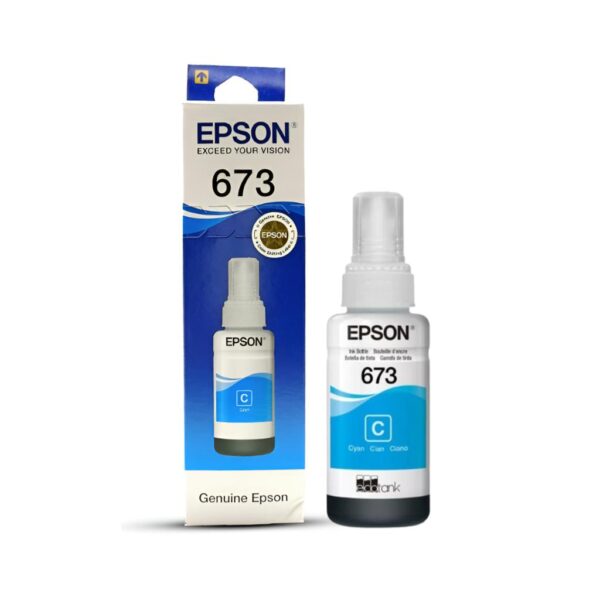
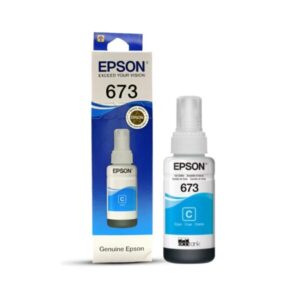
Epson 673 70ml Original Cyan Dye Ink Bottle – Technical Specifications
| Specification | Details |
|---|---|
| Manufacturer | Epson |
| Ink Series | 673 / T673 |
| Ink Model | T6732 |
| Manufacturer Part Number | C13T673298 |
| Colour | Cyan |
| Ink Capacity | 70ml |
| Ink Formulation | Dye-Based |
| Print Technology | Inkjet |
| Product Format | Ink Bottle |
| Supported Printing System | Six-Colour Epson Photo Ink Tank |
| Compatible Printers | L800, L805, L810, L850, L1800 |
| Country of Origin | Indonesia |
| Package Quantity | 1 Bottle |
Compatible Epson Printers
Epson L805 A4 Wi-Fi Photo Printer
Epson L850 Multifunction Photo Printer
Epson 673 70ml Original Cyan Dye Ink Bottle – Product Overview
The Epson 673 70ml Original Cyan Dye Ink Bottle is a genuine Epson replacement ink developed for compatible Epson six-colour photo ink tank printers. Designed to support vibrant photographic colour reproduction, smooth gradients and detailed visual output, this original cyan ink is suitable for photographers, graphic designers, creative professionals and home photography enthusiasts.
The Epson T6732 Cyan Ink Bottle belongs to Epson’s 673 photo ink family, which uses six individual ink colours to produce colour-rich photographs and graphics. This system includes black, cyan, magenta, yellow, light cyan and light magenta inks. Each colour contributes to the printer’s ability to reproduce a broad range of photographic shades.
Cyan is particularly important in reproducing blue skies, oceans, rivers, turquoise backgrounds, green landscapes and other subjects containing blue and mixed colours.
The Epson 673 Cyan Ink Bottle carries Indian manufacturer part number C13T673298 and contains 70ml of original Epson ink. It is designed for selected Epson L-Series photo printers, including the L800, L805, L810, L850 and L1800.
Its refillable bottle format provides a convenient way to maintain the cyan ink supply without replacing a conventional ink cartridge.
Original Epson Six-Colour Photo Ink Technology
The Epson 673 Cyan Ink Bottle forms part of Epson’s six-colour photo printing system.
The system is designed to produce photographic images containing vibrant colours, subtle transitions and detailed visual elements. In addition to the standard black, cyan, magenta and yellow colours, it includes light cyan and light magenta inks.
These additional light colours contribute to smooth tonal variations, particularly in photographs with delicate highlights and pastel shades.
The standard cyan ink helps reproduce stronger cyan and blue tones, while the light cyan ink contributes to softer colour reproduction.
Both inks serve separate purposes within the printer.
The Epson T6732 bottle must be used in the standard cyan reservoir rather than the light cyan tank.
Using the correct genuine Epson ink helps maintain the colour printing characteristics intended for the compatible printer.
Vibrant Cyan Colour for Photographic Printing
Cyan is one of the primary ink colours used in full-colour photographic printing.
It contributes to the reproduction of numerous shades, including blue, turquoise, aqua and mixed green colours.
The Epson 673 Cyan Original Ink Bottle is particularly relevant for images containing skies, water, natural landscapes, blue clothing and graphical backgrounds.
For example, a landscape photograph may contain a bright blue sky above a green forest or lake. Reproducing these colours involves a combination of cyan and the other inks installed in the printer.
In product photography, cyan can contribute to the reproduction of blue packaging, textiles, accessories and decorative objects.
The final result depends on the image, paper selection, printer settings and complete six-colour ink system.
70ml Genuine Epson Ink Capacity
The Epson T6732 Cyan Ink Bottle contains 70ml of genuine Epson ink.
This capacity provides a refill supply for the appropriate cyan tank in compatible Epson photo printers.
Photography studios and creative businesses may regularly produce image-rich prints that consume varying amounts of each ink colour.
The EcoTank refill system allows individual ink reservoirs to be replenished according to usage.
Unlike conventional cartridge-based printers, users can refill only the required colour when the corresponding ink level becomes low.
The number of prints produced depends on photograph dimensions, image coverage, printing settings and maintenance activity.
Keeping the correct original ink available helps reduce interruptions during regular printing work.
Wide Colour Gamut and Detailed Reproduction
Epson markets the T673 photo ink family for colour-rich photographic printing and a wide colour gamut.
A wide colour gamut helps the printer reproduce a broad selection of colours within the capabilities of its ink system and media.
The Epson 673 Cyan Ink Bottle contributes to this colour range through the reproduction of cyan and blue shades.
Many photographs contain subtle variations in blue and green that can influence the overall visual appearance.
Examples include clear skies, reflective water, outdoor scenery and coloured lighting.
With suitable source images, photo paper and printer settings, compatible Epson photo printers can produce detailed, visually appealing output.
Designed for Epson L800 Photo Printer
The Epson L800 is a photo ink tank printer designed for users who require colourful photographic printing.
Its six-colour ink configuration uses the Epson T673 series, including T6732 Cyan.
The Epson 673 Cyan Ink Bottle is an appropriate original replacement consumable for the corresponding cyan tank.
Users can print personal photographs, portfolios, illustrations and creative materials.
The cyan ink contributes to the reproduction of blue, green and turquoise elements throughout these images.
Before refilling, users should confirm the correct colour reservoir and follow Epson’s recommended refill procedure.
Designed for Epson L805 Wi-Fi Photo Printer
The Epson L805 is an A4 Wi-Fi photo printer that uses Epson’s six-colour T673 ink system.
The Epson 673 Cyan Ink Bottle is specified as a compatible replacement for this model.
Photographers using the L805 may produce portraits, family photographs, travel images and design samples.
Cyan contributes to skies, water, blue clothing, coloured backgrounds and other photographic details.
The printer’s separate light cyan reservoir helps support lighter shades, while standard cyan is important for stronger cyan tones.
Users should maintain the correct ink supply in each tank and avoid mixing the two cyan formulations.
Designed for Epson L810 Photo Printer
The Epson L810 is a single-function photo printer designed for colour-rich image printing.
It uses six separate Epson T673 inks, including the T6732 Cyan Ink Bottle.
The L810 can produce photographs and creative prints for personal and professional applications.
The cyan ink helps reproduce blue and green photographic elements and contributes to mixed-colour output.
Photo printing may involve a variety of media and print settings, each of which can influence the final appearance.
Using the correct original Epson ink helps the printer maintain its intended colour reproduction system.
Designed for Epson L850 Multifunction Photo Printer
The Epson L850 is a multifunction photo printer with a six-colour ink tank system.
It supports printing and other document-related functions while being designed for photographic output.
The Epson 673 Cyan Ink Bottle is an original replacement consumable for this printer.
Photography studios and creative professionals may use the L850 for photographs, visual samples and printed materials.
The cyan ink helps reproduce blue, turquoise and green shades in colour images.
Maintaining genuine ink supplies in the correct reservoirs supports the printer’s designed operation.
Designed for Epson L1800 A3+ Photo Printer
The Epson L1800 is an A3+ photo printer designed for larger photographic prints.
Its T673 six-colour ink system includes a dedicated cyan reservoir.
The Epson T6732 Cyan Ink Bottle provides the appropriate replacement ink for that tank.
Larger images can make colour variations and gradients more noticeable.
Photographs containing extensive skies, oceans or coloured backgrounds may require smooth reproduction of different cyan and blue shades.
Professional photographers and designers using the L1800 should select the manufacturer-specified ink and suitable media for their printing requirements.
Smooth Gradients for Landscape Photography
Landscape photographs often include large areas with gradual colour changes.
A blue sky may transition from pale cyan near the horizon to darker blue at the top of the photograph.
Water surfaces may contain combinations of blue, cyan, green and grey tones.
The Epson 673 Cyan Ink Bottle contributes to reproducing these colour variations through the printer’s six-colour system.
Light cyan also helps reproduce lighter blue areas in photographs.
Together with the remaining inks, the printing system can create detailed images containing subtle colour transitions.
The final appearance depends on the source image, paper selection and printing settings.
Natural Colours for Travel Photography
Travel photographs often contain outdoor scenery, architecture, bodies of water and colourful environments.
The Epson T6732 Cyan Ink Bottle contributes to blue and green tones commonly found in these images.
Photographs of beaches, mountains, lakes and city skylines may contain substantial cyan colour information.
Using compatible Epson photo printers, photographers can create physical prints from digital travel collections.
Proper colour management and paper selection help users achieve suitable results.
The original Epson cyan formulation is designed for the printer’s intended photo printing system.
Ideal for Professional Photography Studios
Photography studios frequently produce client photographs, event images, portfolio prints and promotional visuals.
The Epson 673 Original Cyan Ink Bottle supports colour reproduction on compatible Epson photo printers.
The six-colour printing system is particularly relevant for images containing detailed colour gradients and varied tonal information.
Studio portraits may include coloured clothing, decorative backgrounds and soft lighting effects.
Event photographs may feature colourful decorations and mixed lighting.
Maintaining the correct original cyan ink supply helps studios manage these printing requirements.
Professional users should combine genuine ink with suitable photo paper and consistent printing settings.
Wedding and Event Photography Applications
Wedding and event photography frequently includes colourful clothing, floral arrangements, venue decorations and scenic locations.
The Epson 673 Cyan Ink Bottle contributes to blue and green tones in these images.
Outdoor wedding photographs may contain blue skies, gardens and decorative lighting.
Indoor celebrations may contain cyan-coloured backgrounds or blue fabric elements.
The printer’s six-colour ink system works together to reproduce these details.
When preparing customer prints, photographers should ensure that the source image and printer settings are appropriate for the selected photo paper.
High-Quality Portrait Printing
Portrait photographs often contain detailed tonal variations.
Skin tones, clothing, hair, accessories and backgrounds must be reproduced with care.
Although cyan is most visible in blue areas, it also participates in creating many mixed colours.
The Epson 673 Cyan Ink Bottle contributes to the overall colour balance of printed portraits.
The separate light cyan and light magenta inks also support photographic colour gradations.
For photographers, consistent printing materials and settings help achieve predictable results.
Genuine Epson ink provides a manufacturer-designed consumable for this process.
Suitable for Graphic Designers
Graphic designers frequently use photo printers to create visual proofs, presentations and artwork samples.
The Epson 673 Cyan Ink Bottle supports the reproduction of blue and mixed-colour graphics.
Cyan is common in branding, gradients, illustrations, backgrounds and product designs.
Printed proofs allow designers to review how their artwork appears on physical media.
The appearance of printed colours may differ from a digital display because monitors and printers use different colour reproduction methods.
Using suitable colour settings and genuine Epson inks can support more predictable printing.
Useful for Artists and Illustrators
Artists and illustrators may use compatible Epson photo printers to reproduce digital artwork.
The Epson 673 Cyan Ink Bottle contributes to the printing of blue, green and turquoise elements.
Illustrations may contain skies, water, coloured characters, backgrounds and decorative graphics.
The six-colour Epson system helps reproduce these elements using different combinations of ink.
Paper texture, coating and print settings can influence the appearance of artistic prints.
For important projects, artists may benefit from producing test prints before final production.
Product Photography and Marketing Materials
Businesses often produce printed product photographs for presentations, catalogs and promotional materials.
The Epson 673 Cyan Ink Bottle supports photo printing for these purposes.
Cyan contributes to the reproduction of blue packaging, textiles and branded graphics.
Product photography may also contain blue or green backgrounds that require careful colour reproduction.
The quality of the final print depends on the source image, printer calibration and paper.
The original Epson T6732 Cyan Ink Bottle provides the manufacturer-specified consumable for compatible printers.
Printing Photo Albums and Personal Memories
Home users may print family photographs, travel pictures, celebrations and personal albums.
The Epson 673 Cyan Ink Bottle contributes to the colourful output of compatible Epson photo printers.
Photographs may include blue skies, outdoor scenery, colourful clothing and decorative backgrounds.
The 70ml refill bottle allows users to replenish the cyan reservoir when necessary.
The refillable tank system offers convenience for households printing photographs regularly.
Using genuine Epson ink helps maintain the printer’s expected colour printing characteristics.
Convenient Epson Ink Tank Refilling
The Epson 673 Cyan Ink Bottle is designed for compatible refillable ink tank printers.
Before refilling, users should identify the dedicated standard cyan reservoir.
The manufacturer’s product code should be checked to ensure compatibility.
The refill process must follow Epson’s instructions for the printer model.
Users should not pour standard cyan ink into the light cyan reservoir.
Mixing incompatible inks or filling the wrong colour tank may affect printing performance.
After refilling, users should close the tank correctly and follow any relevant printer procedures.
Importance of Genuine Epson Ink
Original Epson inks are developed for specific printers and ink delivery systems.
The Epson 673 Cyan Ink Bottle is an original consumable designed for compatible T673 photo printers.
Using the correct genuine ink helps maintain the printing system’s expected operating characteristics.
Unverified third-party formulations may differ in colour reproduction and other physical properties.
For users producing important photographs, correct product selection is particularly valuable.
Customers should verify the manufacturer code and inspect the packaging before refilling.
EcoTank Printing and Consumable Costs
Epson ink tank printers are designed to use refillable reservoirs rather than conventional cartridge replacement systems.
This can offer cost advantages for users with regular printing requirements.
The Epson 673 Cyan Ink Bottle allows the individual cyan reservoir to be replenished according to consumption.
Photographers and businesses can keep separate replacement supplies for each colour.
Actual costs depend on ink pricing, photo sizes, paper costs, printing volume and maintenance.
Keeping track of consumable usage can help users plan replacement purchases.
Printing on Glossy Photo Paper
Glossy photo paper is commonly used for vibrant photographic prints.
The Epson 673 Cyan Ink Bottle contributes to the reproduction of blue and cyan tones on suitable photo media.
The reflective surface of glossy paper can create a vivid visual appearance.
However, colour saturation and image contrast depend on the paper coating, printer settings and image.
Users should select supported photographic media and the appropriate printer driver settings.
For important images, test prints can help confirm the desired result.
Printing on Matte and Other Compatible Media
Matte photo paper provides a different surface appearance from glossy paper.
It may be selected for artwork, photographic presentations and portfolio prints.
The Epson 673 Cyan Ink Bottle contributes to colour output on compatible matte media.
Blue and turquoise colours may appear differently depending on the paper surface and coating.
Printer settings should be matched to the selected paper type.
Using the correct media profile can help maintain consistent output.
Cyan Versus Light Cyan in the T673 Series
The Epson T673 photo ink family contains two separate cyan-related colours.
Standard Cyan uses the T6732 ink model, while Light Cyan uses T6735.
These are different products with separate reservoirs in the printer.
Standard cyan contributes to stronger cyan and blue tones.
Light cyan supports lighter photographic colour variations.
The two inks must not be used interchangeably.
For WooCommerce inventory, the manufacturer codes should be recorded separately to prevent ordering errors.
Proper Ink Storage and Handling
The Epson 673 Cyan Ink Bottle should be stored according to Epson’s recommendations.
Keep the bottle sealed before use and avoid unsuitable temperatures or contamination.
Inspect the packaging before refilling.
Confirm that the bottle contains cyan ink and carries the appropriate manufacturer code.
Use the ink only in the correct reservoir.
Careful handling helps reduce the risk of accidental spills and supports reliable printer operation.
Original Epson Product Identification
The Epson 673 Cyan Ink Bottle is identified by Indian manufacturer SKU C13T673298.
Epson also lists the regional code C13T673200 for the same T673 Cyan ink family.
The exact part number on the packaging is important for inventory management and barcode matching.
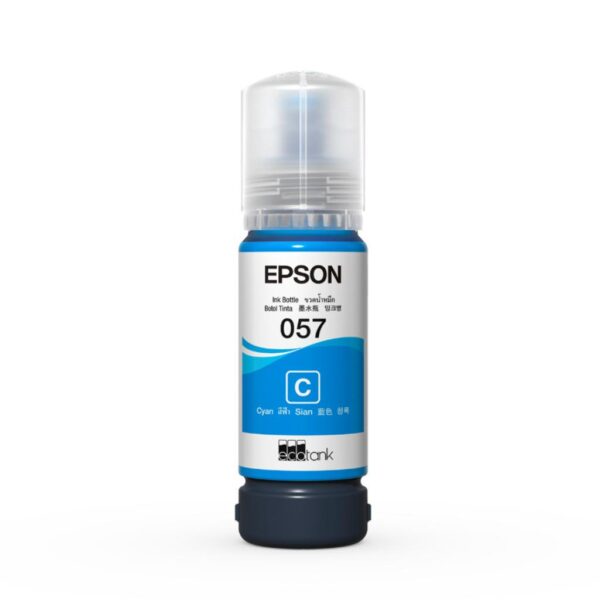
Other Epson cyan ink series, such as 057, 664, 001 and 012, are designed for different printer families.
Customers should not assume these products are interchangeable.
Using the correct manufacturer SKU helps reduce purchasing and compatibility errors.
Why Choose Epson 673 Original Cyan Ink?
The Epson 673 70ml Original Cyan Dye Ink Bottle combines genuine Epson manufacturing, six-colour photographic printing technology and convenient ink tank refilling.
It supports vibrant blue and cyan tones, natural-looking landscapes, smooth gradients and detailed photo reproduction.
Its 70ml capacity provides a practical refill supply for compatible Epson L800, L805, L810, L850 and L1800 photo printers.
For customers seeking genuine Epson cyan ink, Epson 673 T6732 Cyan Ink Bottle (C13T673298) is the appropriate Indian-market product to select when specified for their printer.
Official Epson India Store: Epson 673 T6732 Cyan Ink Bottle – C13T673298
Official Epson India Product: Epson T673 Cyan Ink and Printer Compatibility
| Weight | 0.8 kg |
|---|---|
| Brand | Epson |
| Color | Cyan |
| EAN / UPC Code | 8906049010166 |
| Model | T6732 |
| Product Type | Ink Bottle |
You may also like

Reviews
There are no reviews yet.