

-
 Pick up from the Woodmart Store
-
 Courier delivery
-
 DHL Courier delivery
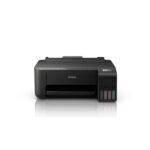
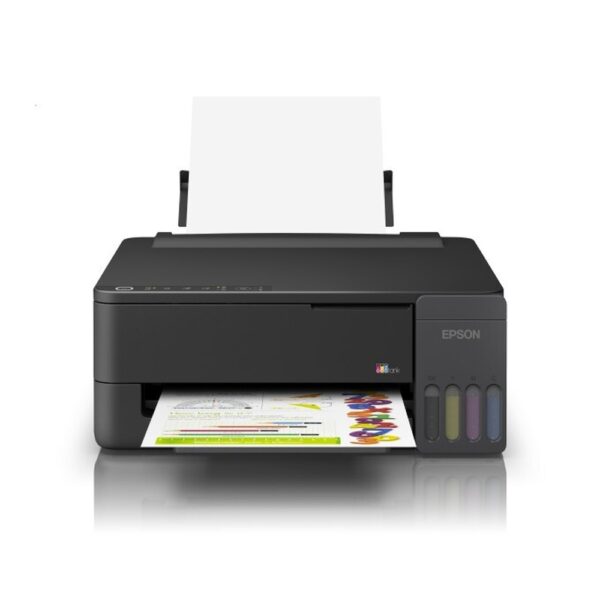
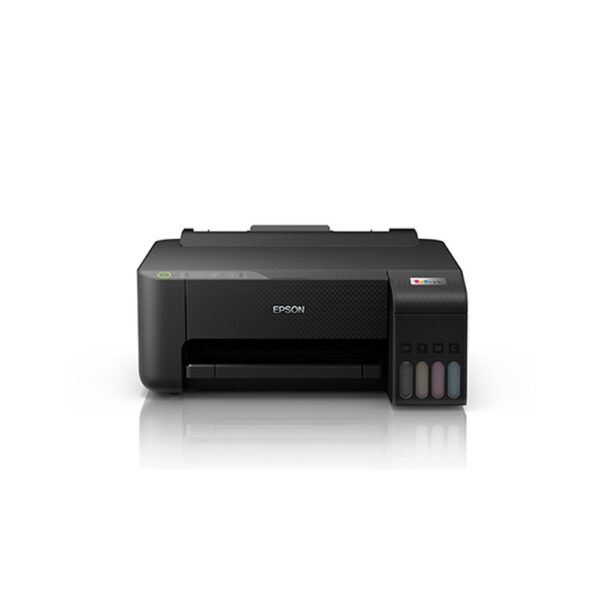
Epson EcoTank L1350 A4 Wi-Fi Single-Function Colour Ink Tank Printer (C11CL65504)
1. Epson EcoTank L1350 A4 Wi-Fi Ink Tank Printer Overview
The Epson EcoTank L1350 A4 Wi-Fi Single-Function Colour Ink Tank Printer is designed for customers looking for economical colour printing, convenient wireless connectivity and dependable everyday performance. Built around Epson’s refillable EcoTank technology, the L1350 combines essential document printing capabilities with modern features suitable for homes, students and small offices.
The printer uses Epson’s Micro Piezo printhead technology and a four-colour ink tank system to produce black-and-white documents, colour reports, educational materials and selected photographs.
With wireless connectivity, users can send compatible documents from computers and mobile devices without connecting each device directly by cable.
The Epson L1350 also features a compact integrated ink tank arrangement, helping it fit comfortably into smaller workspaces.
Customers comparing models can explore the complete Epson EcoTank printer range and select equipment based on the printing functions and connectivity they need.
2. Dedicated Single-Function Printing
The Epson EcoTank L1350 is a single-function printer designed to handle printing tasks efficiently.
Unlike multifunction devices, it does not incorporate a physical scanner, photocopier or fax mechanism. Instead, it focuses on producing printed documents from compatible computers and smart devices.
This straightforward configuration can be practical for customers who already have access to a scanner or who primarily need to print documents.
For example, students may regularly print assignments, notes and educational worksheets without needing an integrated photocopier.
Home users can prepare household records, photographs, invitations and general correspondence.
Small businesses can use the printer for quotations, purchase records, price lists, customer letters and everyday administrative paperwork.
The L1350 is particularly suitable for users who want a dedicated colour printer with wireless features rather than a larger multifunction system.
3. Epson Micro Piezo Printing Technology
The Epson EcoTank L1350 uses Epson’s Micro Piezo inkjet printing technology.
The printhead controls ink droplet ejection using piezoelectric elements rather than relying on the thermal heating process used in some other inkjet systems.
This technology supports accurate ink placement for text, graphics and colour documents.
The L1350 has a nozzle configuration of 180 black nozzles and 59 nozzles for each of the three colour channels.
Its printing system is designed to handle everyday office documents containing text, coloured headings, tables, illustrations and charts.
The combination of a dedicated ink delivery system and genuine compatible inks supports consistent output when the printer is maintained and operated correctly.
As with any inkjet printer, output quality depends on paper selection, printing settings, ink condition and proper maintenance.
4. Epson Heat-Free Technology
The Epson EcoTank L1350 is powered by Epson Heat-Free Technology.
This approach allows the printer to eject ink droplets without heating the ink as part of the printing process.
The technology contributes to efficient operation and supports the printer’s relatively low power consumption.
Epson specifies approximately 12 watts of power consumption under the relevant operating test condition.
For households and offices that regularly print documents, efficient operation is a useful consideration alongside print speed, consumable costs and paper usage.
Heat-Free Technology does not mean the printer produces no heat at all during operation. It refers specifically to the ink ejection mechanism.
Users can learn more through Epson’s official Heat-Free printing technology information.
5. High-Resolution Printing up to 5760 × 1440 dpi
The Epson L1350 supports a maximum print resolution of 5760 × 1440 dpi.
This resolution helps the printer reproduce detailed text, diagrams and colour graphics on suitable media.
Higher-resolution printing is particularly helpful for documents containing fine lines, illustrations, presentation graphics and photographs.
Students can prepare projects containing images and diagrams, while office users can print reports incorporating charts and logos.
Users should select an appropriate print-quality setting based on the purpose of each document.
Draft mode is useful when speed is the priority, while higher-quality settings may be more suitable for final presentations or photographs.
Printing at maximum quality is not always necessary for routine text documents.
The source document’s resolution and the selected paper also influence the appearance of the finished print.
6. Fast Black-and-White Draft Printing
The Epson EcoTank L1350 offers draft black printing speeds of up to 33 pages per minute.
This speed is intended for appropriate documents printed under the manufacturer’s fast-printing test conditions.
Draft printing can be useful when preparing rough notes, internal reports, study materials, reference pages and other documents where quick output is more important than presentation-quality finishing.
Businesses can use draft settings for preliminary quotations and internal paperwork.
Students may find the feature useful when producing large sets of revision notes.
Actual speed depends on the complexity of the document, selected quality settings, connection method and connected computer.
For customer-facing documents and final submissions, users may prefer a standard or higher-quality mode.
The printer also has a standardised black ISO print speed of up to 11 images per minute, which provides another useful performance reference.
7. Colour Printing for Everyday Business Documents
The Epson L1350 supports colour draft printing speeds of up to 15 pages per minute.
Its four-colour ink system uses black, cyan, magenta and yellow to reproduce a broad range of document colours.
Colour printing can improve the appearance and readability of business reports, educational worksheets, charts, diagrams and presentation handouts.
Businesses can prepare branded correspondence with coloured logos and headings.
Students can create illustrated assignments and project covers.
Home users can print personal images, calendars and colourful activity materials.
The ISO colour printing speed is rated at up to 6 images per minute.
These speed figures should be understood according to the manufacturer’s testing methods rather than treated as guaranteed speeds for every page.
Image-heavy documents and high-resolution printing modes may require additional time.
8. Built-In Wi-Fi for Convenient Wireless Printing
Built-in Wi-Fi connectivity is one of the key features of the Epson EcoTank L1350.
The printer can be configured to communicate with compatible computers and supported mobile devices through a wireless network.
This makes it easier to share the printer within a household or small work environment without requiring every computer to use a direct USB connection.
For example, a family may print documents from different laptops, while a small office can provide access from multiple compatible workstations.
Wireless printing also gives users flexibility in positioning the printer within suitable network coverage.
Successful wireless operation depends on the network configuration, connected devices and availability of appropriate drivers or applications.
Users should follow Epson’s setup and security guidance when enabling wireless access.
9. Wi-Fi Direct Printing Without a Router
The Epson L1350 also supports Wi-Fi Direct connectivity.
Wi-Fi Direct enables compatible devices to connect directly to the printer without requiring an ordinary wireless router between them.
This feature can be useful in smaller offices, temporary workspaces or home environments where users want a direct wireless printing arrangement.
Epson states that Wi-Fi Direct allows connections from up to eight supported devices.
The feature is designed for device-to-printer communication and should not be confused with a general internet connection.
A compatible smartphone, tablet or computer may require appropriate settings and applications before it can print successfully.
Wireless availability and supported features can differ depending on the connected device.
For customers who need to print frequently from portable devices, Wi-Fi Direct adds practical flexibility to the L1350.
10. Epson Smart Panel Mobile Application
The Epson EcoTank L1350 supports Epson Smart Panel, an application developed to help users manage supported Epson printers through compatible smartphones and tablets.
The application can assist with printer setup, wireless connection procedures, printer status information and supported mobile printing tasks.
This provides a convenient alternative to managing every operation through a desktop computer.
For example, a user may print supported documents from a smartphone or use the application to identify an available printer maintenance function.
The exact features depend on the printer model, application version and connected mobile device.
Although Epson Smart Panel offers scanning and copying features for certain multifunction Epson printers, those functions do not add a scanner to the L1350.
The L1350 remains a single-function print-only device.
11. Epson Connect and Remote Printing
The Epson L1350 supports Epson Connect services for compatible printing environments.
According to Epson, supported services include Epson iPrint, Epson Email Print and Remote Print Driver.
These tools provide additional methods for submitting documents to an appropriately configured Epson printer.
Epson Email Print allows supported printers to receive documents through an enabled email-printing service.
The Remote Print Driver offers a way for compatible computers to print to an appropriately registered Epson device over an internet connection.
Availability of individual features depends on service status, software support and internet access.
For customers who work between home and office locations, supported remote printing functions may provide useful flexibility.
Users should follow Epson’s current registration and security procedures rather than assuming that remote printing is automatically enabled after installation.
12. USB 2.0 Wired Connectivity
In addition to wireless features, the Epson EcoTank L1350 includes a USB 2.0 interface.
This allows the printer to connect directly to a compatible computer through a suitable USB cable.
A wired connection can be convenient for an individual desktop workstation, reception desk or home study computer.
It may also be helpful where wireless networking is restricted or unavailable.
Users should install the correct Epson printer driver to access supported paper settings, print-quality options and maintenance features.
The presence of a USB interface does not guarantee that a USB cable is included in every sales package.
Customers should verify the supplied accessories against the retail carton before ordering.
The official Epson L1350 driver and software support page provides model-specific support resources.
13. Refillable EcoTank Ink System
The Epson EcoTank L1350 features an integrated refillable ink tank system.
Instead of conventional replacement ink cartridges, the printer uses dedicated ink reservoirs that can be replenished using the correct Epson ink bottles.
The four-colour arrangement includes separate reservoirs for black, cyan, magenta and yellow.
Each colour can be refilled as required, which helps users manage consumable purchases according to their printing patterns.
For example, a customer printing mainly text documents may consume black ink differently from the three colour inks.
The integrated design also helps keep the printer compact.
The front-facing ink level windows allow users to inspect the approximate remaining ink levels.
The EcoTank system is particularly useful for people who print regularly and want to consider long-term consumable costs when selecting a printer.
14. Genuine Epson 003 Ink Compatibility
The Indian Epson EcoTank L1350 uses genuine Epson 003 series ink bottles.
The compatible manufacturer codes are C13T00V198 for black, C13T00V298 for cyan, C13T00V398 for magenta and C13T00V498 for yellow.
These codes are important because Epson produces multiple ink families for different printer models.
A bottle from another series should not be assumed compatible simply because the colour or packaging looks similar.
For black ink replacement, customers can purchase the Epson 003 Black Original Ink Bottle from Aadinath Peripherals & Consumables.
The cyan, magenta and yellow bottles should be selected using their exact manufacturer part numbers.
For additional consumable choices, browse original printer ink bottles available through Aadinath.
Correct ink identification is essential for suitable printer operation.
15. High-Yield Ink Bottles for Regular Printing
The Epson EcoTank L1350 is designed for high page yields from compatible genuine replacement ink bottles.
Epson’s May 2026 Indian brochure quotes up to 4,700 pages from black replacement ink and 7,500 composite colour pages from the colour ink set.
These figures are based on standardised testing patterns and Epson’s stated methodology.
Actual page yields vary according to the content being printed, document coverage, print quality, maintenance operations and printing frequency.
A short text document will normally require a different amount of ink from a full-colour photograph.
The first set of inks supplied with a printer may deliver different effective yields because some ink is used during initial printer setup.
The colour yield is a composite figure, not an independent promise of 7,500 pages from each individual colour bottle.
16. Economical Printing for Homes and Small Offices
Ongoing printing expenses are an important consideration for customers who regularly produce documents.
The Epson EcoTank L1350 offers high-yield refillable ink bottles that can help reduce the frequency of consumable replacement.
Epson advertises indicative printing costs of approximately 9 paise per black page and 33 paise per colour page under its published assumptions.
These figures should be treated as manufacturer estimates rather than guaranteed costs.
The actual cost per page depends on the price of replacement inks, document coverage, printer usage and maintenance requirements.
Students printing regular assignments and offices preparing administrative documents may benefit from estimating their expected printing volume.
Using appropriate print modes and avoiding unnecessary reprints can also help manage running expenses.
For accurate budgeting, businesses should calculate costs using their actual consumable prices and document types.
17. Convenient and Spill-Resistant Ink Refilling
The Epson L1350 uses refill ink bottles with designated nozzles and colour identification features.
The refill design is intended to simplify replenishment and reduce the chance of incorrect filling during normal use.
The printer’s ink tanks are integrated into the body, with access arranged for routine refilling.
Before adding ink, users should verify the bottle’s colour and manufacturer code.
The printer should be placed on a level surface, and Epson’s recommended refill procedure should be followed carefully.
Users should avoid mixing different Epson ink families or using unsuitable replacement fluids.
Ink tank openings should be closed correctly after refilling.
Genuine compatible ink bottles are designed for the supported EcoTank system and are preferable to choosing consumables solely by appearance.
18. User-Replaceable Maintenance Box
A useful feature of the Epson EcoTank L1350 is its user-replaceable maintenance box.
The manufacturer’s Indian brochure identifies maintenance box part number C12C939901.
During printer operation and certain maintenance procedures, a maintenance box collects waste ink generated by the printer.
Because the maintenance box is user-replaceable, customers can replace the designated component when required according to Epson’s instructions.
This can be convenient for users who want a printer designed for regular document production.
The maintenance box is separate from the four colour ink reservoirs and should not be confused with replacement ink bottles.
Users should only replace it when instructed by the printer or the manufacturer.
Incorrect handling may cause ink leakage or printing problems.
For compatibility and replacement guidance, consult the official Epson L1350 support resources.
19. A4 and Other Supported Paper Formats
The Epson L1350 is primarily an A4 ink tank printer.
It supports A4, Letter and several smaller or alternative paper sizes identified in Epson’s technical documentation.
These include A6, B5, B6, C6 and DL formats, along with selected photo and envelope sizes.
The printer also supports defined custom paper dimensions up to 215.9 × 1200 mm.
This provides flexibility for producing different kinds of documents without purchasing a specialist large-format printer.
A4 is useful for business correspondence, school assignments, reports and normal office paperwork.
Smaller supported media can be used for suitable personal printing tasks and envelopes.
Customers should select the matching paper size in the printer driver to prevent scaling and alignment problems.
The L1350 does not support A3 or A3+ paper-width printing.
20. Practical Paper Input and Output Capacity
The Epson EcoTank L1350 offers a standard input capacity of up to 100 sheets of A4 or Letter plain paper using the specified 80 g/m² media.
Its plain-paper output capacity is up to 30 sheets.
This arrangement is suitable for everyday home and small-office printing requirements.
Users can prepare assignments, reports and document batches without inserting individual sheets for every page.
The input system also supports smaller quantities of selected media, including glossy photo paper and envelopes.
Epson lists up to 20 sheets of supported Premium Glossy Photo Paper and 10 envelopes under its specified conditions.
Paper capacity varies with paper type and thickness, so users should follow the correct loading guidelines.
Offices that regularly print very large unattended batches may prefer a printer with a larger paper-handling system.
21. Borderless Photo Printing up to 4R
The Epson L1350 supports borderless photo printing up to 4R size.
The standard 4R format measures approximately 4 × 6 inches or 10 × 15 centimetres.
Borderless printing allows the image to extend to the edges of compatible photo paper, providing a finished photograph without ordinary white margins.
This can be useful for personal photo collections, small greeting materials and selected creative projects.
Users should choose the correct supported paper type and borderless setting when printing.
The quality of the output depends on the original photograph, selected print resolution, paper and ink condition.
For media outside the supported borderless format, standard page margins apply.
The printer is useful for everyday photo printing but is not intended to replace a specialised professional photographic production printer.
22. Manual Double-Sided Printing Considerations
The Epson EcoTank L1350 does not contain an automatic duplex unit.
Users who want to print on both sides of suitable paper must handle the process manually, when supported by the connected application and driver.
This normally involves printing one side, reloading the sheets correctly and then printing the reverse side.
Manual double-sided printing can help reduce paper usage when preparing study notes, drafts, reference documents and suitable office reports.
However, it requires user participation and careful paper alignment.
The process may take additional time compared with a printer equipped with automatic duplex printing.
Customers who frequently produce two-sided documents should consider their printing volume before deciding whether manual handling is sufficient.
For frequent automatic double-sided printing, a different Epson EcoTank model with dedicated duplex hardware would be more convenient.
23. Compact Space-Saving Desktop Design
The Epson EcoTank L1350 is designed with a compact footprint for modern homes and small workspaces.
Its dimensions are approximately 361 mm wide, 317 mm deep and 152 mm high.
The printer weighs approximately 3.1 kg without shipping packaging.
This compact design makes it suitable for computer desks, home study tables, small office counters and dedicated printing areas.
The integrated ink tanks help reduce external components and keep the installation organised.
Users should still allow adequate clearance for loading paper, collecting printed sheets and performing maintenance.
The printer should be positioned on a stable, flat surface away from excessive moisture, dust and unsuitable heat.
Its straightforward black exterior is designed to blend with ordinary home and office equipment.
24. Printing Solutions for Students
Students often need a printer that can handle frequent educational documents without complicated operation.
The Epson EcoTank L1350 is suitable for preparing notes, assignments, school projects, worksheets, charts and presentation materials.
Its colour printing capabilities can be useful for diagrams, illustrations and educational handouts.
Wireless connectivity allows students to submit supported print jobs from compatible computers or smart devices.
The refillable ink system is also useful when educational printing becomes a regular requirement.
Draft printing can be selected for working notes, while higher-quality settings may be appropriate for final project pages.
Because the L1350 is a single-function model, students who need to scan handwritten documents or photocopy materials will require separate equipment.
For customers focused primarily on document printing, the L1350 provides a practical combination of convenience and essential performance.
25. Everyday Home and Family Printing
Households can use the Epson EcoTank L1350 for personal documents, family records, letters, educational worksheets, recipes, calendars and creative activities.
The printer’s wireless features are especially convenient when several people use different computers or smartphones.
Parents can prepare learning materials for children, while working professionals can print documents needed for personal administration.
Colour printing allows households to produce charts, invitations and photographs on suitable media.
The printer’s integrated ink reservoirs make it relatively easy to monitor the remaining ink supply.
Using the correct refill bottles helps simplify routine consumable replacement.
Households should also consider whether printing is their only requirement.
If frequent scanning or copying is required, an Epson all-in-one EcoTank model may be a better fit than this dedicated printer.
26. Suitable for Small Business and Office Printing
Small businesses regularly need to produce quotations, reports, customer correspondence, purchase records, simple price lists and other administrative documents.
The Epson EcoTank L1350 can support these tasks through its colour printing system and wireless connectivity.
A business can use the printer for documents with coloured logos, text, tables and graphics.
Wi-Fi connectivity is useful for sharing the printer among suitable workstations within a small workplace.
The refillable ink system may also simplify consumable planning when printing requirements are predictable.
The printer’s compact dimensions make it easier to install in locations where desk space is limited.
For larger offices, however, additional features such as automatic duplex printing, higher paper capacity and integrated scanning may be important.
Customers should select the printer based on their actual workflow rather than simply choosing the highest advertised print speed.
27. Printer Driver Setup and Compatibility
The Epson L1350 requires appropriate software configuration for use with compatible computers.
Epson’s May 2026 India brochure lists support for Windows 7, 8, 8.1, 10 and 11, as well as selected Windows Server versions, macOS and Linux.
Actual compatibility depends on the driver and software packages available for the specific operating-system version.
Users should download software from Epson’s official support resources.
The printer can be connected through USB or configured for wireless use according to the manufacturer instructions.
During initial installation, the ink system must also be prepared and charged correctly.
Users should not interrupt the recommended initialisation process unnecessarily.
The Epson EcoTank L1350 installation and driver page provides the appropriate starting point for software and documentation.
28. Routine Maintenance for Reliable Printing
Regular printer maintenance is important for preserving consistent document quality.
Users should monitor the ink tank levels and refill with the specified Epson 003 bottles when required.
The printer should be kept in a suitable environment and protected from excessive dust or moisture.
If output develops streaks, missing colours or other irregularities, users should consult the official maintenance instructions.
Printer utilities may provide nozzle checking and printhead cleaning functions.
These procedures consume ink and should be used only when appropriate.
The L1350 also includes a replaceable maintenance box, which should be replaced when required by the manufacturer’s instructions.
Frequent unnecessary cleaning or incorrect consumable use can increase printing costs and create avoidable maintenance problems.
Following Epson’s operating guidelines is preferable to attempting improvised servicing.
29. Low Power Consumption and Responsible Printing
The Epson EcoTank L1350 is designed for relatively low operating power consumption.
Its published electrical specifications include approximately 12 watts for the manufacturer’s operating test, 5 watts in ready mode, 0.5 watts in sleep mode and 0.1 watts when powered off.
Actual power consumption depends on operating conditions and selected functions.
For home and office users, power-management settings can help reduce unnecessary electricity consumption.
The refillable ink tank system also reduces reliance on frequent cartridge changes compared with traditional cartridge-based designs.
Customers can further manage resource usage by selecting suitable printing settings and avoiding unnecessary duplicate print jobs.
Printing still consumes ink, paper and electricity, so responsible usage remains important.
Used consumables and electronic equipment should be disposed of or recycled according to applicable local requirements.
30. Manufacturer Warranty and Support
The Epson EcoTank L1350 is backed by Epson India’s published one-year onsite warranty or 50,000-page coverage, whichever comes first.
Epson also identifies printhead coverage under the applicable warranty conditions.
The warranty is subject to the manufacturer’s official terms and exclusions.
Customers should retain their original purchase invoice and relevant product documentation.
Registration and support procedures may require product identification details such as the model number and serial number.
For service-related issues, users should contact Epson through its authorised support channels.
Warranty conditions can depend on the nature of the fault, usage history and compliance with the manufacturer’s instructions.
The official Epson L1350 support centre provides model-specific downloads, documentation and service resources.
31. Why Choose the Epson EcoTank L1350?
The Epson EcoTank L1350 combines the features many customers want from a dedicated everyday colour printer.
Its advantages include a refillable four-colour ink system, wireless connectivity, compact dimensions, high maximum resolution and practical page yields.
Epson Heat-Free Technology and Micro Piezo printing support document output while helping the printer maintain relatively low power consumption.
Wi-Fi Direct and Epson Smart Panel make it convenient to print from compatible mobile devices.
The replaceable maintenance box is also a useful feature for long-term ownership.
However, buyers should remember that it does not offer scanning, photocopying, faxing, automatic duplex printing or A3 printing.
Those requirements are better addressed by selecting a different model designed to provide those functions.
For customers focused primarily on A4 colour printing, the L1350 offers a balanced set of features.
32. Buy Epson EcoTank L1350 from Aadinath Peripherals & Consumables
The Epson EcoTank L1350 A4 Wi-Fi Single-Function Colour Ink Tank Printer is a practical option for customers who want everyday black-and-white and colour printing with wireless convenience and refillable ink tanks.
Its 5760 × 1440 dpi maximum print resolution, Wi-Fi and Wi-Fi Direct connectivity, high-yield Epson 003 ink bottles and support for borderless 4R photographs make it suitable for personal, educational and small-office applications.
Aadinath Peripherals & Consumables supplies printers, printer consumables and computer peripherals for business and individual customers.
Buyers can browse original ink bottles and printer consumables or explore the official Epson EcoTank printer collection to compare different models.
For exact technical information and the latest manufacturer documentation, visit the official Epson EcoTank L1350 product page.

Technical specifications – Epson L1350
| Specification | Details |
|---|---|
| Brand | Epson |
| Product Series | EcoTank |
| Model | L1350 |
| MPN / Product Code | C11CL65504 |
| Printer Type | Colour Ink Tank Printer |
| Function | Print Only |
| Printing Technology | Piezoelectric Printhead / Micro Piezo |
| Heat-Free Technology | Yes |
| Printhead Nozzles – Black | 180 |
| Printhead Nozzles – Colour | 59 per colour |
| Ink Colours | Black, Cyan, Magenta, Yellow |
| Maximum Resolution | 5760 × 1440 dpi |
| Draft Speed – Black | Up to 33 ppm |
| Draft Speed – Colour | Up to 15 ppm |
| ISO Speed – Black | Up to 11 ipm |
| ISO Speed – Colour | Up to 6 ipm |
| First Page Out – Black | Approx. 10 seconds |
| First Page Out – Colour | Approx. 16 seconds |
| 4R Photo Speed – Bordered | Approx. 69 seconds |
| 4R Photo Speed – Borderless | Approx. 90 seconds |
| Borderless Photo Printing | Up to 4R (4 × 6 inches) |
| Automatic Duplex | No |
| Standard Paper Formats | A4, A6, B5, B6, Letter, C6, DL, 4 × 6 inches, 5 × 7 inches and other specified sizes |
| Maximum Custom Paper Size | 215.9 × 1200 mm |
| Number of Paper Trays | 1 |
| Plain Paper Input | Up to 100 sheets |
| Plain Paper Output | Up to 30 sheets |
| Premium Glossy Photo Input | Up to 20 sheets |
| USB Connectivity | USB 2.0 |
| Wi-Fi | Yes |
| Wi-Fi Direct | Yes |
| Network Protocols | TCP/IPv4, TCP/IPv6 |
| Epson Smart Panel | Supported |
| Epson iPrint | Supported |
| Epson Email Print | Supported |
| Remote Print Driver | Supported |
| Printer Language | ESC/P-R, ESC/P Raster |
| Compatible Ink Family | Epson 003 |
| Black Replacement Ink Yield | Up to 4,700 pages |
| Composite Colour Yield | Up to 7,500 pages |
| Replaceable Maintenance Box | Yes |
| Maintenance Box Code | C12C939901 |
| Rated Voltage | AC 220–240 V |
| Rated Frequency | 50–60 Hz |
| Operating Power Consumption | Approx. 12 W |
| Ready Mode Power | 5 W |
| Sleep Mode Power | 0.5 W |
| Power Off Consumption | 0.1 W |
| Dimensions (W × D × H) | 361 × 317 × 152 mm |
| Net Printer Weight | 3.1 kg |
| Warranty | 1-year onsite / 50,000 prints, whichever comes first |
| Printhead Warranty Coverage | Included, subject to Epson terms |
| Weight | 3.1 kg |
|---|---|
| Brand | Epson |
| Model | L1350 |
| EAN / UPC Code | 8715946741604 |
You may also like

Reviews
There are no reviews yet.