

-
 Pick up from the Woodmart Store
-
 Courier delivery
-
 DHL Courier delivery
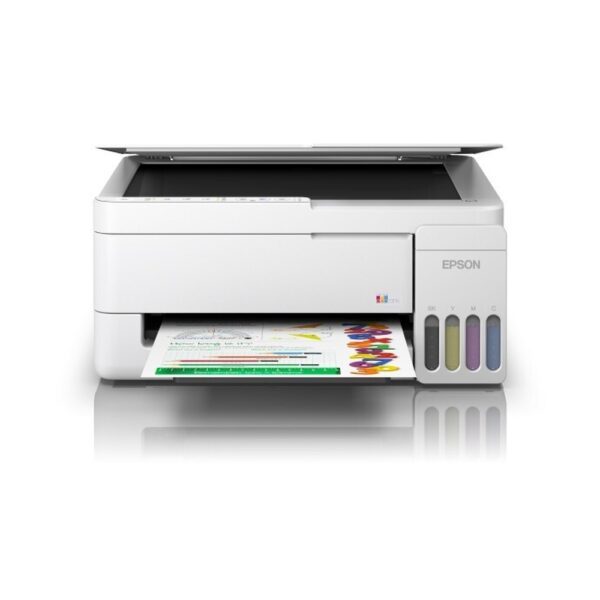
Epson EcoTank L3310 A4 All-in-One Colour Ink Tank Printer
1. Epson EcoTank L3310 A4 All-in-One Colour Ink Tank Printer Overview
The Epson EcoTank L3310 A4 All-in-One Colour Ink Tank Printer is designed to simplify everyday document printing, scanning and copying for home users, students and small offices. Combining Epson’s Micro Piezo printing technology with refillable EcoTank ink reservoirs, this multifunction printer provides an economical solution for regular personal and professional printing requirements.
The Epson L3310 supports both black-and-white and colour documents, making it suitable for correspondence, educational worksheets, illustrations, charts and everyday office records.
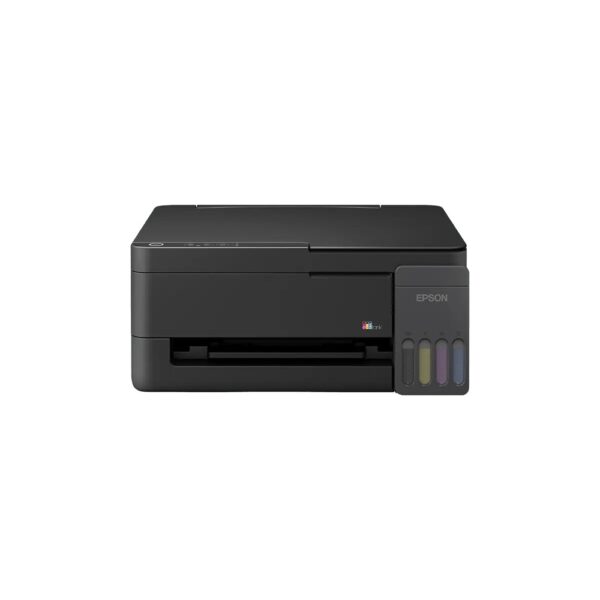
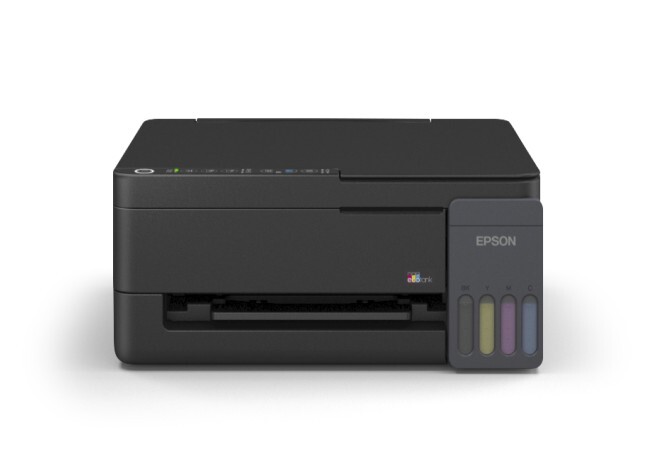
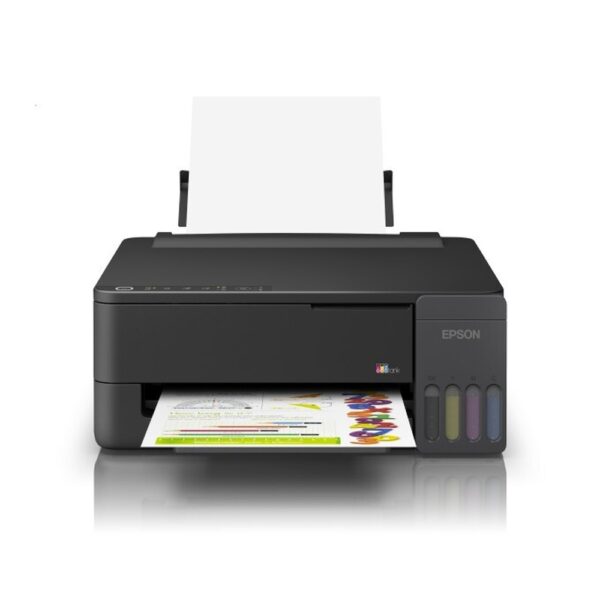
Its compact design includes integrated front-facing ink tanks, while the USB 2.0 interface provides direct connectivity to a compatible computer.
The printer also supports borderless 4R photo printing and includes a user-replaceable maintenance box.
Customers can explore multifunction and colour ink tank printers at Aadinath Peripherals & Consumables.
2. Three-in-One Printing, Scanning and Copying
The Epson EcoTank L3310 combines three useful functions within one compact machine: printing, scanning and copying.
This multifunction design is particularly useful for customers who regularly handle physical and digital documents. Users can print documents from a compatible computer, scan paperwork to create digital files and copy suitable originals without requiring separate machines for every task.
Students may scan handwritten assignments and print completed projects, while households can copy forms and prepare personal records.
Small businesses can also use the printer for letters, reports, quotations and routine correspondence.
The L3310 does not include an integrated fax function or automatic document feeder. Customers requiring these capabilities should compare other Epson EcoTank multifunction printers.
3. Epson Micro Piezo Printing Technology
The Epson EcoTank L3310 uses Epson’s Micro Piezo inkjet printing technology.
The printer’s printhead contains piezoelectric elements that control the ejection of ink droplets onto compatible media. This mechanism supports accurate ink placement for text, charts, illustrations and colour documents.
Epson specifies 180 black nozzles and 59 nozzles for each colour channel.
The four-colour system uses black, cyan, magenta and yellow inks to reproduce a range of documents.
Micro Piezo technology is useful for everyday printing requirements where clarity, legibility and consistent operation are important.
Actual printing performance depends on source-document quality, paper characteristics, selected print settings, ink condition and appropriate maintenance.
4. Epson Heat-Free Technology for Efficient Printing
The Epson EcoTank L3310 incorporates Epson Heat-Free Technology.
Unlike printing mechanisms that use heat to eject ink droplets, Epson’s piezoelectric system uses mechanical movement to control ink delivery.
This contributes to efficient printing and supports the printer’s relatively low electrical power requirements.
Epson’s May 2026 Indian brochure specifies approximately 12 watts during standalone copying under its testing conditions.
For customers selecting printing equipment for home or office use, electricity consumption is one consideration alongside ink costs and printing performance.
Heat-Free Technology refers specifically to the ink ejection process rather than suggesting that the entire printer produces no heat.
5. Detailed Printing Resolution of 5760 × 1440 dpi
The Epson L3310 supports a maximum print resolution of 5760 × 1440 dpi.
This resolution allows users to print detailed documents containing text, coloured diagrams, illustrations and other visual content.
High-resolution printing can be useful for school projects, presentation handouts, business charts and selected personal photographs.
The printer’s variable-sized droplet technology helps control ink placement according to the selected print mode.
However, users do not need to select maximum resolution for every task. Standard print quality may be sufficient for routine correspondence and reports.
Higher-quality modes can require additional time compared with fast draft printing.
For satisfactory results, users should select paper and driver settings suitable for the document.
6. Fast Black-and-White Printing for Everyday Documents
The Epson EcoTank L3310 supports A4 draft black printing speeds of up to 33 pages per minute.
This makes draft mode useful for documents such as study notes, internal office records, worksheets and preliminary reports.
Under Epson’s published ISO 24734 testing conditions, the printer achieves black A4 printing speeds of up to 11 images per minute.
These are different performance measurements and should not be treated as interchangeable.
Actual printing speed varies with document complexity, selected quality settings, paper type and connected computer.
For customer-facing documents, users may prefer a standard print mode even when it takes longer.
The L3310 provides practical printing performance for everyday desktop requirements.
7. Colour Printing for Charts, Illustrations and Projects
The Epson EcoTank L3310 offers colour printing through its four-colour ink tank system.
The printer supports colour draft speeds of up to 15 pages per minute and an ISO A4 colour speed of up to 6 images per minute.
These capabilities are suitable for everyday documents containing coloured text, images, graphs and diagrams.
Students can prepare illustrated assignments, while businesses can print reports featuring coloured headings and charts.
Families may also use colour output for calendars, educational activities and other personal documents.
The appearance of printed colours depends on the source image, paper, printing mode and ink condition.
For image-intensive documents, printing may take longer than for ordinary text.
8. First Page Out Performance
The Epson L3310 is designed to produce its first printed page without unnecessary delays under normal operating conditions.
Epson specifies a first-page-out time of approximately 10 seconds for black and 16 seconds for colour from ready mode.
This can be useful for customers who frequently print short documents rather than large batches.
For example, an employee may need one printed form, a student may require an assignment page, or a household may need an important letter.
Actual first-page timing depends on the printer’s operating state, document processing and selected settings.
A printer emerging from a different power state may require additional preparation time.
9. Borderless Photo Printing Up to 4R Size
The Epson EcoTank L3310 supports borderless photo printing up to 4R size.
The common 4R format measures 4 × 6 inches, or approximately 10 × 15 centimetres.
Borderless printing allows a compatible image to extend towards the edges of supported photo paper without ordinary white margins.
This is useful for family photographs, greeting materials and selected creative projects.
Epson specifies approximate photo printing times of 69 seconds for bordered and 90 seconds for borderless 4R photographs under its stated conditions.
Users should select suitable photo paper and the appropriate print settings.
Borderless support does not apply automatically to all supported paper sizes.
10. Compact Integrated EcoTank Ink System
A key feature of the Epson L3310 is its integrated refillable ink tank system.
Instead of requiring conventional replacement ink cartridges, the printer allows users to replenish its dedicated ink reservoirs using compatible genuine Epson bottles.
The integrated arrangement helps reduce the space required for external components.
Transparent ink-level windows make it easier to inspect the approximate amount of ink remaining.
The tanks are positioned conveniently for routine maintenance.
This design is useful for customers who regularly print school assignments, personal documents or office paperwork.
The refillable ink system also allows individual colours to be purchased according to actual consumption.
11. Genuine Epson 003 Ink Bottle Compatibility
The Indian Epson EcoTank L3310 uses genuine Epson 003 replacement ink bottles from the T00V series.
The compatible bottles are Epson 003 Black C13T00V198, Cyan C13T00V298, Magenta C13T00V398 and Yellow C13T00V498.
These part numbers are important because different Epson EcoTank printer families use different ink formulations.
A replacement bottle should always match the ink series specified for the printer.
For black ink replacement, customers can buy the Epson 003 Black Original Ink Bottle 65ml through Aadinath Peripherals & Consumables.
Customers can also consult the official Epson L3310 ink compatibility page before ordering replacements.
12. High-Yield Replacement Ink Bottles
The Epson EcoTank L3310 is designed for customers who want to manage recurring printing requirements using high-yield consumables.
Epson’s May 2026 India brochure quotes replacement ink yields of up to 4,700 black pages and 7,500 composite colour pages.
These figures are measured under Epson’s stated test conditions and help estimate how often ink replenishment may be required.
Actual yields depend on document coverage, printing frequency, print settings, maintenance and operating conditions.
A text document uses different amounts of ink from a full-page photograph.
Some ink from the supplied bottles is used during initial setup, so bundled-ink yields may differ from replacement bottle yields.
13. Economical Printing for Regular Use
The Epson L3310 is developed to support economical everyday printing.
Epson India advertises indicative costs of approximately 9 paise per black page and 33 paise per colour page under its published assumptions.
These figures provide a reference for customers comparing running costs across different printer technologies.
However, the actual cost per page depends on current ink prices, paper, document coverage, printing settings and maintenance requirements.
Students who frequently print assignments may benefit from estimating their expected monthly page volume.
Small offices can also calculate approximate printing expenses based on their normal paperwork.
The refillable ink system helps customers replenish consumables without repeatedly purchasing traditional cartridge assemblies.
14. Spill-Resistant and Colour-Coded Refilling
The Epson EcoTank L3310 is designed with a convenient ink refilling arrangement.
Epson’s genuine replacement ink bottles use designated nozzles and colour identification features intended to make refilling straightforward.
The manufacturer describes a key-lock mechanism and colour-coded caps that help reduce the chance of filling the wrong tank.
Before refilling, users should identify the correct ink colour and confirm the bottle’s manufacturer part number.
The printer should remain on a stable surface during maintenance.
Users should follow Epson’s refill instructions rather than mixing different ink types.
Correct refilling helps maintain compatibility with the printer’s ink delivery system.
15. Flatbed Colour Scanner for A4 Documents
The Epson EcoTank L3310 includes an integrated flatbed colour scanner.
This scanner allows users to digitise paper documents, photographs, forms and other suitable originals.
Epson’s May 2026 brochure specifies a CIS image sensor and a maximum scan area of 216 × 297 mm.
This is suitable for ordinary A4 and Letter-size documents.
For households, scanning can be useful when preserving personal records or submitting digital copies of paperwork.
Students may scan worksheets, handwritten notes and project materials.
Small businesses can use the scanner to create electronic copies of signed correspondence and routine office documents.
The scanner does not support A3 or A3+ originals.
16. Optical Scanning Resolution of 600 × 1200 dpi
The Epson L3310’s current Indian brochure specifies an optical scanning resolution of 600 × 1200 dpi.
This resolution is suitable for capturing everyday documents, text and selected images.
Users can choose appropriate scan settings depending on whether they require a digital document, image or reference copy.
The scanner supports colour and grayscale capture, making it useful for both text-based and illustrated originals.
For general office records, suitable resolution settings can help balance file size and readability.
A higher scanning setting is not always necessary for documents containing ordinary text.
Users should refer to the correct Epson driver options and software when configuring scanning tasks.
17. Convenient Scanning for Digital Records
Document scanning is useful for customers who maintain electronic records.
The Epson L3310 can capture suitable originals using its flatbed scanner and compatible computer software.
A small business may scan invoices, signed paperwork or correspondence for digital filing.
Students can create electronic versions of handwritten notes or project pages.
Households may preserve selected personal documents and photographs.
The Epson brochure identifies support for computer scanning workflows, including Epson ScanSmart and supported WSD computer scanning.
Available software functionality depends on the connected computer, driver and operating system.
Customers should use the official Epson software and avoid assuming that the USB-only printer provides independent wireless scanning.
18. Scanning Speed for Everyday Tasks
Epson specifies monochrome scanning times of up to approximately 11 seconds and colour scanning times of up to 32 seconds under the manufacturer’s stated 200 dpi test conditions.
These timings provide a useful reference for ordinary scanning tasks.
Actual scanning time depends on image complexity, selected resolution, document size and connected computer.
For example, a black-text document may be processed differently from a detailed colour photograph.
The flatbed configuration requires users to place originals on the scanner glass.
For occasional forms and personal documents, this arrangement is practical.
Customers who regularly digitise large multi-page batches may prefer a printer with an automatic document feeder.
19. Standalone Copying Without a Computer
The Epson EcoTank L3310 includes a standalone copying function.
This allows users to produce copies of suitable originals directly from the printer without initiating a separate print job through computer software.
The copier is particularly useful for everyday home and small-office requirements.
For instance, users can copy forms, letters, school documents or other A4-size paperwork.
The printer supports a maximum of 20 copies in a standalone operation.
The maximum copy resolution is 600 × 600 dpi.
Customers should note that copying is performed using the printer’s integrated flatbed scanner.
The L3310 does not include an automatic document feeder for unattended multi-page copying.
20. Black-and-White and Colour Copying Speeds
The Epson EcoTank L3310 supports both black-and-white and colour copying.
According to Epson’s May 2026 India brochure, ISO A4 copying speeds are rated at up to 7 ipm in black and 1.7 ipm in colour.
These figures are useful for customers comparing the performance of everyday multifunction printers.
Black copying can be suitable for forms, letters and reference documents.
Colour copying may be useful for worksheets, charts and illustrations.
Actual copying speed depends on the original, selected settings and operating conditions.
For businesses needing frequent large-volume copying, a printer with an ADF and faster copy specifications may be more appropriate.
21. A4 and Common Document Paper Support
The Epson L3310 supports A4, Letter and several smaller paper formats.
Its Indian brochure identifies sizes including A6, B5, B6, C6, DL, selected envelopes and common photo dimensions.
This variety makes the printer suitable for everyday letters, worksheets, handouts and selected personal printing tasks.
A4 is especially useful for office correspondence and educational work.
Smaller formats can be used for certain photographs, invitations and other documents.
The printer also supports specified custom media dimensions up to 215.9 × 1200 mm.
Users should select the correct paper size in the driver and ensure that the loaded media meets Epson’s compatibility requirements.
22. Practical 100-Sheet Paper Input Capacity
The Epson EcoTank L3310 has a standard paper input capacity of up to 100 sheets of A4 or Letter plain paper using the specified 80 g/m² media.
This is convenient for ordinary household and small-office printing.
Instead of loading one sheet at a time, users can prepare a modest batch of documents.
The printer also supports smaller loading quantities for selected photo paper, envelopes and postcards.
Epson specifies up to 20 sheets of compatible Premium Glossy Photo Paper and up to 10 envelopes under suitable conditions.
Paper capacity varies with thickness and media format.
Correct paper alignment and avoiding overloading can help maintain reliable feeding.
23. Convenient Output Paper Handling
The Epson L3310 provides an output capacity of up to 30 sheets of A4 plain paper.
This is practical for common documents such as letters, reports, notes and worksheets.
For supported Premium Glossy Photo Paper, Epson specifies a smaller output capacity.
Users should collect printed pages regularly when preparing longer documents to prevent excessive accumulation in the output area.
The printer is suitable for routine desktop printing rather than very large unattended production runs.
When using glossy media, printed sheets should be handled according to the paper manufacturer’s recommendations.
For offices requiring significantly larger paper capacity, a business-class Epson EcoTank model may offer more suitable paper-handling features.
24. USB 2.0 Connectivity for Desktop and Laptop Computers
The Epson EcoTank L3310 uses a Hi-Speed USB 2.0 interface for direct computer connectivity.
This makes it suitable for households and offices that primarily print from a designated desktop computer or compatible laptop.
After installing the appropriate Epson printer driver, users can send supported documents directly to the printer.
The wired arrangement is straightforward and does not require a wireless router for printing.
It is particularly appropriate for customers who prefer a dedicated computer-connected printer.
The L3310 does not include built-in Wi-Fi, Wi-Fi Direct or Ethernet.
For wireless printing requirements, customers should compare the Epson EcoTank printer range before purchasing.
25. Understanding the L3310’s Connectivity Limitations
The Epson EcoTank L3310 should not be described as a wireless printer.
Its documented interface is USB 2.0, which is intended for connection to a compatible computer.
Customers who want to print directly from smartphones through Wi-Fi should consider a model with built-in wireless functionality.
The Epson L3310 also does not provide automatic network sharing as a standard hardware feature.
Some computer operating systems can offer additional printer-sharing arrangements, but these depend on external equipment and configuration.
Such arrangements are not equivalent to built-in wireless printing.
For customers who need simple computer-connected printing, the L3310’s USB interface can be sufficient without introducing unnecessary networking complexity.
26. Manual Double-Sided Document Printing
The Epson EcoTank L3310 does not include automatic duplex printing hardware.
Users who need two-sided documents can print one side, turn or reload the paper correctly and then print the reverse side where supported by the application and driver.
This approach can help reduce paper consumption for occasional reports, drafts and study notes.
However, the process requires manual handling.
Customers preparing frequent two-sided documents may prefer a printer equipped with automatic duplex printing.
The L3310 is best suited to users who primarily print ordinary single-sided documents and require only occasional manual double-sided output.
The correct paper orientation is important when manually printing on both sides.
27. Compact Space-Saving Desktop Design
The Epson L3310 features a compact integrated printer design suitable for smaller workspaces.
Its published dimensions are approximately 361 mm wide, 317 mm deep and 162 mm high.
The integrated ink tanks are positioned within the printer’s main footprint, avoiding a bulky separate external reservoir.
This makes the printer practical for home study tables, computer desks and small office counters.
Users should still allow adequate clearance for paper loading, printed-page collection and maintenance access.
The printer should be positioned on a stable and level surface.
A suitable installation location helps protect the ink system and provides convenient access for everyday operation.
28. User-Replaceable Maintenance Box
The Epson EcoTank L3310 includes a user-replaceable maintenance box identified by part number C12C939901.
A maintenance box collects waste ink produced during certain printing and maintenance operations.
This component is separate from the normal colour ink tanks.
When replacement is required, users should follow the printer’s maintenance notification and Epson’s official instructions.
The replaceable arrangement can simplify certain maintenance procedures without requiring users to treat the printer as a disposable device.
Customers should purchase the exact compatible maintenance component rather than selecting a visually similar part.
For manufacturer guidance, visit the official Epson L3310 support centre.
29. Routine Maintenance and Printer Care
Proper maintenance is important for preserving consistent print quality.
Users should inspect ink levels regularly and refill the designated tanks with genuine Epson 003 bottles when necessary.
The printer should be protected from excessive dust, moisture and unsuitable environmental conditions.
If printed documents develop streaks or missing colours, users should consult Epson’s recommended nozzle-checking and printhead-cleaning procedures.
Cleaning cycles consume ink and should not be performed repeatedly without need.
Paper should be stored correctly and loaded according to the manufacturer’s instructions.
When moving or transporting the printer, the ink system should be handled according to Epson’s guidance.
30. Printing for School and College Students
Students frequently need a printer for assignments, project reports, revision notes, diagrams and educational worksheets.
The Epson EcoTank L3310 combines black-and-white and colour printing with scanning and copying functions that can support these requirements.
Colour output is useful for illustrated projects, while black printing can be used for notes and reference materials.
The flatbed scanner allows students to digitise suitable handwritten documents.
Standalone copying can also help reproduce selected school and college paperwork.
The printer’s refillable ink system is practical for regular educational printing.
Students who rely on wireless printing from multiple devices should compare the L3310 with a Wi-Fi-enabled alternative.
31. Everyday Home and Family Printing
The Epson L3310 is suitable for a variety of household document requirements.
Families can print personal records, activity sheets, calendars, letters, invitations and other everyday materials.
The four-colour ink system allows users to produce illustrated documents and compatible 4R photographs.
The flatbed scanner can help digitise personal paperwork, while copying is useful for producing duplicates of forms and letters.
Its compact size is suitable for a home computer workspace.
The printer’s USB connection makes it particularly practical where a household uses a designated laptop or desktop computer.
Customers should consider how frequently they print and whether they require built-in wireless connectivity before selecting this model.
32. Useful for Small Offices and Local Businesses
Small businesses often require a dependable printer for routine correspondence, invoices, quotations, price lists and administrative documents.
The Epson EcoTank L3310 can support these tasks through its multifunction design and refillable ink system.
The printer also allows users to scan selected paperwork and create standalone copies.
Colour printing is useful for documents containing company logos, charts and illustrations.
Its compact footprint makes it suitable for an individual workstation or reception counter.
For teams that require a shared wireless printer, automatic duplex or automatic document feeding, a different Epson office model may be more convenient.
For a dedicated USB-connected workstation, the L3310 provides practical everyday functionality.
33. Epson Printer Drivers and Installation
Before using the Epson EcoTank L3310, customers should complete the recommended installation process.
This typically involves positioning the printer, filling the ink tanks, completing initial ink charging and installing the appropriate software.
The USB interface allows the printer to connect to a compatible computer.
Epson’s current brochure lists compatibility with several Windows versions, selected Windows Server operating systems, macOS and Linux.
Driver availability and supported functions may vary according to the operating system.
Customers should obtain software from Epson’s official support resources.
The Epson L3310 drivers and software page provides a suitable starting point for setup and troubleshooting.
34. Low Power Consumption and Responsible Printing
The Epson EcoTank L3310 is designed for efficient everyday operation.
Its May 2026 India brochure specifies approximately 12 watts during standalone copying, 6 watts in ready mode, 0.5 watts during sleep and 0.1 watts when powered off.
These figures represent the manufacturer’s test conditions rather than guaranteed usage in every environment.
Customers can manage printing costs by selecting appropriate print settings, checking documents before printing and avoiding unnecessary duplicate pages.
The refillable ink tank system also reduces reliance on conventional replacement cartridges.
Printing still consumes paper, ink and electricity, so responsible usage remains important.
Used consumables and equipment should be disposed of according to applicable requirements.
35. Epson India Manufacturer Warranty
The Epson EcoTank L3310 is backed by Epson India’s published onsite warranty of one year or 50,000 prints, whichever occurs first.
Epson states that printhead coverage is included under the applicable manufacturer warranty conditions.
This provides customers with a defined service period and page-count limit.
Buyers should retain the original invoice, printer serial number and relevant warranty documentation.
Warranty coverage is subject to Epson’s official terms and exclusions.
Consumable replacements, accidental damage and problems caused by unsuitable usage should not automatically be assumed to qualify for free repair.
For product registration, troubleshooting and service information, customers can visit the official Epson support website.
36. Why Choose the Epson EcoTank L3310?
The Epson EcoTank L3310 is a practical option for customers who need printing, scanning and copying within a compact desktop printer.
Its Micro Piezo Heat-Free Technology, refillable Epson 003 ink system and high maximum print resolution make it suitable for everyday text and colour documents.
The printer supports fast draft printing, 4R borderless photographs and convenient standalone copying.
A user-replaceable maintenance box and accessible ink tanks also contribute to practical ownership.
However, customers should remember that the model is USB-connected and does not include Wi-Fi, automatic duplex printing, faxing or an ADF.
Choosing the correct printer depends on actual document and connectivity requirements.
37. Buy Epson EcoTank L3310 from Aadinath Peripherals & Consumables
The Epson EcoTank L3310 A4 All-in-One Colour Ink Tank Printer offers convenient printing, scanning and copying for homes, students and small offices.
With 5760 × 1440 dpi maximum resolution, Micro Piezo Heat-Free Technology, genuine Epson 003 refillable inks and borderless 4R printing, it supports a broad range of everyday document requirements.
Aadinath Peripherals & Consumables supplies printers, original printer consumables and IT hardware for individual and business customers.
Customers can browse colour ink tank printers, explore original ink bottles and printer consumables or enquire about printer quotations.
For manufacturer specifications and compatible consumables, visit the official Epson EcoTank L3310 product page.
The Epson EcoTank L3310 combines compact A4 multifunction printing, economical refillable ink, practical document scanning and convenient USB connectivity for reliable everyday use.

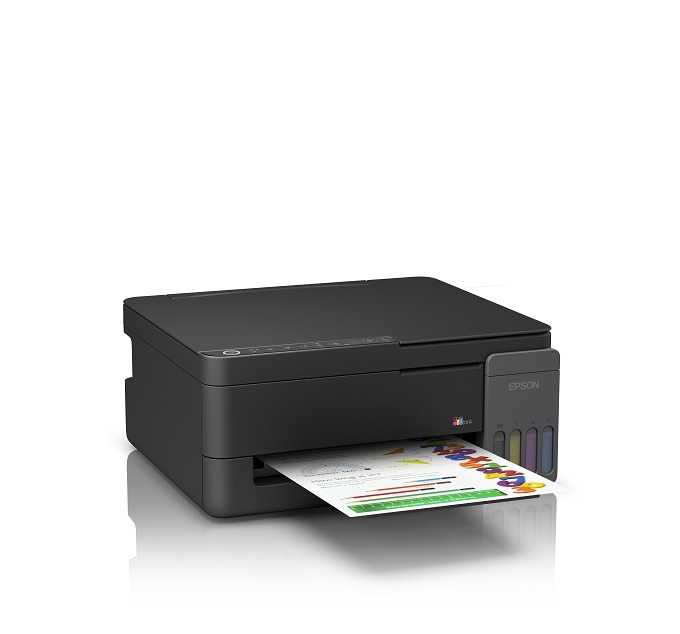
Technical specifications – Epson EcoTank L3310
General and printing specifications
| Specification | Details |
|---|---|
| Brand | Epson |
| Series | EcoTank |
| Model | L3310 |
| Indian MPN | C11CL61505 |
| Printer Type | A4 Colour Multifunction Ink Tank Printer |
| Functions | Print, Scan, Copy |
| Printing Method | On-demand Piezoelectric Inkjet |
| Printhead Technology | Epson Micro Piezo |
| Heat-Free Technology | Yes |
| Nozzles – Black | 180 |
| Nozzles – Colour | 59 per colour |
| Minimum Ink Droplet Size | 3 pl (Epson Shop listing) |
| Maximum Print Resolution | 5760 × 1440 dpi |
| Draft Speed – Black | Up to 33 ppm |
| Draft Speed – Colour | Up to 15 ppm |
| ISO A4 Simplex – Black | Up to 11 ipm |
| ISO A4 Simplex – Colour | Up to 6 ipm |
| First Page Out – Black | Approx. 10 seconds |
| First Page Out – Colour | Approx. 16 seconds |
| 4R Photo Printing – Bordered | Approx. 69 seconds |
| 4R Photo Printing – Borderless | Approx. 90 seconds |
| Maximum Borderless Format | 4R / 4 × 6 inches |
| Automatic Duplex Printing | No |
| Printer Language | ESC/P-R, ESC/P Raster |
| Colour Configuration | Black, Cyan, Magenta, Yellow |
Scanner and copier specifications
| Specification | Details |
|---|---|
| Scanner Type | Flatbed Colour Image Scanner |
| Scanner Sensor | CIS |
| Optical Scanner Resolution | 600 × 1200 dpi (May 2026 India brochure) |
| Maximum Scan Area | 216 × 297 mm |
| Colour Scanning Bit Depth | 48-bit input, 24-bit output |
| Grayscale Bit Depth | 16-bit input, 8-bit output |
| Monochrome Scan Speed | Up to approx. 11 seconds (200 dpi) |
| Colour Scan Speed | Up to approx. 32 seconds (200 dpi) |
| Standalone Copy Function | Yes |
| Copy Speed – Black | Up to 7 ipm |
| Copy Speed – Colour | Up to 1.7 ipm |
| Maximum Copy Resolution | 600 × 600 dpi |
| Maximum Standalone Copies | 20 |
| Maximum Copy Size | A4 / Letter |
| Automatic Document Feeder | No |
| Fax Function | No |
Epson’s older webpage lists an optical scan resolution of 1200 × 2400 dpi. Epson’s newer May 2026 brochure instead specifies 600 × 1200 dpi, so the table uses that value.
Paper handling, connectivity and physical specifications
| Specification | Details |
|---|---|
| Number of Paper Trays | 1 |
| Paper Feeding | Rear Paper Feed |
| A4 Plain-Paper Input | Up to 100 sheets |
| Premium Glossy Photo Input | Up to 20 sheets |
| Envelope Input | Up to 10 |
| Postcard Input | Up to 30 |
| A4 Plain-Paper Output | Up to 30 sheets |
| Premium Glossy Photo Output | Up to 20 sheets |
| Supported Standard Sizes | A4, Letter, A6, B5, B6, C6, DL, specified photo and envelope formats |
| Maximum Custom Paper Size | 215.9 × 1200 mm |
| USB | Hi-Speed USB 2.0 |
| Wi-Fi | No built-in Wi-Fi |
| Wi-Fi Direct | No |
| Ethernet | No |
| Compatible Replacement Ink | Epson 003 / T00V |
| Black Replacement Ink Yield | Up to 4,700 pages |
| Composite Colour Yield | Up to 7,500 pages |
| Replaceable Maintenance Box | Yes |
| Maintenance Box Code | C12C939901 |
| Rated Voltage | AC 220–240 V |
| Rated Frequency | 50–60 Hz |
| Standalone Copy Power | Approx. 12 W |
| Ready Mode | Approx. 6 W |
| Sleep Mode | Approx. 0.5 W |
| Power Off | Approx. 0.1 W |
| Product Dimensions | 361 × 317 × 162 mm |
| Net Weight – Epson Shop | 4.2 kg |
| Alternative Brochure Weight | 4.1 kg, illustration incorrectly labelled L3111 |
| Warranty | 1 year onsite / 50,000 pages, whichever comes first |
| Printhead Warranty | Included, subject to Epson terms |
| Weight | 4.2 kg |
|---|---|
| Brand | Epson |
| EAN / UPC Code | 8715946698656 |
| Model | L3310 |
You may also like

Reviews
There are no reviews yet.