

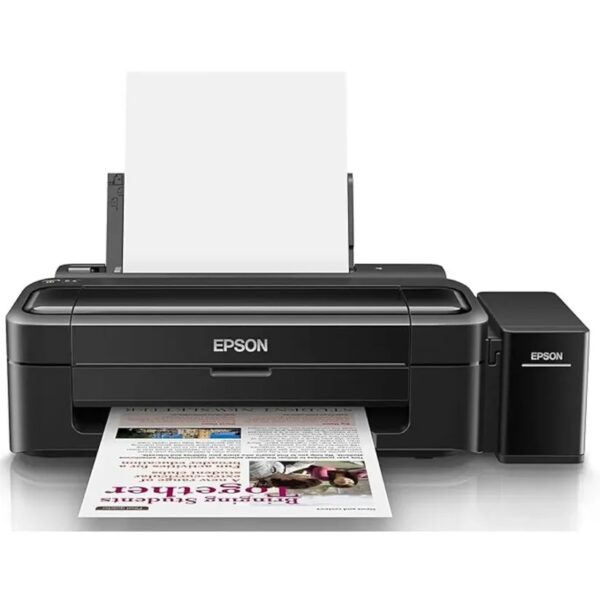
Epson EcoTank L130 A4 Single-Function Colour Ink Tank Printer
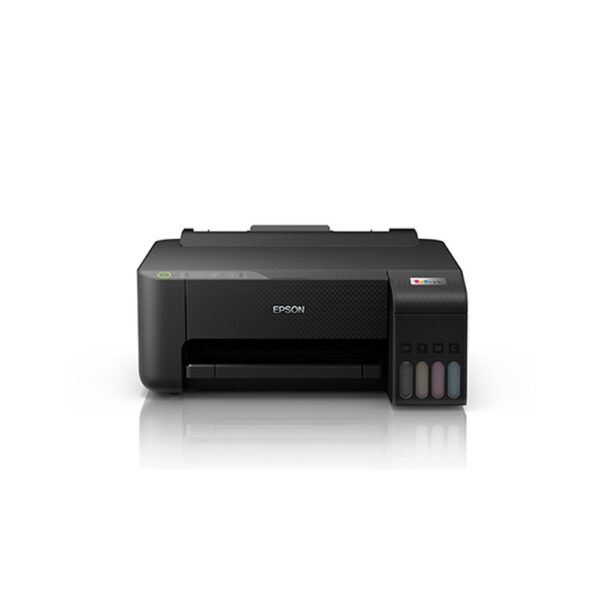
The Epson EcoTank L130 A4 Single-Function Colour Ink Tank Printer (C11CE58501) is a compact and economical printer designed for home users, students, small offices and everyday business printing. Featuring Epson’s refillable four-colour ink tank system and Micro Piezo printing technology, it produces clear black documents and vibrant colour output with a maximum resolution of 5760 × 1440 dpi.
With draft printing speeds of up to 27 ppm in black and 15 ppm in colour, USB 2.0 connectivity and support for A4 and other common paper sizes, the Epson L130 offers straightforward, cost-conscious printing.
Key Highlights:
- Single-function colour ink tank printer — print only.
- Up to 5760 × 1440 dpi print resolution.
- Up to 27 ppm black and 15 ppm colour in draft mode.
- Refillable ink tank with genuine Epson 664 ink bottles.
- Up to 50-sheet plain-paper input capacity.
- Manual double-sided printing support.
- USB 2.0 wired connectivity.
- Manufacturer warranty of 1 year or 15,000 prints, whichever comes first.
₹12,999.00 Original price was: ₹12,999.00.₹10,250.00Current price is: ₹10,250.00. (Inclusive of GST)
2 in stock
-
 Pick up from the Woodmart Store
To pick up today
Free
-
 Courier delivery
Our courier will deliver to the specified address
2-3 Days
From $40
-
 DHL Courier delivery
DHL courier will deliver to the specified address
1-2 Days
From $40
Epson EcoTank L130 A4 Single-Function Colour Ink Tank Printer
1.Epson EcoTank L130 A4 Colour Ink Tank Printer Overview
The Epson EcoTank L130 A4 Single-Function Colour Ink Tank Printer is designed to deliver economical and dependable printing for everyday personal, educational and business requirements. Built around Epson’s refillable ink tank technology, this printer offers a practical alternative to conventional cartridge-based printers for customers who regularly print documents, assignments, worksheets, letters and other colour materials.
Its compact design makes it suitable for desktop installations where workspace is limited. The printer focuses on the essential function of printing, making it especially useful for customers who already have separate scanning equipment or simply do not require copying and faxing.
The Epson EcoTank L130 combines four-colour printing, Micro Piezo inkjet technology and high-yield ink bottles to provide an efficient solution for routine document production. Its wired USB connectivity supports direct printing from a compatible computer without requiring a wireless network.
Customers looking for an economical A4 printer can also explore Epson ink tank printers available through Aadinath Peripherals & Consumables.
2. Single-Function Printing Designed for Everyday Needs
One of the defining characteristics of the Epson EcoTank L130 is its dedicated single-function design. Unlike multifunction printers that combine printing with scanning, copying and fax capabilities, the L130 concentrates on producing black-and-white and colour printed output.
This makes it a sensible option for individuals and organisations that primarily need a computer-connected printer. Home users can print important letters and household documents, while students can produce schoolwork, projects and revision materials without investing in additional functions they may never use.
Small offices can also benefit from a dedicated printer for daily correspondence and document output. Depending on the nature of the work, a business may already have a document scanner or shared photocopier and only require an economical desktop colour printer.
The Epson L130 does not include a scanner, copier or fax. Buyers requiring these features should consider an Epson EcoTank all-in-one printer instead.
3. Refillable EcoTank System for Economical Printing
The Epson EcoTank L130 uses a refillable ink tank system designed to reduce dependence on traditional replaceable ink cartridges. Instead of purchasing a new cartridge whenever ink runs low, users refill the corresponding ink tank with an approved genuine Epson ink bottle.
This approach is particularly useful for customers with frequent printing requirements. Reports, learning materials, business correspondence and everyday office documents can consume considerable amounts of ink over time. A high-capacity ink tank system offers a convenient method of replenishing ink without continually replacing cartridge assemblies.
The four-colour tank arrangement supports black, cyan, magenta and yellow inks. Each colour is replenished separately, allowing users to purchase the specific replacement bottle required.
The practical advantage of the EcoTank design is predictable consumable management. Businesses can keep approved replacement inks available for routine use, while home users can monitor their ink levels and arrange refills as required.
4. Epson Micro Piezo Printing Technology
The Epson EcoTank L130 incorporates Epson’s Micro Piezo inkjet printing technology. This printhead system uses piezoelectric elements to control the ejection of very small ink droplets onto the printing surface.
Unlike thermal inkjet mechanisms that rely on heating ink to generate droplets, piezoelectric printing technology controls ink delivery through mechanical deformation. The technology is developed to support consistent ink placement and accurate reproduction of documents, images and graphics.
For ordinary printing requirements, this technology helps the printer handle combinations of text and colour graphics. Customers can produce letters with logos, educational worksheets with illustrations or documents containing charts and tables.
The printer features variable-sized droplet technology and a specified minimum droplet size of 3 picolitres. These characteristics support the reproduction of fine printed details under appropriate settings.
Actual results depend on factors such as paper quality, document resolution, selected print mode, ink condition and printer maintenance.
5. High Print Resolution Up to 5760 × 1440 dpi
The Epson EcoTank L130 supports a maximum printing resolution of 5760 × 1440 dpi, enabling it to reproduce detailed text and colour graphics for suitable everyday applications.
High-resolution printing can be especially useful for documents containing smaller lettering, detailed tables, charts, diagrams or illustrations. Users preparing business presentations, educational notes or personal creative projects can select suitable quality settings to obtain the required balance between output detail and printing time.
When printing on compatible photo or speciality paper, the printer can also be used for selected image-printing tasks. Appropriate paper selection and driver settings are important for achieving satisfactory results.
A higher maximum resolution does not mean every document is printed at that setting. Everyday draft and normal print modes may use different resolutions to balance speed, quality and ink consumption.
For typical office paperwork, a standard print setting will often be more practical than the highest available quality mode.
6. Fast Draft Printing for Black-and-White Documents
For users who frequently print letters, reference documents, study notes and office paperwork, printing speed can be an important consideration.
The Epson L130 offers maximum draft printing speeds of approximately 27 pages per minute for black-and-white output. This figure represents performance under the manufacturer’s specified draft testing conditions and should not be confused with typical full-quality business document printing speeds.
Draft mode may be suitable for documents where quick output is more important than presentation-quality reproduction. Examples include internal notes, preliminary worksheets, rough document copies, working drafts and reference materials.
Print speed depends on the content being printed. A simple text document usually requires different processing from a page containing large photographs or complex graphics.
Users should also consider the connected computer, selected driver settings, paper type and print quality. For documents intended for clients or final submission, a higher-quality print setting may be preferable even when it requires additional printing time.
7. Colour Printing for Documents, Charts and Presentations
The Epson EcoTank L130 is not limited to black-and-white document production. Its four-colour ink system allows users to prepare colour worksheets, illustrated reports, presentation handouts and other everyday documents containing graphics.
The printer uses cyan, magenta and yellow alongside black to reproduce a wide range of colours. These inks work together to produce coloured headings, diagrams, charts, photographs and illustrations.
Colour printing can improve the readability of certain materials. For example, a business report can use different colours to distinguish figures in charts, while an educational worksheet can include colour illustrations to make information easier to understand.
The L130 offers maximum draft colour printing speeds of up to 15 pages per minute under the manufacturer’s specified test conditions.
For presentations, customer-facing documents and personal photographs, users should select appropriate print quality and media settings rather than relying solely on the fastest draft mode.
8. High-Yield Genuine Epson Ink Bottles
A major benefit of the Epson EcoTank L130 is its support for genuine Epson 664 series replacement ink bottles.
Epson documentation quotes replacement ink yields of up to approximately 4,500 black pages and 7,500 composite colour pages under specified testing conditions. These figures refer to particular replacement ink bottle yields and are not guarantees of the number of pages every customer will obtain.
Actual print yields can vary significantly depending on the amount of ink used on each page. A document containing mostly black text will have different ink requirements from a full-page colour photograph or a presentation with large coloured backgrounds.
Printing frequency, maintenance cycles, print settings and environmental conditions can also affect overall ink usage.
Some Epson product literature separately quotes approximately 4,000 black and 6,500 colour pages for the printer’s supplied ink configuration. Therefore, customers should distinguish between bundled ink yields and replacement bottle yields when comparing printing costs.
9. Managing Long-Term Printing Costs
When choosing a printer, the purchase price is only one part of the total ownership cost. Customers who print regularly should also consider replacement ink, paper, maintenance and the expected number of pages printed over time.
The Epson EcoTank L130 is designed around high-capacity refillable ink tanks, which can make it an economical option for routine printing compared with systems that depend on frequent cartridge replacement.
For a home user, this can make regular school assignments and household documents more manageable. For a business, maintaining a stock of genuine replacement ink bottles can help simplify consumable planning.
Epson has published cost-per-print estimates for the L130, but such estimates depend on the price and yield of the ink bottles used in the calculation. They should not be treated as fixed printing costs for every customer or every document.
For a more accurate estimate, divide the current consumable cost by the expected number of pages under your actual printing pattern.
10. Convenient Ink Refilling and Maintenance
The Epson EcoTank L130 is designed to allow users to refill its dedicated ink tanks when the corresponding ink levels become low.
Genuine Epson ink bottles are made for use with specified Epson ink tank systems, helping users replenish the correct colours through the printer’s refill arrangement. The printer also incorporates ink supply tubing to deliver ink from the tanks to the printhead.
During refilling, users should follow Epson’s instructions carefully. The correct bottle should be matched with the corresponding tank colour, and the printer should be positioned on a stable surface.
It is also important not to substitute an ink bottle simply because it carries the same colour name. Different Epson printer families can require different ink formulations and bottle series.
After completing a refill, users should close the tank openings securely and follow any applicable ink-level reset or maintenance instructions in the official Epson documentation.
11. Genuine Epson 664 Ink Compatibility
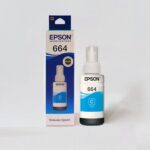
The Epson EcoTank L130 supports genuine Epson 664 replacement ink bottles in four colours.
For customers purchasing individual replacements, the relevant ink bottles are:
- Epson 664 Black Ink Bottle – T6641
- Epson 664 Cyan Ink Bottle – T6642
- Epson 664 Magenta Ink Bottle – T6643
- Epson 664 Yellow Ink Bottle – T6644
Customers requiring all four colours together can also explore the Epson 664 CMYK Ink Bottle Set.
Using the ink series specified for the printer helps minimise the risk of incompatibility and supports the expected operation of the Epson ink delivery system.
Before ordering, customers should verify the exact part number against the printer’s ink requirements. Epson’s official L130 compatible ink information provides a manufacturer reference for the supported consumables.
12. Versatile A4 and Smaller Paper Sizes
The Epson L130 supports several common paper sizes required for home, school and office printing.
The Indian retail specification lists A4, A5, A6, B5, C6 and DL media formats. These sizes make the printer suitable for producing everyday business letters, school assignments, short notices, small-format documents and compatible envelopes.
A4 is particularly useful for standard office correspondence and educational printing, while A5 and A6 can be appropriate for smaller handouts, notes and selected personal projects.
C6 and DL envelope support adds flexibility for customers preparing correspondence that requires printed envelope information.
Users should select the corresponding media size in the printer driver before printing. The document layout should also match the loaded paper to avoid unexpected scaling or cropping.
For unusual media formats, users should check Epson’s official documentation and the printer driver’s available settings rather than assuming every paper size or thickness will be supported.
13. Paper Input and Output Capacity
The Epson EcoTank L130 is equipped with a paper handling system suitable for light daily workloads.
Its standard paper input capacity is up to 50 sheets of A4 plain paper, while the output capacity is specified at up to 30 sheets under the relevant test conditions.
This arrangement is practical for users printing short reports, letters, reference materials and modest batches of documents throughout the day.
Students may use the printer to prepare several assignments, while office employees can produce routine paperwork without loading individual sheets for every document.
Paper handling limits depend on paper type and thickness. Glossy or speciality papers may require smaller quantities than standard plain paper.
For dependable feeding, paper should be aligned correctly, the guides should be positioned appropriately and the tray should not be overloaded.
Users who regularly need to print very large batches may prefer a printer equipped with a larger paper tray and more advanced paper-handling features.
14. Manual Double-Sided Printing Support
The Epson EcoTank L130 supports manual duplex printing, enabling users to print on both sides of a sheet through a process that involves turning or reloading the paper.
This feature is useful when preparing documents such as study notes, internal reference materials, draft reports and personal records where reducing paper consumption is desirable.
Unlike automatic duplex printing, the L130 does not contain a mechanism that turns the paper over independently.
The printing procedure therefore requires user involvement, usually through a driver-guided sequence or manual paper reloading according to the selected printing application.
Customers producing two-sided documents should allow for the additional handling involved. Correct sheet orientation is important to prevent pages from printing upside down or out of sequence.
Manual duplex is suitable for occasional double-sided printing. Offices with a continuous requirement for two-sided documents may find an Epson model with automatic duplex printing more convenient.
15. Simple USB 2.0 Computer Connectivity
The Epson EcoTank L130 connects to a compatible computer through a USB 2.0 interface.
This wired connection is suitable for users who prefer a printer connected directly to a desktop computer or laptop without requiring wireless network configuration.
For a home study area, this can provide a straightforward method of printing assignments and personal documents. In a small office, the printer can be connected to a designated workstation for routine document output.
The printer does not have built-in Wi-Fi or Ethernet networking. Customers should therefore not assume that it can connect directly to a wireless router or receive print jobs over a network without additional external arrangements.
The L130 is also not designed as a standalone mobile printing solution.
For customers who specifically need printing from phones or multiple wireless devices, a Wi-Fi-enabled model from the Epson EcoTank printer range would generally be a more suitable choice.
16. Compact Design for Home and Office Desks
Space management is important in smaller homes, reception areas, offices and study rooms.
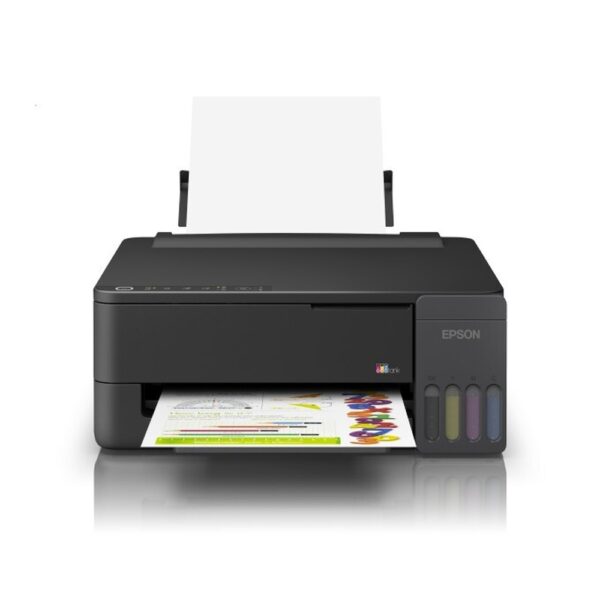
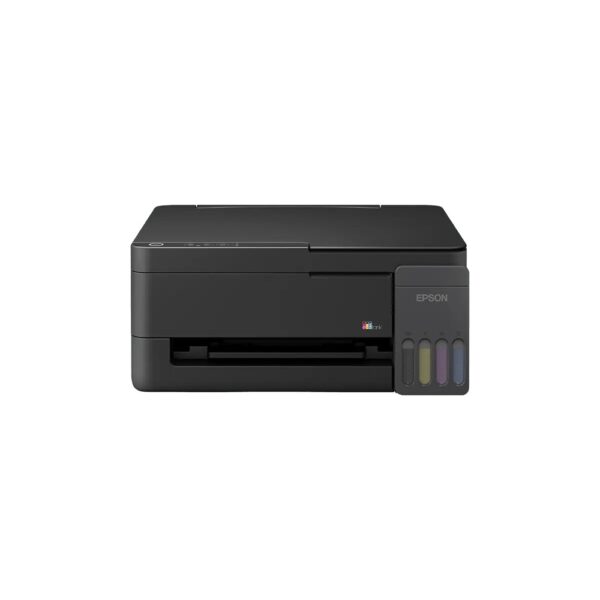
The Epson EcoTank L130 features a compact desktop design with the refillable ink tank system positioned alongside the printer body. This arrangement provides convenient access to the tanks while keeping the basic printer layout straightforward.
Its size allows it to be positioned on suitable desks, computer tables or work surfaces, provided adequate clearance is maintained for paper loading, output collection and ventilation.
The relatively lightweight construction makes the printer easier to position than many larger office printing devices.
When installing the printer, users should allow room behind and in front of the body for paper movement. They should also ensure the ink tank remains accessible and that the printer stands on a firm, level surface.
The compact construction makes the L130 particularly attractive for users who want dependable colour document printing without occupying excessive workspace.
17. An Effective Choice for Students
Students frequently need to print assignments, project reports, educational worksheets, reference notes and learning materials.
The Epson EcoTank L130 is suitable for these regular tasks because it combines black text printing with four-colour output and a refillable ink tank system.
Black-and-white printing can be used for reading notes and text-based documents, while colour printing supports charts, maps, scientific illustrations, diagrams and presentation materials.
The printer’s A4 support is particularly relevant for many school and college submissions.
Students can select draft mode when preparing rough notes and higher-quality settings when printing final assignments or project covers.
The USB connection makes the printer suitable for study spaces where a desktop computer or compatible laptop is used.
Because the L130 is print-only, students who need to scan documents or photocopy book pages would require a separate scanner or multifunction device.
18. Suitable for Everyday Small-Business Printing
Small businesses often need a dependable printer for routine correspondence and administrative tasks.
The Epson EcoTank L130 can be used to print quotations, invoices, office letters, notices, simple reports, price lists and other documents generated from compatible computer applications.
Its ability to reproduce colour is useful for documents containing logos, coloured headings, tables or charts.
The refillable ink tank system also supports businesses that want to manage consumable purchases separately from the initial hardware investment.
For an individual workstation or a modest office environment, a dedicated USB printer can meet many regular document production needs.
However, the L130 is not a network-ready multifunction business printer. Larger teams may prefer shared wireless or Ethernet printers with higher paper capacities, automatic duplex capability and scanning features.
Customers should assess their expected printing volume, connectivity requirements and workflow before choosing the most appropriate model.
19. Useful for Home and Personal Printing
In addition to professional and educational applications, the Epson EcoTank L130 is suitable for many everyday household printing tasks.
Families can use it to prepare personal letters, household records, activity sheets, invitations, recipes and learning materials.
Colour printing is useful for children’s worksheets, calendars, charts, pictures and other documents where visual presentation matters.
Home users can choose from supported media sizes depending on the requirements of the document.
When using photo or speciality paper, it is important to select the corresponding media setting and confirm compatibility with the printer.
The refillable ink tank design offers a convenient way to replenish ink when needed rather than depending on conventional replacement cartridges.
The printer is best suited to households that primarily print documents from a computer and do not require integrated scanning or wireless mobile printing.
20. Printing Photographs and Creative Projects
The Epson L130’s colour inkjet technology and high maximum print resolution allow it to produce suitable photographs and graphics on supported media.
Users can print selected personal photographs, illustrations, invitations, greeting materials and creative project pages using appropriate print settings.
Photo output quality depends on the source image, paper finish, ink condition and the resolution selected in the printer driver.
A good-quality photograph printed on compatible glossy media may produce different results from the same photograph printed on ordinary office paper.
Customers should therefore choose their paper carefully and follow Epson’s recommendations for compatible print media.
The printer is designed as an everyday colour document printer rather than a specialist professional photo printing system.
Users whose primary requirement is high-volume photographic production, specialist colour management or professional photo media handling should consider printers developed specifically for those applications.
21. Printer Setup and Driver Installation
The Epson EcoTank L130 requires appropriate installation before the first print job can be completed.
Initial setup generally involves placing the printer on a suitable surface, preparing the ink system according to Epson’s instructions, loading paper and configuring the printer with a compatible computer.
Because the L130 uses refillable ink tanks, the initial ink charging procedure is an important part of first-time preparation.
Users should follow the manufacturer’s setup sequence rather than attempting repeated printing before the ink system is properly initialised.
Software and drivers should be selected according to the connected computer’s operating system. Compatibility should not be assumed solely because the printer uses USB.
Epson provides official installation resources and downloadable software through its Epson L130 driver and support page.
Using the correct manufacturer-provided driver helps ensure that the available print modes, paper settings and maintenance functions are configured appropriately.
22. Printer Care and Routine Maintenance
Proper printer care can help maintain consistent output quality and reduce avoidable printing problems.
The Epson EcoTank L130 should be operated on a stable surface and kept away from excessive dust, moisture and unsuitable temperatures.
Users should check ink levels periodically and refill with the specified genuine Epson ink bottles when necessary.
Printing very infrequently can affect inkjet performance, making it important to follow Epson’s guidance for storage and periodic use.
If printing quality becomes irregular, users should consult the driver maintenance options and the official Epson instructions for procedures such as nozzle checking or printhead cleaning.
Cleaning operations consume ink and should therefore be performed only when needed.
The printer should not be moved carelessly while the ink system is prepared for operation. Before transportation, users should follow Epson’s recommendations for securing and protecting the ink tank arrangement.
23. Supporting Responsible Ink and Paper Usage
The refillable ink tank concept can help reduce the frequency of disposable cartridge replacement in printing environments that would otherwise rely on conventional cartridges.
For users who print regularly, the Epson EcoTank L130 provides a practical method of replenishing ink through individual replacement bottles.
Customers can also reduce paper consumption by using manual duplex printing where appropriate.
Selecting draft mode for working documents, checking layouts before printing and avoiding unnecessary repeat print jobs can contribute to more efficient everyday operation.
These practices may help households and businesses manage their use of paper and consumables.
However, printing still requires electricity, ink, packaging and paper. Environmental benefits depend on the equipment, printing volume and actual user behaviour.
Used ink packaging and the printer itself should be handled according to applicable local waste disposal and electronic waste requirements.
24. Epson Manufacturer Warranty Coverage
The Epson EcoTank L130 is supported by a manufacturer’s warranty specified as one year or 15,000 prints, whichever occurs first.
This coverage provides customers with a defined warranty period and print-count limitation under Epson’s applicable terms and conditions.
Customers should retain their purchase invoice and any relevant warranty documentation. These documents may be needed when registering the product or requesting service.
Warranty coverage is subject to Epson’s official policies, including exclusions relating to misuse, unsuitable consumables, accidental damage or other conditions stated by the manufacturer.
Customers should not assume that all maintenance procedures, parts or service visits are automatically covered.
For product registration, assistance and service-related information, users can visit the official Epson support website.
Checking the manufacturer’s current warranty terms before purchasing is advisable, particularly when buying older inventory or products stored for an extended period.
25. Important Product Limitations to Consider
Before purchasing the Epson EcoTank L130, customers should understand the features included in this model.
The L130 is a single-function printer. It does not include integrated scanning, photocopying or fax functionality.
Its primary connection method is USB, and it does not provide built-in Wi-Fi or Ethernet connectivity.
Double-sided printing is supported manually rather than automatically.
The printer is intended for common A4 and smaller document printing requirements. It should not be treated as an A3 printer or a substitute for a specialised commercial printing system.
Its paper input capacity is appropriate for everyday tasks, but users with demanding, unattended high-volume printing requirements may prefer equipment with a larger paper tray and additional automation features.
These limitations do not prevent the L130 from being a useful printer. They simply identify the situations where a different model may better match the buyer’s needs.
26. Selecting the Right Printer for Your Workspace
The Epson EcoTank L130 is particularly suitable for customers who prioritise economical colour printing, straightforward operation and a compact desktop footprint.
For individual users, its USB interface can provide a direct connection to a compatible computer.
For households and students, the refillable ink system can be useful when producing recurring assignments and personal documents.
For businesses, the colour printing capability supports everyday documentation while the four-colour refill arrangement helps with consumable planning.
A buyer who needs automatic duplex printing, wireless connectivity or integrated scanning should compare the L130 with a multifunction Epson EcoTank model before placing an order.
It is also useful to consider the frequency of printing. Inkjet printers generally benefit from appropriate regular use and maintenance rather than being left unused for extended periods.
Choosing a printer around genuine requirements can help avoid paying for unnecessary features or overlooking functions that are essential for daily work.
27. Original Epson Ink and Consumable Availability
Reliable consumable sourcing is an important consideration when purchasing an ink tank printer.
The Epson L130 supports Epson’s 664 series, with separate bottles available for black, cyan, magenta and yellow.
Customers can purchase replacement bottles individually when one colour needs replenishing or choose a complete four-colour set when several tanks require refilling.
At Aadinath Peripherals & Consumables, buyers can browse original printer ink bottles and select the appropriate Epson 664 products.
For the L130, the exact supported consumable family should always be confirmed rather than assuming that all Epson EcoTank ink bottles are interchangeable.
A correctly identified genuine ink bottle is preferable to selecting an item on the basis of colour or bottle appearance alone.
Customers planning regular printing may find it convenient to keep suitable replacement ink available, particularly when operating the printer for business or educational use.
28. Buy Epson EcoTank L130 from Aadinath Peripherals & Consumables
The Epson EcoTank L130 A4 Single-Function Colour Ink Tank Printer offers an economical way to handle everyday black-and-white and colour document printing.
Its refillable four-colour ink system, USB connectivity, compact design and high maximum print resolution make it a practical option for homes, students and smaller offices.
Customers looking for a printer primarily for printing documents can benefit from its straightforward configuration without additional scanning or fax hardware.
Aadinath Peripherals & Consumables supplies printers, original ink bottles, computer peripherals and office technology products for individual and business requirements.
Explore the Epson printer collection to compare available models, or visit the Epson EcoTank L130 official manufacturer page for the original model information.
The Epson EcoTank L130 remains a practical choice for customers who require a dedicated A4 colour ink tank printer with refillable consumables and dependable everyday printing capability.
technical specifications
| Specification | Details |
|---|---|
| Brand | Epson |
| Series | EcoTank |
| Model Number | L130 |
| Manufacturer SKU | C11CE58501 |
| Printer Type | Colour Ink Tank Printer |
| Printer Function | Print Only |
| Printing Method | On-demand Piezoelectric Inkjet |
| Printhead Technology | Epson Micro Piezo |
| Ink Colours | Black, Cyan, Magenta, Yellow |
| Maximum Print Resolution | 5760 × 1440 dpi |
| Black Draft Print Speed | Up to 27 ppm |
| Colour Draft Print Speed | Up to 15 ppm |
| Black ISO Print Speed | Up to 8.5 ipm, current Epson India webpage |
| Colour ISO Print Speed | Up to 4.5 ipm, current Epson India webpage |
| Minimum Ink Droplet Size | 3 pl |
| Black Nozzles | 180 |
| Colour Nozzles | 59 per colour |
| Paper Sizes | A4, A5, A6, B5, C6, DL |
| Input Paper Capacity | 50 sheets |
| Output Paper Capacity | 30 sheets |
| Double-Sided Printing | Manual |
| Connectivity | USB 2.0 Hi-Speed |
| Wi-Fi / Ethernet | No built-in support |
| Compatible Replacement Ink | Epson T664 Series |
| Replacement Ink Yield – Black | Up to 4,500 pages |
| Replacement Ink Yield – Colour | Up to 7,500 composite colour pages |
| Power Supply | 100–240 V AC, 50/60 Hz |
| Power Consumption – Printing | Approximately 9 W |
| Printer Weight | 2.8 kg, Epson Shop India listing |
| Printer Dimensions | 487 × 228 × 135 mm, Epson Shop India listing |
| Warranty | 1 Year / 15,000 Prints, whichever comes first |
| Weight | 2.8 kg |
|---|---|
| Brand | Epson |
| Model | L130 |

Reviews
There are no reviews yet.