


-
 Pick up from the Woodmart Store
-
 Courier delivery
-
 DHL Courier delivery
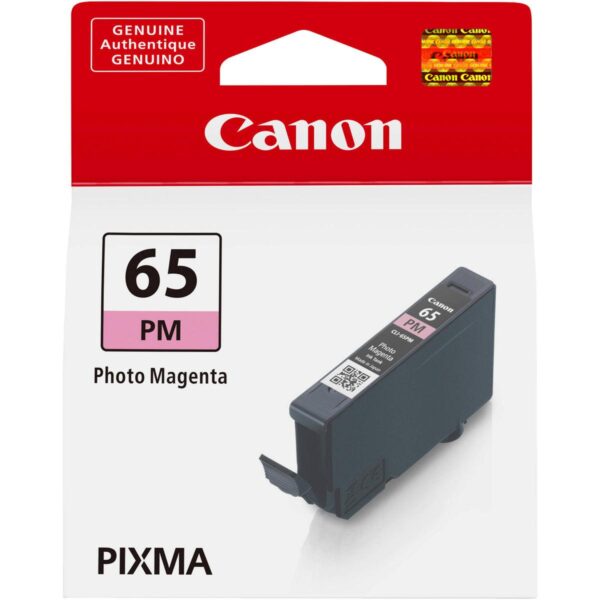
Canon CLI-65 Photo Magenta Ink Cartridge for Professional Photo Printing
The Canon CLI-65 Photo Magenta Ink Cartridge is a genuine Canon photographic ink tank designed to deliver vibrant colour reproduction, smooth tonal transitions, and reliable photo printing performance. Developed specifically for Canon PIXMA PRO-200 series professional photo printers, this 12.6 ml dye-based cartridge uses Canon’s advanced ChromaLife100+ ink technology to support exceptional photographic output.
Professional photography printing demands accurate colour representation, detailed images, and smooth transitions between different shades. Whether producing portraits, landscapes, wedding photographs, fine art prints, or creative portfolios, every colour contributes to the quality of the finished photograph. The Canon CLI-65 PM provides dedicated Photo Magenta ink that works alongside the printer’s other seven ink colours to create rich and visually appealing photographic results.
Designed for photography studios, professional photographers, creative professionals, photo printing businesses, and photography enthusiasts, this original Canon cartridge provides the manufacturer-specified ink formulation for compatible printers.
The Canon CLI-65 Photo Magenta Ink Cartridge is individually replaceable, allowing customers to replace the required ink colour without changing the complete cartridge set. When used with suitable Canon photographic paper and appropriate printing settings, it supports the excellent colour quality expected from Canon’s professional photographic printing system.
Advanced Canon ChromaLife100+ Ink Technology
The Canon CLI-65 Photo Magenta Ink Cartridge features ChromaLife100+ technology, a dye-based ink system developed to provide vibrant photographic colours and improved print longevity when combined with suitable Canon photographic media.
ChromaLife100+ technology is designed around the interaction of genuine Canon inks, compatible printers, and appropriate photographic paper. Together, these components provide a coordinated printing system capable of producing images with strong colour reproduction and refined tonal detail.
The Photo Magenta ink contributes to the printer’s enhanced colour gamut, particularly in magenta and red regions. Canon also identifies improvements in dark colour reproduction, including red and blue tones, as benefits of the CLI-65 ink family.
For photographers who require richly coloured portraits, decorative photography, artistic images, and professional photographic prints, this technology helps the compatible printer reproduce the intended colour combinations.
The actual appearance of a photograph depends on image quality, media selection, print settings, and colour management. Using genuine Canon ink provides the formulation designed for the printer’s photographic system, making it a suitable choice for customers seeking manufacturer-matched printing performance.
Rich and Vibrant Photo Magenta Colour Reproduction
Photo Magenta plays an important role in producing photographic prints with subtle red, purple, pink, and related colour variations.
Unlike standard office documents, professional photographs contain complex colour combinations that require controlled reproduction. Light skin tones, flowers, sunsets, fashion fabrics, decorative artwork, and colourful landscapes may contain delicate variations in magenta-based colours.
The Canon CLI-65 Photo Magenta Ink Cartridge is formulated to contribute to these colour regions within the PIXMA PRO-200’s eight-colour printing system.
A dedicated Photo Magenta ink gives the printer an additional colour option beyond its standard Magenta cartridge. The printer uses its available inks according to the photograph, media choice, and printing instructions.
This approach helps support gradual colour transitions rather than treating all magenta-related shades as the same colour.
Photographers producing colour-sensitive work can benefit from a printing system specifically developed for photographic images. The dedicated Photo Magenta cartridge is particularly relevant when prints contain soft pinks, subtle purples, warm highlights, or complex shades of red.
Canon CLI-65 Photo Magenta Ink Cartridge for PIXMA PRO-200
The Canon CLI-65 Photo Magenta Ink Cartridge is designed for the Canon PIXMA PRO-200 and PIXMA PRO-200S professional photographic inkjet printers.
These printers use an advanced eight-colour dye-based ink system intended for photographic output.
The CLI-65 ink family includes Black, Cyan, Magenta, Yellow, Grey, Photo Cyan, Photo Magenta, and Light Grey.
Each ink colour has a designated position and provides a specific contribution to photographic colour reproduction. Photo Magenta is one of the two additional photographic colour inks, alongside Photo Cyan, that expand the available colour system.
When printing a photograph, the printer controls the application of the installed inks according to its image-processing and printing settings.
Using the correct cartridge ensures that the Photo Magenta ink position contains the manufacturer’s intended formulation.
Customers should verify their printer model before ordering, as Canon offers numerous ink cartridge families that are not interchangeable.
The CLI-65 PM is not a universal Canon cartridge, and compatibility should not be assumed with PIXMA printers requiring CLI-42, CLI-65 Magenta, or other ink models.
Photo Magenta vs Standard Magenta Ink
Canon’s CLI-65 cartridge series includes both a standard Magenta cartridge and a Photo Magenta cartridge.
Although the names are similar, these two cartridges contain different ink shades and serve separate functions within the printer’s eight-colour system.
The standard Magenta cartridge is identified as CLI-65 M, while the Photo Magenta cartridge is identified as CLI-65 PM.
Photo Magenta supports the reproduction of photographic tones that require a lighter or more delicate magenta contribution.
Its presence within the printing system is particularly useful for subtle photographic colour transitions.
Standard Magenta and Photo Magenta should not be treated as interchangeable products.
Each cartridge has a designated position inside compatible Canon photo printers, and users must select the correct replacement according to the printer’s ink status.
For photography studios and businesses purchasing cartridges in larger quantities, maintaining accurate inventory labels can prevent ordering mistakes.
Customers looking for the Canon CLI-65 Photo Magenta Ink Cartridge should always confirm that the product packaging specifies PM or Photo Magenta.
Professional Quality Colour Photography
High-quality photographic printing requires the reproduction of a broad range of colours, including bright highlights, subtle midtones, and detailed darker areas.
The Canon CLI-65 Photo Magenta Ink Cartridge helps the PIXMA PRO-200’s printing system produce photographic colours with refined gradations.
It is suitable for professional applications where visual appearance is important, such as customer portraits, photography exhibitions, promotional images, and creative artwork.
Colour photographs frequently contain combinations of pink, red, purple, blue, and neutral shades. The printer’s eight-colour ink system is designed to reproduce these complex combinations.
The dedicated Photo Magenta ink contributes to this capability, particularly where delicate colour transitions are required.
For best results, the source photographs should be properly exposed and edited, and the correct photographic paper settings should be selected.
The cartridge does not independently determine the quality of every image. Resolution, colour profiles, paper, and printer settings remain important.
However, using the genuine ink specified by Canon helps ensure that the printer is operating with its intended photographic ink formulation.
Ideal for Portrait Photography
Portrait photographs often contain delicate variations in skin tones, facial highlights, clothing colours, and background shades.
The Canon CLI-65 Photo Magenta Ink Cartridge contributes to the reproduction of these colour regions within the PIXMA PRO-200 series.
Skin tones can contain subtle mixtures of red, magenta, yellow, and neutral colours. Accurate reproduction depends on the entire printing system rather than one ink alone.
The Photo Magenta ink supports the printer’s ability to create smooth transitions across such areas.
This makes it relevant for photographers printing studio portraits, family photographs, fashion images, personal portfolios, and professional headshots.
In portraits featuring colourful backgrounds or clothing, the additional photographic ink colours can also contribute to more nuanced colour output.
For consistent results, photographers should use suitable image files, appropriate print settings, and compatible photographic media.
A carefully managed printing workflow helps maintain the intended balance between skin tones, shadows, highlights, and surrounding colours.
Genuine Canon CLI-65 ink is an appropriate replacement choice for users maintaining this professional photo printing workflow.
Excellent for Wedding and Event Photography
Wedding and event photography often requires the printing of images containing varied colours, lighting conditions, and intricate visual details.
Bridal clothing, floral decorations, stage lighting, jewellery, fabric textures, and indoor backgrounds can introduce complex colour combinations.
The Canon CLI-65 Photo Magenta Ink Cartridge supports the printer’s ability to reproduce rich magenta and red tones within these photographs.
It can be used as part of the printing system for wedding portraits, engagement photographs, event images, customer samples, and photographic displays.
Wedding photographers often prepare prints in different sizes, from smaller images for client selection to larger photographs intended for framing.
The PIXMA PRO-200’s professional photographic printing capabilities make it suitable for such workflows.
The Photo Magenta cartridge is one of the essential inks used by the printer for full-colour output.
To maintain consistency across a complete print order, users should avoid changing media settings or colour management methods unnecessarily.
Suitable paper, properly prepared images, and genuine ink cartridges contribute to a dependable photographic production process.
Detailed Landscape and Nature Photography
Landscape photography frequently involves a wide variety of colours, including sunsets, flowers, skies, mountains, forests, and reflected light.
Some landscapes contain bright red or pink highlights, while others feature subtle purple and magenta shades.
The Canon CLI-65 Photo Magenta Ink Cartridge contributes to reproducing these colours as part of the compatible printer’s eight-colour ink system.
Sunset photographs are a particularly useful example because their colours may shift gradually from yellow and orange to red, magenta, violet, and blue.
A printer with dedicated photographic ink colours can reproduce these complex transitions using its designed colour combinations.
Nature photographers may also print flowers, wildlife, colourful textures, and delicate environmental details.
The final appearance depends on the source image and the selected print media, but genuine CLI-65 Photo Magenta ink provides the manufacturer’s specified ink for the relevant cartridge position.
Photographers preparing landscape prints for exhibitions or display should also evaluate their colour management workflow and the surface characteristics of the chosen photographic paper.
Suitable for Fine Art and Creative Photography
Fine art photography emphasizes visual interpretation, colour relationships, tonal balance, and artistic presentation.
The Canon CLI-65 Photo Magenta Ink Cartridge supports creative printing applications where rich colour and subtle transitions are important.
Fine art photographers may work with portraits, abstract compositions, architecture, conceptual images, or carefully controlled studio photographs.
Such images may contain complex shades that require more than standard office colour reproduction.
The PIXMA PRO-200’s eight-colour system provides separate photographic inks, including Photo Magenta, to support refined colour output.
Artists may also experiment with different compatible photo papers to achieve specific surface textures or finishes.
The appearance of a photograph can change when printed on glossy, lustre, matte, or other supported media.
For this reason, photographers should consider both ink and paper when evaluating a finished print.
Using original Canon CLI-65 cartridges helps preserve the printer’s intended ink formulation throughout the creative process.
This is useful for professionals who require a consistent starting point when producing multiple related photographic prints.
12.6 ml Genuine Canon Ink Capacity
The Canon CLI-65 Photo Magenta Ink Cartridge contains 12.6 ml of original Canon dye-based ink.
This capacity is intended for the printer’s individual Photo Magenta ink position.
The cartridge is supplied as a single ink tank, allowing customers to purchase a replacement for only the required colour.
Professional printing environments may consume Photo Magenta at a different rate from other inks depending on the images being printed.
For example, photographs containing substantial red, pink, or magenta regions may produce a different ink consumption pattern from monochrome photographs or images dominated by neutral colours.
Actual ink usage is controlled by the printer and depends on image characteristics, print dimensions, paper type, and print settings.
Users should therefore check the printer’s cartridge status rather than assuming all eight ink tanks will require replacement together.
The 12.6 ml capacity identifies the amount of ink supplied in the cartridge; it should not be interpreted as a guarantee of a fixed print count across all applications.
Canon CLI-65 Photo Magenta Ink Cartridge Photo Yield
Canon publishes photographic yield estimates for the CLI-65 PM ink cartridge under defined testing conditions.
For 4 × 6-inch colour photographs using Canon Photo Paper Pro Platinum PT-101, the cartridge has an approximate yield of 320 photos.
For A3+ colour photographs using Canon’s specified testing method and the same photo paper series, the estimated yield is approximately 54 prints.
Canon India also lists an estimated yield of 108 A3+ monochrome photographs for the Photo Magenta cartridge under its particular test conditions.
These figures help customers understand the cartridge’s tested photographic output.
However, actual yields can vary significantly depending on the images, media, print settings, printer maintenance, and operating conditions.
A photograph with extensive magenta areas may require a different quantity of Photo Magenta ink compared with an image dominated by other colours.
For commercial printing businesses, measuring real usage across common jobs provides a more useful estimate of operating cost than relying entirely on standard yield figures.
Consistent Results for Photography Studios
Photography studios frequently prepare multiple customer print orders involving portraits, product photographs, portfolios, and event images.
Maintaining consistent output is important, particularly when several prints belong to the same project.
The Canon CLI-65 Photo Magenta Ink Cartridge provides the original Canon ink formulation required for the designated cartridge position in compatible printers.
This helps studios maintain the manufacturer’s intended ink combination without introducing an unverified alternative into their printing workflow.
For repeat orders, photographers should also maintain consistent paper specifications, image files, and printer settings.
Changes in paper type or colour management may affect the appearance of prints even when the same ink cartridges are used.
Keeping spare original cartridges in stock can help reduce interruptions caused by an exhausted ink tank.
Because the CLI-65 family uses individual cartridges, studios can replenish Photo Magenta independently of the other seven colours.
This makes inventory management more practical for businesses with varying print volumes.
Reliable Printing for Graphic Designers
Graphic designers often work with visually demanding images containing rich colours, subtle gradients, detailed textures, and carefully selected photographic elements.
The Canon CLI-65 Photo Magenta Ink Cartridge can support photographic artwork and visual presentation prints produced on compatible PIXMA PRO-200 series printers.
Creative applications may include photographic portfolios, promotional imagery, artist presentation samples, and design-focused photo prints.
The dedicated Photo Magenta ink contributes to colour reproduction in regions containing red, pink, purple, and related tones.
For professional design work, the colour management process remains important.
A graphic designer should understand the differences between screen appearance and printed output, particularly when working across RGB images, printing profiles, and different paper types.
The printer cannot guarantee an exact match to every display or colour reference.
However, using genuine Canon ink provides the manufacturer’s designed ink system as a consistent foundation.
When combined with suitable image preparation and compatible photographic media, this supports a more controlled photographic printing workflow.
Smooth Gradients and Subtle Colour Transitions
Smooth gradients are important in many types of photography, especially images containing soft backgrounds, gentle lighting, skies, and natural skin tones.
Gradients involve gradual transitions between colours or brightness levels.
The Canon CLI-65 Photo Magenta Ink Cartridge contributes to the printer’s ability to reproduce delicate magenta-related colour transitions.
This can be useful in photographs containing soft pink backgrounds, floral details, coloured lighting, or subtle transitions between red and violet shades.
The printer’s complete eight-colour system determines how ink is applied to achieve the desired image.
Photo Magenta provides an additional ink shade that can contribute to these transitions alongside other available colours.
The appearance of a gradient also depends on the image’s bit depth, quality, editing process, and printing configuration.
Photographers should avoid excessive image compression or editing adjustments that introduce visible banding before printing.
Using the correct original ink cartridge helps ensure that the printer has the intended ink colour available when processing the photograph.
Canon Original Ink vs Third-Party Ink
Choosing between genuine Canon ink and third-party alternatives is an important consideration for photographic printing.
The Canon CLI-65 Photo Magenta Ink Cartridge is an original manufacturer product formulated for the corresponding Canon printer series.
Original Canon cartridges are designed to operate with the manufacturer’s intended ink delivery system and photographic printing process.
Third-party alternatives may use different ink formulations, even when advertised as compatible with the same printer.
Differences in ink characteristics can influence photographic output, colour management, and long-term print appearance.
This does not mean every compatible alternative will necessarily produce poor results. However, customers who prioritize manufacturer-specified consumables may prefer the genuine cartridge.
For photographers delivering prints to paying customers, maintaining a consistent ink and paper combination can be particularly valuable.
Original Canon consumables also provide identifiable model codes and product specifications, making replacement purchasing more straightforward.
Customers should purchase from reputable suppliers and verify that the product packaging corresponds to the correct CLI-65 PM model.
Best Results with Genuine Canon Photo Paper
Photographic paper plays a major role in determining the appearance of a finished print.
The Canon CLI-65 Photo Magenta Ink Cartridge is designed to work within Canon’s ChromaLife100+ ink system, which combines genuine ink with compatible photographic media.
Different paper types offer different surface characteristics, reflectivity, texture, and perceived contrast.
Glossy photographic paper is often selected for vibrant photographic colours, while matte and other specialty papers may be preferred for particular artistic applications.
The Canon PIXMA PRO-200 series supports a range of photographic media suitable for different printing needs.
Users should select paper that is compatible with their printer and choose the corresponding media settings.
For high-quality colour photographs, Canon Photo Paper Pro Platinum PT-101 is one of the media types referenced in Canon’s official yield measurements.
Professional users may also experiment with other supported photographic papers according to their desired results.
Correct media selection allows the printer’s entire ink system, including Photo Magenta, to contribute to the intended photographic appearance.
Long-Lasting Photographic Prints
Photographic print longevity is influenced by several factors, including ink formulation, paper type, exposure to light, and environmental conditions.
Canon’s ChromaLife100+ technology is developed to support long-lasting photographic prints when genuine Canon inks are combined with appropriate Canon photographic paper.
The Canon CLI-65 Photo Magenta Ink Cartridge belongs to this dye-based ink family.
This makes it suitable for customers who want to produce photographs for display, personal collections, portfolios, and other creative purposes.
Print longevity should not be interpreted as a guarantee that every photograph will remain unchanged for a fixed number of years.
Actual results depend on how the print is handled, displayed, and stored.
Direct sunlight, unsuitable humidity, and poor storage materials can affect photographic prints over time.
Customers preparing long-term photographic collections should consult Canon’s media and storage recommendations.
Using genuine Canon ink and suitable paper is an important part of maintaining the intended photographic printing system.
Understanding the Eight-Colour Ink System
The Canon PIXMA PRO-200 series uses eight individual dye-based ink cartridges rather than a conventional four-colour office printing arrangement.
Its ink system includes Black, Cyan, Magenta, Yellow, Grey, Photo Cyan, Photo Magenta, and Light Grey.
Each colour contributes to the printer’s overall ability to reproduce detailed photographic images.
The dedicated Photo Cyan and Photo Magenta inks support additional colour gradations in their respective regions.
Grey and Light Grey contribute to refined neutral and monochrome reproduction, while the remaining colours support the broader photographic colour range.
The Canon CLI-65 Photo Magenta Ink Cartridge is therefore one essential part of a coordinated printing system.
Although customers purchase cartridges individually, the printer uses its installed inks collectively when producing photographs.
This means users should maintain the correct ink in every designated cartridge position.
An incorrectly selected ink colour cannot be substituted simply because it belongs to the same CLI-65 product family.
Simple Individual Cartridge Replacement
The Canon CLI-65 Photo Magenta Ink Cartridge is designed for individual replacement.
When the Photo Magenta ink level becomes low or the printer indicates that replacement is required, the user can install a new CLI-65 PM cartridge.
There is no need to purchase a complete set of eight cartridges solely because one colour has been exhausted.
This arrangement can help photography studios and regular printer users manage their consumable purchases according to actual requirements.
Before replacing a cartridge, users should identify the correct colour position and confirm that the replacement packaging clearly states Photo Magenta.
The printer should be powered on and the cartridge replacement procedure should be followed according to the manufacturer’s instructions.
After installation, the printer may perform checks or other routine operations.
Users should avoid touching exposed electrical contacts or ink outlet components unnecessarily.
Following the official Canon replacement procedure helps reduce the chance of installation errors.
Storage and Handling Guidelines
Proper storage and handling are important for protecting an unused original Canon ink cartridge.
The Canon CLI-65 Photo Magenta Ink Cartridge should remain in its original sealed packaging until it is required.
Customers should avoid exposing unused cartridges to excessive heat, direct sunlight, and unsuitable storage conditions.
The manufacturer’s packaging instructions should be followed for any specific handling recommendations.
When transporting or storing stock in a business environment, it is helpful to keep cartridges organized by model number and colour.
Photo Magenta should be labelled separately from standard Magenta to prevent incorrect selection.
Before installing a cartridge, inspect the packaging for visible damage.
Do not dismantle the ink cartridge or attempt to modify its internal components.
If a replacement cartridge is not recognized, check its compatibility and installation before attempting further troubleshooting.
For professional printing operations, maintaining well-organized consumable storage helps reduce delays and replacement mistakes.
Practical Ink Management for Businesses
Businesses that print photographs regularly can benefit from tracking ink consumption across different print jobs.
The Canon CLI-65 Photo Magenta Ink Cartridge provides a clearly identifiable original replacement for the PIXMA PRO-200 series.
Its dedicated model designation allows purchasing teams to record stock separately from standard Magenta and other CLI-65 colours.
For example, a photography studio may maintain separate inventory entries for CLI-65 PM, CLI-65 M, CLI-65 PC, and CLI-65 LGY.
This helps staff identify exactly which ink is required when a printer reports a low cartridge level.
Businesses can review historical cartridge consumption to estimate how frequently each colour needs replenishment.
Actual usage may vary according to the studio’s photographic work.
A portrait studio, landscape photography business, or commercial photo printing service may experience different consumption patterns.
By monitoring ink levels and maintaining appropriate spare stock, businesses can improve consumable planning and reduce unnecessary ordering.
Cost-Effective Individual Ink Replacement
The Canon CLI-65 Photo Magenta Ink Cartridge is sold as a separate ink tank, allowing customers to replace only the colour that is required.
This provides greater purchasing flexibility than systems in which multiple ink colours must be replaced together.
For customers using a professional eight-colour photo printer, individual cartridges make it easier to manage ink expenditure according to actual consumption.
The overall cost per photograph depends on several factors, including print size, ink usage, paper price, printer maintenance, and unsuccessful prints.
Customers should not assume that the manufacturer’s stated photographic yield guarantees a fixed printing cost.
For professional businesses, calculating costs using typical photographs and preferred media provides a more realistic basis for pricing print services.
The genuine Canon cartridge also offers the convenience of a manufacturer-specified replacement with a consistent model designation.
This is useful for repeat purchasing and maintaining organized consumable records.
Suitable for Home Photography Enthusiasts
The Canon CLI-65 Photo Magenta Ink Cartridge is not limited to commercial photography businesses.
Home photography enthusiasts who own a compatible PIXMA PRO-200 or PRO-200S can also use this original cartridge for high-quality photo printing.
Photography enthusiasts often print family portraits, travel photographs, artistic projects, and images intended for framing.
These applications can benefit from the printer’s dedicated photographic ink system.
Photo Magenta contributes to the reproduction of delicate pink and red tones, colourful backgrounds, and subtle photographic transitions.
For occasional printing, users should still follow the printer manufacturer’s recommended operating and maintenance procedures.
Keeping the printer in suitable operating condition and using the correct replacement cartridges helps maintain a reliable printing workflow.
Customers should also choose photographic paper suitable for their printing requirements.
The Canon CLI-65 PM is therefore an appropriate original replacement for both professional users and serious photography enthusiasts.
Why Choose the Canon CLI-65 Photo Magenta Ink Cartridge?
The Canon CLI-65 Photo Magenta Ink Cartridge combines genuine Canon manufacturing, a dedicated photographic ink colour, and compatibility with professional PIXMA photo printers.
Its 12.6 ml ChromaLife100+ dye-based formulation is developed to contribute to vibrant magenta and red reproduction, smooth colour gradations, and refined photographic images.
The cartridge is suitable for a wide range of applications, including portrait photography, wedding prints, landscapes, creative artwork, fine art photography, and photography portfolios.
Its individual replacement design provides a practical way to maintain the printer’s complete eight-colour ink system.
For customers seeking original ink rather than an unverified alternative, the CLI-65 PM provides the manufacturer-specified Photo Magenta cartridge.
Using the correct genuine ink, compatible photographic paper, and appropriate printer settings helps users achieve results aligned with Canon’s intended printing system.
Choose the Canon CLI-65 Photo Magenta Ink Cartridge for professional photographic printing, vibrant colour reproduction, and genuine Canon compatibility.
Technical Specifications
| Specification | Details |
|---|---|
| Brand | Canon |
| Product name | Canon CLI-65 Photo Magenta Ink Cartridge |
| Cartridge model | CLI-65 PM |
| Ink colour | Photo Magenta |
| Ink type | Dye-based |
| Ink technology | ChromaLife100+ |
| Capacity | 12.6 ml |
| Cartridge type | Original Canon Ink Tank |
| Yield category | Standard |
| Compatible printers | Canon PIXMA PRO-200, PRO-200S |
| 4 × 6-inch colour photo yield | Approx. 320 photographs |
| A3+ colour photo yield | Approx. 54 photographs |
| A3+ monochrome photo yield | Approx. 108 photographs |
| Pack quantity | 1 cartridge |
| Regional MPNs | 4221C001 / 4221C002 |
| European EAN | 4549292159417 |
| US UPC | 013803326673 |
| Manufacturer | Canon Inc. |
| Country of origin | Japan (European variant) |
| Weight | 0.05 kg |
|---|---|
| Brand | Canon |
| Color | Magenta |
| EAN / UPC Code | 013803326673 |
| Model | CLI-65 PM |
| Product Type | Ink Cartridges |

Reviews
There are no reviews yet.