

-
 Pick up from the Woodmart Store
-
 Courier delivery
-
 DHL Courier delivery
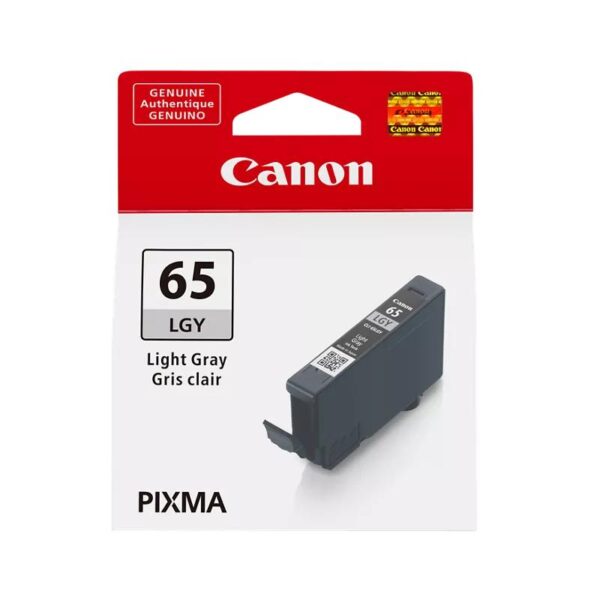
Canon CLI-65 Light Grey Ink Cartridge for Professional Photo Printing
The Canon CLI-65 Light Grey Ink Cartridge is an original Canon inkjet consumable developed for photographers, photo studios, graphic designers, and creative professionals who require precise tonal control and dependable photographic output. Designed for Canon’s PIXMA PRO-200 series, this 12.6 ml light grey ink tank contributes to natural-looking monochrome images, delicate highlights, and balanced colour photographs.
Professional photography printing requires more than high resolution. The relationship between light and dark areas, the smoothness of tonal transitions, and the subtle reproduction of highlights influence how a finished photograph appears. The Canon CLI-65 LGY cartridge contributes to these aspects by providing a dedicated light grey ink within the printer’s eight-colour ink system.
Whether printing portraits, landscapes, fine art photography, exhibition prints, or photographic portfolios, the Canon CLI-65 Light Grey Ink Cartridge supports professional photo reproduction. It is especially useful when producing images containing delicate shades, soft lighting, skin textures, architectural details, or extensive neutral areas.
As an original Canon ink tank, it is designed to work with the printer’s ink delivery system and compatible Canon photographic media. Its individual cartridge design also allows users to replace the light grey ink separately when required.
Genuine Canon ChromaLife100+ Ink Technology
The Canon CLI-65 Light Grey Ink Cartridge uses Canon’s ChromaLife100+ dye-based ink system, developed to provide rich photographic output and improved print longevity when combined with compatible Canon media and appropriate storage conditions.
ChromaLife100+ technology brings together genuine Canon inks, photographic papers, and Canon printing technology to produce photographic prints with strong colour reproduction and tonal depth.
Unlike everyday document printing, photographic printing must preserve subtle changes in brightness and contrast. The CLI-65 Light Grey ink contributes to lighter neutral tones, helping compatible printers reproduce complex images with controlled gradations.
The dye-based formulation is particularly suited to the PIXMA PRO-200’s photographic printing system, which is engineered for vibrant colour output and detailed monochrome photography.
Photographers who print images for display, personal collections, customer delivery, or portfolios benefit from a printing system designed around consistent ink and paper performance. Using original Canon consumables also helps maintain the manufacturer’s intended combination of ink formulation, printer operation, and photographic output.
Canon describes the ChromaLife100+ system as supporting long-lasting prints when the correct ink, paper, and display or storage conditions are used. Actual print longevity depends on those conditions.
Canon Canada., Inc+1
Smooth Light Grey Tonal Gradation
One of the most important functions of the Canon CLI-65 Light Grey Ink Cartridge is supporting smooth transitions between light and dark areas in photographs.
Light grey plays an important role in photographic printing because many images contain delicate tonal variations that cannot be represented simply as black and white. Portraits, clouds, fabric textures, metallic surfaces, studio backgrounds, and pale landscapes frequently contain multiple levels of neutral grey.
A dedicated light grey ink gives the compatible printer an additional ink colour for reproducing these subtle regions.
This can be particularly valuable in photographs where slight changes in tone determine whether an image appears soft and natural or excessively contrasted.
For example, a black-and-white portrait may contain delicate transitions around facial highlights, while a landscape photograph may include mist, clouds, or reflective water. Light grey ink contributes to the rendering of such details within the complete ink system.
The Canon CLI-65 LGY is therefore a useful component of the PIXMA PRO-200’s professional photographic printing capabilities.
Excellent Black-and-White Photography Reproduction
Black-and-white photography remains an important creative medium for professional photographers, artists, designers, and photography enthusiasts.
Producing high-quality monochrome photographs requires careful reproduction of shadows, midtones, and highlights. Details within dark areas should remain distinguishable, while lighter portions of a photograph should retain their intended texture and appearance.
The Canon CLI-65 Light Grey Ink Cartridge contributes to monochrome reproduction by supporting lighter neutral shades in the printer’s photographic ink system.
It works alongside the printer’s other ink colours, including Black and Grey, to produce black-and-white photographs with nuanced tonal transitions.
Photographers working with portraits, architecture, street photography, documentary images, and artistic monochrome compositions can benefit from this approach.
For best results, image preparation, calibrated displays, paper selection, and the printer’s appropriate media settings should also be considered. The cartridge is one part of the complete photographic printing workflow rather than a standalone guarantee of colour or tonal accuracy.
Designed for Canon PIXMA PRO-200 Printers
The Canon CLI-65 Light Grey Ink Cartridge is designed for compatibility with the Canon PIXMA PRO-200 and PIXMA PRO-200S photographic inkjet printers.
The PIXMA PRO-200 series uses an eight-colour dye-based ink system designed for professional-quality photographic printing.
Its CLI-65 cartridges include:
-
Black (BK)
-
Cyan (C)
-
Magenta (M)
-
Yellow (Y)
-
Grey (GY)
-
Photo Cyan (PC)
-
Photo Magenta (PM)
-
Light Grey (LGY)
Each ink tank serves a particular role within the colour reproduction system. Together, these inks support vibrant photographic colours, detailed tonal gradations, and monochrome reproduction.
The Light Grey cartridge is not interchangeable with the standard Grey cartridge. Both colours have different designated positions in the printer and should be replaced with their corresponding ink tanks.
Before purchasing, customers should check that their printer supports CLI-65 LGY cartridges. Printers requiring different Canon CLI, PGI, or GI ink series should not be assumed compatible merely because they share the Canon brand.
Canon India+1
12.6 ml Original Canon Ink Capacity
The Canon CLI-65 LGY cartridge contains 12.6 ml of genuine Canon dye-based light grey ink.
The ink tank is designed to fit into its dedicated cartridge position in a compatible PIXMA PRO-200 series printer.
Its individual ink tank construction allows users to replace only the colour that requires replacement rather than purchasing an entire eight-colour set each time.
For professional photo printing businesses, this arrangement can make it easier to manage stock levels across different ink colours.
Actual ink consumption depends on the photographs being printed, image brightness, colour balance, paper type, print size, and printer settings.
For example, a monochrome photograph containing extensive light neutral areas may use the available ink colours differently from a highly saturated colour photograph.
The 12.6 ml capacity should therefore be understood as the cartridge’s ink volume, not as a fixed promise of a specific number of prints under every usage condition.
Canon Canada., Inc+1
Professional Photo Printing Performance
The Canon CLI-65 Light Grey Ink Cartridge is intended for photographic output where image appearance matters.
In a professional printing workflow, tonal transitions must reproduce smoothly across different regions of an image.
Portrait photography may require subtle treatment of skin tones, while architectural images can contain grey stone, concrete, metal, shadows, and reflected light.
Landscape photographs can present complex differences between clouds, mountains, water, and the sky.
Using a genuine light grey ink within the compatible printer helps the printing system reproduce these photographic elements according to its designed colour processing.
The finished result also depends on print resolution, photographic paper, image quality, and selected printer settings.
For photographers who sell prints or prepare customer photographs, maintaining a consistent printer setup is particularly important.
Using the correct Canon ink model helps reduce uncertainty about whether the consumable itself matches the printer manufacturer’s specifications.
Natural Highlight and Shadow Detail
Photographs often contain areas in which extremely small changes in brightness affect the final image.
Bright wedding dresses, pale backgrounds, studio portraits, white architectural interiors, and softly illuminated objects are examples of subjects where highlight detail matters.
The Canon CLI-65 Light Grey Ink Cartridge is part of the ink system used to reproduce these delicate tonal regions.
It contributes to the printer’s ability to produce graduated light tones without relying entirely on darker inks.
The result can be more controlled reproduction of lighter photographic areas when the complete printing workflow is properly configured.
For shadow details, the printer also uses its other ink colours and image processing system. The light grey cartridge does not independently control all shadow reproduction.
Photographers should therefore evaluate both the image file and print settings when seeking a particular tonal appearance.
Using appropriate paper profiles, matching media settings, and a suitable photographic source image can help the printer deliver results closer to the intended photograph.
Suitable for Colour and Monochrome Photography
Although its name suggests black-and-white printing, the Canon CLI-65 Light Grey Ink Cartridge also participates in the printer’s broader photographic colour system.
Colour photographs can contain many near-neutral regions, including concrete, clouds, white fabrics, reflective objects, and shaded surfaces.
These areas may require subtle tonal variations rather than strong saturated colours.
The printer’s dedicated light grey ink provides another option within its eight-colour system for reproducing such image content.
This makes the cartridge relevant to a variety of photographic applications, from colourful landscape images to restrained fine art compositions.
The CLI-65 ink system is intended to provide both vibrant colour reproduction and refined monochrome output.
Users who regularly alternate between colour and black-and-white photographs therefore do not require different cartridges for each type of photographic project.
The printer selects and combines its installed inks according to the image, media, and print settings.
Canon CLI-65 Light Grey Ink Cartridge Photo Yield
Canon provides photographic yield estimates for the CLI-65 LGY cartridge under specified printing tests.
For colour photographs on Canon Photo Paper Pro Platinum PT-101, Canon lists an approximate yield of up to 965 photographs at 10 × 15 cm and up to 139 A3+ photographs.
Canon India additionally lists approximately 44 A3+ monochrome photographs under its specified testing conditions.
These figures are useful for understanding the cartridge’s tested photographic output, but they are not fixed production quantities for every customer.
A photograph with extensive grey or neutral content may consume ink differently from one dominated by vivid colours.
Printing settings, cleaning cycles, initial ink charging, media selection, and image characteristics can also affect actual consumption.
Professional users should therefore estimate operating costs using their own common print sizes and image types rather than applying a single yield figure to every project.
Canon India+1
Ideal for Professional Photographers
Professional photographers often require printed photographs that closely represent their creative vision.
Whether producing client portraits, exhibition photographs, wedding albums, promotional prints, or personal portfolios, reliable ink compatibility is essential.
The Canon CLI-65 LGY cartridge supports such workflows when used in its designated PIXMA PRO-200 printer.
Photographers who handle regular orders can maintain spare individual cartridges for uninterrupted access to the necessary ink colours.
The light grey tank is particularly relevant in workflows involving black-and-white images or colour photographs with extensive neutral tones.
For photographers preparing prints for exhibitions or customer approval, it is helpful to maintain consistent paper choices and printing settings.
A reliable workflow generally includes proper image preparation, suitable photo paper, correct printer profiles, and genuine consumables.
The Canon CLI-65 Light Grey Ink Cartridge provides the manufacturer’s designated light grey ink for this workflow.
Suitable for Photography Studios and Print Businesses
Photography studios and small photographic printing businesses often handle projects that vary considerably in size and visual style.
Some customers require portraits, while others request landscape photographs, artistic reproductions, portfolio images, or enlarged photo prints.
These different applications can place different demands on the printer’s ink colours.
The Canon CLI-65 cartridge system is designed to support varied photographic output through its dedicated dye-based inks.
Maintaining the correct Light Grey cartridge enables the printer to use its full intended set of colours.
Businesses can include the CLI-65 LGY cartridge in their regular consumable inventory and replenish it based on actual usage.
As each cartridge is individually replaceable, businesses can manage the colours that are consumed most frequently without automatically replacing all eight tanks.
For accurate cost estimation, the studio should also account for paper consumption, maintenance printing, unsuccessful prints, and other production expenses.
Fine Art and Creative Photography Applications
Fine art photography frequently emphasizes tone, composition, lighting, texture, and visual subtlety.
The difference between a satisfactory print and a carefully prepared photographic print may lie in small changes across neutral or low-contrast areas.
The Canon CLI-65 Light Grey Ink Cartridge contributes to the PIXMA PRO-200’s ability to reproduce such tonal variations.
It can be used as part of the printing workflow for monochrome fine art images, architectural photography, artistic portraits, nature photography, and other photographic compositions.
Artists may experiment with different supported media to achieve their intended visual presentation.
Glossy photo paper can emphasize certain aspects of colour and contrast, while suitable matte or specialty photo media can provide different surface characteristics.
The appropriate result depends on the selected media, ICC profile, image preparation, and printer settings.
When evaluating a fine art print, users should consider both the technical quality of the output and how the chosen paper affects the artwork’s appearance.
Original Canon Ink for Consistent Compatibility
Using the correct ink cartridge is an important part of maintaining a dependable photographic printer.
The Canon CLI-65 Light Grey Ink Cartridge is an original manufacturer consumable specifically identified for the compatible PIXMA PRO-200 series.
Genuine Canon ink is formulated for Canon’s designated printer system, helping maintain compatibility with the printer’s intended operation.
Users should distinguish between genuine Canon cartridges and third-party compatible or refilled products.
Third-party cartridges may differ in ink formulation, construction, and performance characteristics.
This does not mean every alternative cartridge will necessarily fail, but using the manufacturer-specified consumable reduces uncertainty about the intended ink type and printer compatibility.
For customers who prioritize original consumables, predictable purchasing specifications, and manufacturer-matched replacements, the Canon CLI-65 LGY is the appropriate light grey cartridge for the supported printer models.
The genuine cartridge should be purchased from a reputable source and checked against its packaging details before installation.
Individual Replacement for Better Ink Management
The Canon PIXMA PRO-200 uses separate cartridges for its eight ink colours.
This design means users can replace an exhausted light grey cartridge without automatically replacing tanks that still contain usable ink.
Individual ink replacement is useful for photographers whose printing habits cause different colours to be consumed at different rates.
For example, a business regularly printing monochrome photographs may experience a different ink consumption pattern from a studio producing colourful promotional images.
The individual cartridge design enables consumable purchasing to reflect the actual requirements of the printer.
Users should follow their printer’s cartridge status information and replacement instructions rather than replacing tanks solely on an estimated print count.
Keeping spare cartridges in their original sealed packaging until needed can also help with organized stock management.
Users should avoid mixing up Canon CLI-65 Grey and CLI-65 Light Grey during replacement, as they are distinct inks.
How to Install the Canon CLI-65 LGY Cartridge
Installing a genuine Canon CLI-65 Light Grey Ink Cartridge should be carried out according to the printer’s operating instructions.
First, ensure the printer is powered on and ready for an ink replacement procedure.
Open the appropriate printer cover and wait for the ink cartridge holder to move into its replacement position.
Locate the designated Light Grey ink slot and identify the cartridge that needs replacing.
Remove the used cartridge as instructed by Canon, taking care not to damage surrounding components.
Unpack the replacement CLI-65 LGY cartridge and remove the relevant protective material according to the manufacturer’s directions.
Insert the new cartridge into its corresponding position and ensure it is properly seated.
Close the printer cover and allow the printer to complete any required checks or maintenance operations.
Avoid touching exposed electrical contacts or ink outlet areas unnecessarily.
If the printer displays a cartridge recognition warning, verify the cartridge model and installation before attempting further troubleshooting.
For exact illustrations and procedures, follow the instructions supplied with the printer.
Maintaining Quality with Correct Printer Settings
A high-quality ink cartridge forms only one part of a successful photographic printing system.
To obtain the intended results, users should select settings that match the type and size of photo paper being used.
The correct media setting helps the printer apply its printing process to the chosen surface.
Users printing photographs from editing applications should also understand their colour management settings.
Where supported, suitable ICC profiles can help coordinate colour handling between the image-editing software and printer.
For black-and-white photographs, tonal appearance can be influenced by image adjustments, paper characteristics, printer settings, and viewing conditions.
Test prints can be useful before producing large or expensive photographs.
Professionals may also benefit from evaluating their images on an appropriately calibrated display.
The Canon CLI-65 Light Grey Ink Cartridge supports this workflow by providing the genuine light grey ink required by the compatible printer.
Importance of Selecting the Right Photo Paper
The relationship between ink and photographic paper is important to the appearance of a finished print.
Different paper surfaces affect perceived contrast, reflections, texture, and colour presentation.
Glossy papers may be selected for vibrant photographic output, while some photographers prefer matte or other specialty papers for particular artistic effects.
The Canon CLI-65 ink system is intended to work with supported photographic media, including genuine Canon papers.
Canon identifies its ChromaLife100+ technology as a combination of ink and compatible media, making paper choice relevant to print performance and longevity.
When selecting paper, users should check that the media type and thickness are supported by the printer.
Choosing the corresponding printer settings is also important.
Photographers working on premium prints should consider evaluating paper samples before committing to large production runs.
Properly selected paper allows the printer’s complete ink system, including its dedicated light grey cartridge, to contribute to the intended output.
Printing Portraits with Natural Tonal Balance
Portrait photography often contains gradual changes in brightness across faces, clothing, backgrounds, and surrounding environments.
In both colour and monochrome portraits, preserving subtle transitions can be important to the overall appearance.
The Canon CLI-65 LGY is one of the inks available to the PIXMA PRO-200 for reproducing these complex tones.
In a black-and-white portrait, light grey shades may contribute to the appearance of illuminated facial features, softly lit fabrics, and light backgrounds.
In colour portraits, neutral image regions can also benefit from the printer’s broader ink system.
The final appearance still depends on correct exposure, careful photo editing, and appropriate colour management.
Photographers should avoid relying on ink selection alone to correct excessively bright, dark, or poorly prepared image files.
By combining thoughtful photographic preparation with the printer’s supported consumables, users can produce portraits more closely aligned with their creative intentions.
Landscape, Architecture, and Nature Photography
Landscape and architectural images can contain extensive tonal detail across a wide range of surfaces.
Cloud formations, mountains, roads, buildings, reflective windows, stonework, and flowing water may all include delicate variations between light and dark.
The Canon CLI-65 Light Grey Ink Cartridge contributes to the PIXMA PRO-200’s reproduction of lighter neutral tones in such images.
This can be useful when printing misty landscapes, overcast skies, monochrome architecture, or photographs featuring soft natural lighting.
Photographers producing large prints should inspect their images carefully for unwanted artifacts, excessive sharpening, or missing details before printing.
The printer can reproduce only the information available in the source image and within the capabilities of the selected printing process.
Using suitable media and accurate print settings helps achieve more predictable results.
For creative professionals who regularly print detailed photographic compositions, genuine CLI-65 ink is an appropriate consumable choice.
Understanding Canon CLI-65 Grey vs Light Grey
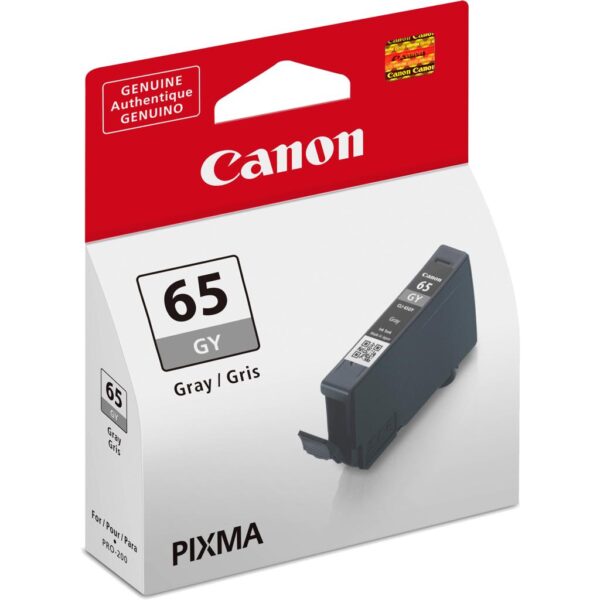
The Canon CLI-65 ink family includes both Grey (GY) and Light Grey (LGY) cartridges.
Although their names are similar, these cartridges are not identical.
The Grey cartridge provides a different ink shade from the Light Grey cartridge, and both have designated positions within the printer’s eight-colour system.
Users should always verify the exact colour abbreviation before placing an order.
For the product described here, the required designation is CLI-65 LGY – Light Grey.
A customer looking for the standard Grey cartridge should instead select CLI-65 GY.
This distinction is important for businesses maintaining multiple cartridge colours in stock.
Proper labelling in inventory systems can help prevent incorrect ordering and unnecessary returns.
For WooCommerce listings, including both the full colour name and its abbreviation can make it easier for customers to distinguish these two products.
Cartridge Storage and Handling Guidelines
Proper storage and handling can help protect the condition of an unused ink cartridge.
Keep the Canon CLI-65 Light Grey cartridge in its original packaging until it is required for installation.
Avoid exposing the cartridge to excessive heat, direct sunlight, or unsuitable storage conditions.
Customers should follow any storage instructions printed on the original Canon packaging.
Do not attempt to dismantle the cartridge or interfere with its ink outlet.
When preparing to replace a cartridge, keep the work area reasonably clean and avoid touching sensitive components.
Customers should check the packaging for signs of damage before installation.
If the product has been transported or stored under unsuitable conditions, follow Canon’s guidance before use.
Unused genuine cartridges should be managed according to their printed storage or date information, where applicable.
Following the manufacturer’s procedures is preferable to applying generic cartridge maintenance advice to a professional photo printer.
Supporting Photographic Print Longevity
Photographic print longevity depends on several factors, including ink formulation, photographic paper, storage environment, and exposure to light.
Canon’s ChromaLife100+ system is developed to support long-lasting photographic prints when genuine inks and suitable Canon photo papers are used together.
The CLI-65 Light Grey cartridge belongs to this dye-based ink family.
For photographs intended for display or archiving, customers should consider how prints will be stored and presented.
Direct sunlight, unsuitable environmental conditions, and poor-quality storage materials may affect the appearance of photographs over time.
Users preparing archival projects should follow Canon’s published recommendations for compatible paper and printing conditions.
The ink cartridge itself is not a guarantee that every photograph will retain its original appearance indefinitely.
By treating photographic printing as a complete process involving appropriate materials and handling, photographers can better protect the quality of their work.
Canon New Zealand+1
A Practical Choice for Regular Photo Printing
Photographers who print regularly need consumables that are easy to identify, purchase, and maintain in stock.
The Canon CLI-65 LGY has a clearly defined colour designation, model series, and capacity.
These details make it straightforward to include the cartridge in a studio inventory or purchasing system.
Businesses can maintain separate stock records for CLI-65 Light Grey, Grey, Black, and the other photo inks.
This can help purchasing teams track consumption and ensure the required cartridges are available.
When ordering replacements, users should confirm the printer model and regional manufacturer part number.
For Aadinath Peripherals & Consumables customers, the Canon CLI-65 Light Grey Ink Cartridge can be listed as an original photo printing consumable for Canon PIXMA PRO-200 series printers.
Its genuine Canon formulation, dedicated light grey shade, and individual replaceability make it suitable for customers seeking the correct manufacturer-specified cartridge.
Technical Specifications
| Specification | Details |
|---|---|
| Brand | Canon |
| Product name | Canon CLI-65 Light Grey Ink Cartridge |
| Cartridge model | CLI-65 LGY |
| Ink colour | Light Grey |
| Ink technology | Dye-based inkjet |
| Ink formulation | ChromaLife100+ |
| Ink volume | 12.6 ml |
| Cartridge type | Original Canon ink tank |
| Yield classification | Standard |
| Compatible printers | Canon PIXMA PRO-200, PRO-200S |
| Approx. 10 × 15 cm colour photo yield | Up to 965 photos |
| Approx. A3+ colour photo yield | Up to 139 photos |
| Approx. A3+ monochrome photo yield | 44 photos |
| Number of cartridges | 1 |
| Refillable | Not sold as a refillable cartridge |
| Manufacturer | Canon Inc. |
| Country of origin | Japan (listed regional variant) |
| Replacement type | Individual ink tank |
| Weight | 0.05 kg |
|---|---|
| Brand | Canon |
| Color | Light Grey |
| EAN / UPC Code | 4549292159448 |
| Product Type | Ink Cartridge |
| Modal No. | CLI-65 LGY |

Reviews
There are no reviews yet.