

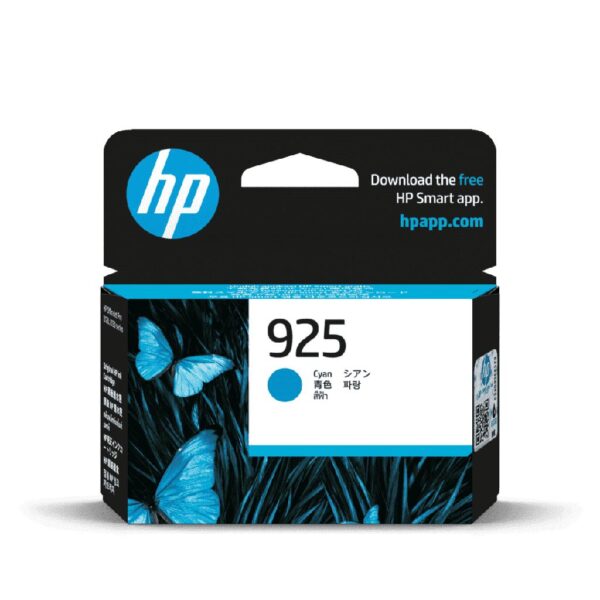
HP 925 Cyan Original Ink Cartridge (4K0V6PA)
The HP 925 Cyan Original Ink Cartridge (4K0V6PA) is a genuine HP standard-capacity ink cartridge designed for vibrant colour documents, professional business graphics and dependable everyday printing.
Containing 6ml of original HP cyan ink, this cartridge delivers an estimated 400 colour pages under HP’s reference testing conditions. Designed for compatible HP OfficeJet Pro 8120 and 8130-series printers, it supports business reports, presentations, charts, illustrations, product information sheets and other professional documents.
Key Features
- Genuine HP 925 Cyan Original Ink Cartridge
- Manufacturer SKU / Part Number: 4K0V6PA
- UPC / GTIN-12: 196548610617 (retailer-listed)
- 6ml original HP cyan ink
- Standard-capacity ink cartridge
- Approximately 400 colour pages
- HP Thermal Inkjet printing technology
- Professional-quality cyan and blended colour graphics
- Suitable for business charts, reports and presentations
- Individual cyan cartridge replacement
- Compatible with selected HP OfficeJet Pro 8120 and 8130-series printers
- Original HP quality with applicable manufacturer warranty
Package Contents: 1 × HP 925 Cyan Original Ink Cartridge.
-
 Pick up from the Woodmart Store
To pick up today
Free
-
 Courier delivery
Our courier will deliver to the specified address
2-3 Days
From $40
-
 DHL Courier delivery
DHL courier will deliver to the specified address
1-2 Days
From $40
HP 925 Cyan Ink Cartridge (4K0V6PA) – Genuine HP Original Ink
The HP 925 Cyan Ink Cartridge (4K0V6PA) is a genuine HP standard-capacity ink cartridge developed for professional colour printing, dependable business documents and everyday office productivity. Designed for compatible HP OfficeJet Pro 8120 and 8130-series printers, this original HP ink cartridge contains 6ml of cyan ink and delivers an approximate 400-page colour yield under HP’s reference testing conditions.
Professional offices frequently require printed documents containing colourful charts, graphical illustrations, business information and presentation materials. The HP 925 Cyan Ink Cartridge provides an original HP replacement supply for these requirements.
Cyan plays an important role in reproducing blue, green and other blended colours. When combined with the printer’s black, magenta and yellow inks, it contributes to clear and colourful documents.
The HP 925 cartridge family is designed for the printing technology used in supported OfficeJet Pro devices, helping customers maintain compatibility with the manufacturer’s intended ink-delivery system.
Identified by manufacturer part number 4K0V6PA, this original cartridge is suitable for businesses, offices, educational institutions and professional users requiring genuine HP cyan ink.
Genuine HP 925 Cyan Ink Cartridge for Professional Printing
The HP 925 Cyan Ink Cartridge is manufactured as an original HP printing consumable.
Original HP ink cartridges are developed for specific printer models, printheads and ink-delivery components.
This is important because reliable printing requires the cartridge and printer to operate as one system.
Professional documents often contain detailed charts, small text, diagrams and other important graphical elements.
The cartridge supplies the original cyan ink needed to reproduce these colours.
For customers who require genuine manufacturer supplies, HP 925 Cyan provides a product with an official part number and documented technical specifications.
Using the correct cartridge also helps avoid problems associated with purchasing supplies intended for a different printer family or region.
6ml Original HP Cyan Ink Capacity
The HP 925 Cyan Ink Cartridge contains 6ml of genuine HP cyan ink.
HP classifies this product as a standard-capacity cartridge.
It is designed for routine colour document printing on compatible OfficeJet Pro printers.
This capacity may be suitable for home offices, small businesses and departments with moderate colour-printing requirements.
The amount of cyan ink consumed depends on the document.
A report with a few coloured headings generally requires less cyan ink than a page containing extensive blue or green graphics.
Printer settings and maintenance can also influence ink usage.
Customers should select cartridge capacity according to their actual printing requirements.
Approximately 400 Colour Pages
HP specifies an approximate yield of 400 colour pages for the HP 925 Cyan Ink Cartridge.
This rating is measured under defined reference conditions.
It provides a useful comparison figure when evaluating original HP replacement cartridges.
However, actual cartridge life varies depending on printing patterns.
A graphical presentation containing large blue backgrounds may consume more cyan ink than a simple document with small colour elements.
Printer maintenance and initialization procedures may also use ink.
For this reason, the published yield should not be treated as a guaranteed minimum number of pages.
Organizations can monitor their actual cartridge replacement intervals to estimate future requirements.
HP Thermal Inkjet Printing Technology
The HP 925 Cyan Ink Cartridge is designed for HP Thermal Inkjet printing technology.
Thermal Inkjet printers use precisely controlled heating in the printhead to eject tiny droplets of ink onto paper.
The printer manages this process according to the digital document and selected printing settings.
The HP 925 Cyan cartridge supplies the ink used by the corresponding printing system.
It works alongside the printer’s other colour supplies.
This interaction helps reproduce text, images, charts and graphical elements.
The cartridge itself does not independently determine the printer’s resolution or printing speed.
Using manufacturer-specified ink supports compatibility with the intended printing technology.
Professional Cyan Colour Reproduction
Cyan is a fundamental colour in office inkjet printing.
The HP 925 Cyan Ink Cartridge supplies original cyan ink for compatible HP OfficeJet Pro printers.
It contributes directly to cyan and blue graphical elements.
When combined with yellow, it contributes to green tones.
Other colour combinations are produced when the printer uses cyan with magenta and the remaining inks.
This makes cyan important for business reports, charts, presentations, maps and illustrations.
The final appearance depends on the source document, selected media and printing settings.
Original HP supplies are developed to support the printer’s intended colour-reproduction process.
Clear Graphics for Business Documents
Professional business documents often contain information presented visually.
Examples include performance charts, comparison graphics, diagrams and graphical summaries.
The HP 925 Cyan Ink Cartridge supports these documents by supplying genuine cyan ink.
Blue and cyan shades may be used to identify a particular data series or highlight information.
The printer reproduces the colours according to the source file.
For effective communication, charts should use sufficient contrast and clearly labelled information.
The quality of the finished print also depends on paper selection and settings.
Using compatible original HP ink contributes to the printer’s expected colour output.
HP 925 Cyan Ink Cartridge for Office Reports
Office reports may contain tables, graphical illustrations and coloured data summaries.
The HP 925 Cyan Ink Cartridge supports the printing of these elements on compatible OfficeJet Pro printers.
For example, a monthly sales report may contain a blue graph showing revenue trends.
An operational report may use different colours to represent departmental performance.
Cyan contributes to the reproduction of these graphics.
The colour system combines the available inks to match the digital document.
For recurring reporting, using consistent paper and printer settings can help maintain similar output.
The cartridge’s standard-capacity format is appropriate for many everyday office-printing requirements.
Ideal for Business Charts and Graphs
Charts help businesses communicate numerical information clearly.
Different colours may be used to identify categories, timelines or performance indicators.
The HP 925 Cyan Ink Cartridge contributes to the printing of blue and green elements in these charts.
For example, a line graph may use cyan to represent one data series.
A pie chart may contain multiple shades created from combinations of the available inks.
Colour can improve readability when used with clear labels and suitable contrast.
Original HP cyan ink supports reproduction within the compatible printing system.
The final output depends on document formatting and printer settings.
Colour Printing for Presentations
Presentation documents frequently contain photographs, diagrams, illustrations and colourful headings.
The HP 925 Cyan Ink Cartridge supplies the cyan ink required for these elements.
Sales teams may print presentation handouts for customers.
Managers may prepare graphical summaries for meetings.
Training departments may print illustrated educational materials.
Cyan contributes to blue, green and various blended shades within these documents.
The finished presentation depends on image quality, paper and selected print settings.
Using genuine HP ink helps maintain compatibility with the printer’s intended colour-printing process.
For professional output, users should review their documents before printing.
Printing Customer Quotations
Customer quotations may combine detailed text with product photographs and coloured graphics.
The HP 925 Cyan Ink Cartridge supports printing these documents on compatible OfficeJet Pro devices.
A quotation may contain blue section headings, product images or comparison charts.
Cyan contributes to the graphical reproduction of these elements.
Clear and properly formatted quotations help customers understand the products being offered.
The original HP ink supplies work together to reproduce the document.
For businesses that issue quotations regularly, maintaining suitable replacement ink helps reduce interruptions when printing is required.
Professional Proforma Invoices
Proforma invoices often include product descriptions, quantities, prices and commercial terms.
Some businesses also include coloured logos or graphical elements in their documents.
The HP 925 Cyan Ink Cartridge contributes to these colours when used in compatible printers.
Blue or cyan branding may appear in the document header.
Additional colours may appear in tables or graphical accents.
The black cartridge generally provides the black text component of the printing system.
The HP 925 Cyan cartridge supplies its corresponding colour ink.
Readable formatting and accurate document information remain essential for professional communication.
HP 925 Cyan Ink for Purchase Orders
Purchase orders are important documents in business procurement.
They contain supplier details, item descriptions, quantities, pricing and delivery information.
Some organizations use coloured document templates to distinguish different sections.
The HP 925 Cyan Ink Cartridge supports printing these colour elements.
It contributes to graphical headings, logos and other cyan-based shades.
Businesses should ensure that important numerical information remains readable.
The cartridge is designed for compatible OfficeJet Pro printing systems.
Maintaining the correct replacement supply can help purchasing teams produce required documents without unnecessary delays.
Professional Marketing Documents
Marketing departments frequently prepare documents that combine text with colour graphics.
Examples include promotional handouts, product information sheets, brochures and internal campaign material.
The HP 925 Cyan Ink Cartridge contributes to blue, green and other blended colours in these designs.
Cyan can play an important role in business logos and graphical accents.
For customer-facing materials, colour reproduction and document presentation are valuable.
The final appearance depends on the original artwork, printing media and settings.
The HP 925 Cyan cartridge provides an original replacement for the supported OfficeJet Pro printer.
Colour Printing for Product Catalogues
Product catalogues often include photographs, specifications and comparison tables.
The HP 925 Cyan Ink Cartridge supplies the cyan ink needed for graphical information.
For example, a technology product catalogue may contain photographs of laptops, printers, monitors and other equipment.
These images may include blue and green tones.
The printer combines cyan with its remaining inks to reproduce the source photograph.
Image quality depends on the resolution of the original file and the selected printing media.
Using genuine HP supplies supports the intended printing process of compatible OfficeJet Pro devices.
Suitable for Small Businesses
Small businesses often rely on multifunction printers for everyday operations.
Typical printing tasks include reports, invoices, quotations, customer correspondence and presentation materials.
The HP 925 Cyan Ink Cartridge supports colour printing for compatible HP OfficeJet Pro devices.
Its standard-capacity format is practical for moderate printing requirements.
Businesses that print more regularly can compare compatible higher-yield alternatives where available.
The correct choice depends on cartridge price, expected workload and regional printer compatibility.
For organizations managing several consumables, the official part number 4K0V6PA simplifies purchasing and stock identification.
Home Office Printing Applications
Home offices may require printed documents for professional and personal use.
These can include business correspondence, schedules, reports, forms and colourful graphical materials.
The HP 925 Cyan Ink Cartridge provides original cyan ink for compatible OfficeJet Pro printers.
It supports printing images, coloured headings and charts.
Customers should monitor their printer’s ink levels and replace the correct cartridge when required.
The actual life of the cyan cartridge depends on how frequently colour documents are printed.
For dependable results, the manufacturer-recommended installation and maintenance procedures should be followed.
Printing for Shared Office Workgroups
Shared printers may serve employees from several departments.
One department may print customer presentations, while another produces operational reports.
The HP 925 Cyan Ink Cartridge supplies cyan ink for these printing requirements.
Different print jobs can consume different quantities of colour ink.
A presentation containing many blue graphics may use more cyan than a document containing mostly black text.
Organizations should monitor ink consumption rather than assuming every cartridge will last for the same number of pages.
Maintaining replacement stock helps reduce interruptions.
The original HP cartridge provides a manufacturer-specified consumable for supported office printing systems.
Educational Printing Applications
Schools, colleges and training centres often print documents containing diagrams, charts and illustrations.
The HP 925 Cyan Ink Cartridge supports these applications with genuine cyan ink.
Blue and green shades may be used to distinguish concepts or categories.
For example, an educational chart might use blue elements to represent one type of information.
The printer combines the available inks to reproduce the source document.
Teachers and students should select suitable print settings and paper.
The standard-capacity cartridge provides a replacement option for compatible OfficeJet Pro printers used in educational environments.
Technical Diagrams and IT Documentation
Technical departments may print network diagrams, system layouts and graphical instructions.
These documents frequently use colours to distinguish devices, connections and workflow stages.
The HP 925 Cyan Ink Cartridge contributes to cyan, blue and green elements in these diagrams.
An IT department may use a blue line to represent a particular network connection.
The meaning of each colour depends on the document’s design.
Clearly printed diagrams can help teams communicate information.
The cartridge supplies genuine HP cyan ink for the supported printer system.
For technical documents, correct source-file formatting remains important.
Compatible with HP OfficeJet Pro 8120 Printers
The HP OfficeJet Pro 8120 series includes multifunction printers intended for home-office and business document printing.
Applicable regional models support the HP 925 cartridge family.
The HP 925 Cyan Ink Cartridge provides the original cyan supply for compatible configurations.
These printers may be used for business correspondence, reports, charts and graphical documents.
The cartridge has a standard-capacity classification and an approximate 400-page yield.
Users should confirm the complete printer model and regional cartridge requirements before purchasing.
The manufacturer part number for this cyan replacement is 4K0V6PA.
Compatible with HP OfficeJet Pro 8122 Printers
Selected HP OfficeJet Pro 8122 printers use the HP 925 cartridge family.
The HP 925 Cyan Ink Cartridge provides the original colour supply for applicable regional configurations.
It supports graphical elements within reports, presentations and business documents.
The printer uses separate cartridges for its black, cyan, magenta and yellow inks.
This enables individual colour replacement when required.
Customers should verify their printer’s regional cartridge designation.
A similar printer sold in another market may require a different cartridge number.
Using the correct part number helps avoid purchasing errors.
Compatible with HP OfficeJet Pro 8123 Printers
The HP OfficeJet Pro 8123 is included among HP’s supported configurations for the HP 925 cartridge range.
The HP 925 Cyan Ink Cartridge supplies original cyan ink for compatible models.
This supports the printing of charts, reports, presentation graphics and everyday documents.
The standard-capacity cartridge provides approximately 400 colour pages under HP’s stated reference conditions.
Actual results vary with document coverage and printer usage.
For customers requiring genuine replacement supplies, manufacturer part number 4K0V6PA identifies the appropriate cyan product for supported configurations.
Compatible with HP OfficeJet Pro 8124 and 8125 Printers
Selected HP OfficeJet Pro 8124 and 8125 printers use the HP 925 cartridge family.
The HP 925 Cyan Ink Cartridge supplies the cyan ink required by compatible configurations.
These printers are suitable for printing business documents and graphical information.
Cyan contributes to coloured headings, illustrations and charts.
The cartridge can be replaced separately when its ink supply becomes depleted.
For reliable compatibility, customers should confirm the printer’s exact model number and original cartridge requirements.
The regional designation is particularly important for imported devices.
Compatible with HP OfficeJet Pro 8128 Printers
The HP OfficeJet Pro 8128 family is also included in HP’s compatible printer information for the HP 925 cartridge range.
The HP 925 Cyan Ink Cartridge supports professional colour printing for applicable configurations.
It supplies original cyan ink for business graphics, reports and presentations.
The standard-capacity format is suitable for everyday printing requirements.
Actual ink consumption depends on the documents being produced.
Users should follow the printer’s installation and maintenance instructions.
Before ordering, confirm that the device specifically accepts HP 925 cartridges.
Compatible with HP OfficeJet Pro 8130 Printers
The HP OfficeJet Pro 8130 family includes multifunction office printers designed for professional document workflows.
Selected regional configurations use original HP 925 ink cartridges.
The HP 925 Cyan Ink Cartridge supplies the cyan component of the printer’s colour system.
It supports reports, diagrams, presentations and graphical business documents.
The cartridge can be replaced independently of the other ink supplies.
For offices using these printers regularly, monitoring cartridge status helps identify when replacement is required.
The printer’s official regional consumables information should be followed.
Compatible with HP OfficeJet Pro 8132 and 8133 Printers
Selected HP OfficeJet Pro 8132 and 8133 printers support the HP 925 cartridge range.
The HP 925 Cyan Ink Cartridge provides original cyan ink for compatible configurations.
These printers can be used for business correspondence and graphical materials.
Cyan may contribute to charts, illustrations, coloured headings and other visual elements.
The cartridge offers approximately 400 reference colour pages.
The exact number produced will vary with the printing workload.
Customers should confirm the complete printer model and its region before purchasing replacement supplies.
Compatible with HP OfficeJet Pro 8134 and 8135 Printers
Selected HP OfficeJet Pro 8134 and 8135 printers use original HP 925 cartridges.
The HP 925 Cyan Ink Cartridge supplies cyan ink for supported models.
It contributes to business reports, graphics and presentation materials.
The printer’s other ink supplies provide the remaining colours.
This allows the cyan cartridge to be replaced individually when necessary.
The standard-capacity product is identified by part number 4K0V6PA.
Customers should verify the original cartridge number before purchasing, especially for devices obtained from other markets.
Compatible with HP OfficeJet Pro 8138 and 8139 Printers
The HP OfficeJet Pro 8138 and 8139 families include professional multifunction printers.
Selected configurations use the HP 925 ink cartridge family.
The HP 925 Cyan Ink Cartridge provides original cyan ink for compatible devices.
It supports graphical documents, colour charts and presentations.
Businesses can replace cyan separately when its supply becomes depleted.
The manufacturer’s approximate 400-page rating helps provide a comparison reference.
Before ordering, check the full printer model and applicable regional cartridge requirements.
Compatibility with HP OfficeJet Pro e-Series Printers
Selected OfficeJet Pro 8120e and 8130e printer configurations also use the HP 925 cartridge family.
The HP 925 Cyan Ink Cartridge provides an original replacement for compatible regional models.
The e-series designation does not independently establish cartridge compatibility.
A printer’s region and complete product number are important.
Some HP e-series devices may also have additional account or subscription requirements.
Customers should follow the consumable requirements and setup policies applicable to their specific printer.
For standard cartridge purchasing, the official HP compatibility list provides the appropriate reference.
Regional HP Cartridge Compatibility
HP uses different cartridge numbers for similar OfficeJet Pro printer families in different markets.
For HP OfficeJet Pro 8120 and 8130-series printers, HP identifies HP 923 in North America, HP 924 in various other markets and HP 925 in selected regions including India.
These supplies should not be assumed interchangeable.
A customer using an imported printer should verify the cartridge number specified for that particular device.
This is especially important when purchasing online.
The HP 925 Cyan Ink Cartridge (4K0V6PA) should only be selected when the printer explicitly supports the HP 925 family.
HP 925 Cyan Versus HP 925e EvoMore Cyan
HP offers standard and higher-yield cyan cartridge choices for compatible printers.
The standard HP 925 Cyan Original Ink Cartridge uses part number 4K0V6PA and has an approximate 400-page yield.
The HP 925e EvoMore Cyan Original Ink Cartridge uses part number 4K0W0PA and has an approximate 800-page yield.
These are separate products with different capacity classifications.
The higher-yield version may be suitable for customers printing more frequently.
The most economical option depends on current pricing, actual printing volume and printer compatibility.
Customers should select the correct cartridge designation rather than choosing by colour alone.
HP 925 Cyan and the Four-Colour Ink System
Compatible HP OfficeJet Pro printers use separate black, cyan, magenta and yellow cartridges.
The HP 925 Cyan Ink Cartridge contains cyan ink only.
It does not include black, magenta or yellow supplies.
The printer combines the installed inks to reproduce graphical and photographic information.
Individual colour cartridges can be replaced according to their consumption.
For example, a business printing many blue graphics may consume cyan at a different rate from magenta or yellow.
This separate-cartridge arrangement helps users manage supplies according to actual requirements.
Individual Cyan Cartridge Replacement
The HP 925 Cyan Ink Cartridge is supplied as one individual replacement.
It is not a combined tri-colour cartridge or multipack.
When cyan ink becomes depleted, users can replace that cartridge separately.
The other colour supplies may remain installed if they are functioning correctly.
This is convenient because office documents consume colours at different rates.
The printer’s available ink-status information can help determine when replacement is necessary.
For purchasing, the manufacturer part number 4K0V6PA identifies the standard cyan replacement.
Easy HP 925 Cartridge Installation
The HP 925 Cyan Ink Cartridge is designed for straightforward replacement in compatible printers.
Before installation, verify that the cartridge carries part number 4K0V6PA.
Follow the printer’s instructions to access the cartridge compartment.
Remove the existing cyan cartridge using the recommended procedure.
Unpack the new original HP cartridge and remove protective materials as directed.
Avoid touching sensitive electronic contacts or ink-delivery components.
Install the cartridge in the correct cyan position.
Allow the printer to complete any recognition process before printing.
If an error appears, consult HP’s official printer support guidance.
Maintaining Consistent Print Quality
Professional document quality depends on the printer, ink, paper and selected settings.
The HP 925 Cyan Ink Cartridge supplies original ink developed for compatible OfficeJet Pro devices.
Using consistent printing media and settings can help maintain similar output across related jobs.
This may be useful for repeated business reports or updated presentations.
However, source-file differences and printer maintenance can influence the final result.
If colours appear incorrect, users should follow HP’s recommended troubleshooting steps.
Unnecessary cleaning procedures should be avoided because they may consume ink.
Proper installation and printer care support reliable operation.
Choosing Suitable Printing Paper
Paper selection influences the appearance of colour documents.
The HP 925 Cyan Ink Cartridge supports colour printing on media compatible with the printer.
Suitable plain office paper may be appropriate for everyday reports and charts.
Compatible presentation paper may provide a different finish for important graphical materials.
Users should select media supported by their exact OfficeJet Pro model.
The printer’s paper-type settings should match the selected medium.
For professional results, the source artwork and image resolution are also important.
Original HP ink contributes to the intended printing process, but paper selection remains a separate consideration.
Understanding Cyan Ink Consumption
Cyan ink consumption depends on document coverage and printer usage.
The HP 925 Cyan Ink Cartridge contains 6ml of ink and has a published reference yield of approximately 400 pages.
Actual output may be lower or higher depending on the printed content.
A document containing extensive cyan or blue areas can use more cyan ink than a mostly black-and-white document.
The printer may also consume ink during maintenance or initialization.
Businesses should monitor their real cartridge replacement intervals.
This helps estimate future purchasing requirements more accurately than relying only on a published page-yield figure.
Estimating Printing Cost per Page
Businesses may estimate consumable costs when selecting replacement cartridges.
The HP 925 Cyan Ink Cartridge has a reference yield of approximately 400 colour pages.
A basic reference calculation divides the cartridge’s purchase price by its rated page yield.
However, this represents only the cyan cartridge’s contribution under the assumed test conditions.
Colour documents may also consume black, magenta and yellow ink.
Paper, printer maintenance and electricity are additional expenses.
Actual printing costs depend on prices and usage.
For accurate budgeting, businesses should use their real purchasing records and print-volume information.
HP 925 Cyan Ink for Procurement Teams
Procurement departments may purchase ink cartridges for several office printers.
Accurate manufacturer references help prevent purchasing mistakes.
The HP 925 Cyan Ink Cartridge should be recorded using SKU 4K0V6PA.
A complete item description should specify the brand, series, colour, capacity classification and pack quantity.
This distinguishes the standard HP 925 Cyan cartridge from HP 925e EvoMore and other regional cartridge families.
For quotations and purchase orders, using the official product code provides clarity.
Organizations managing multiple printers should maintain a compatibility record for each device.
This simplifies repeat purchasing and inventory management.
Identifying Genuine HP 925 Cyan Ink
Customers requiring original HP ink should verify the supplied product before installation.
The packaging should identify the HP 925 Cyan Original Ink Cartridge.
The manufacturer part number should match 4K0V6PA.
Packaging designs may vary by manufacturing period and regional market.
Customers should inspect the package condition and refer to applicable HP authenticity guidance.
For business purchases, retaining the invoice and supplier information can support inventory records and warranty enquiries.
The exact manufacturer part number is a more reliable identifier than packaging appearance alone.
Original HP Ink Versus Third-Party Alternatives
Original HP and third-party cartridges may be available for certain printer models.
The HP 925 Cyan Ink Cartridge (4K0V6PA) is a genuine HP original supply.
It is designed for the corresponding printer and ink-delivery system.
Third-party alternatives may use different components or ink formulations.
Compatibility and printing results can vary.
Some HP printers use dynamic security features that affect cartridges containing non-HP chips or electronic circuitry.
Customers should consult their printer’s requirements when selecting supplies.
For organizations requiring original manufacturer products, the official HP part number identifies the intended cartridge.
Proper Cartridge Storage and Handling
Unused HP 925 Cyan cartridges should remain in their original packaging until required.
The package should be protected from physical damage, contamination and unsuitable storage conditions.
Businesses maintaining multiple cartridges should organize stock by manufacturer part number and colour.
This helps avoid confusion between cyan, magenta, yellow and black supplies.
Before installation, users should inspect the package and confirm the correct model.
Avoid unnecessary contact with sensitive electronic components.
For detailed storage requirements, follow the instructions on the supplied HP package.
Careful handling helps preserve the condition of replacement consumables.
Responsible HP Ink Cartridge Recycling
Used cartridges should be handled through appropriate recycling or disposal arrangements.
HP provides information about original printing-supply recycling through its HP Planet Partners programme, where available.
Programme availability and accepted cartridge types vary by location.
Businesses that replace cartridges regularly may benefit from organizing a collection process.
Responsible printing also includes reviewing documents before printing and avoiding unnecessary copies.
Unused replacement cartridges should be stored until required.
Customers should follow applicable local waste-management requirements.
The HP 925 Cyan cartridge is an individual supply that can be managed through suitable recycling arrangements after use.
Why Choose HP 925 Cyan Ink Cartridge (4K0V6PA)?
The HP 925 Cyan Ink Cartridge combines genuine HP manufacturing, standard-capacity convenience and compatibility with selected HP OfficeJet Pro printers.
Its 6ml original cyan ink supply contributes to vibrant graphical documents, charts and presentations.
The approximate 400-page yield provides a useful reference for everyday business printing.
The cartridge is suitable for home offices, small businesses, educational institutions and professional workgroups.
Its official manufacturer part number makes product identification straightforward.
For customers seeking a genuine HP replacement cyan cartridge, HP 925 4K0V6PA is a practical option.
Buy HP 925 Cyan Ink Cartridge – Original HP 4K0V6PA
The HP 925 Cyan Ink Cartridge (4K0V6PA) is a genuine HP standard-capacity original ink cartridge designed for dependable everyday colour printing.
Featuring 6ml of original HP cyan ink, it contributes to blue, green and blended shades in professional business documents.
The cartridge delivers approximately 400 colour pages under HP’s reference testing conditions.
It is designed for compatible HP OfficeJet Pro 8120 and 8130-series printers.
Suitable applications include reports, charts, presentations, graphical illustrations and everyday office documents.
Before ordering, confirm the printer’s complete model and regional cartridge requirements.
Choose the HP 925 Cyan Ink Cartridge (4K0V6PA) for genuine HP quality, professional colour printing and reliable everyday OfficeJet Pro performance.
| Weight | 1 kg |
|---|---|
| Brand | HP |
| Color | Cyan |
| Model | 4K0V6PA |
| Product Type | Ink Cartridges |

Reviews
There are no reviews yet.