


-
 Pick up from the Woodmart Store
-
 Courier delivery
-
 DHL Courier delivery
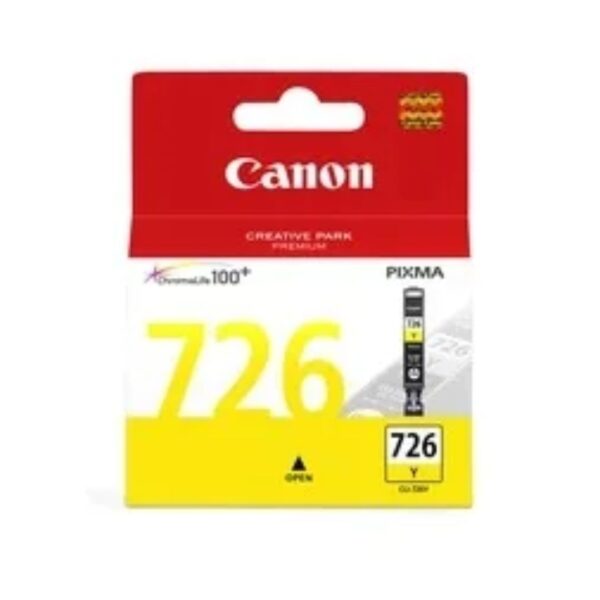
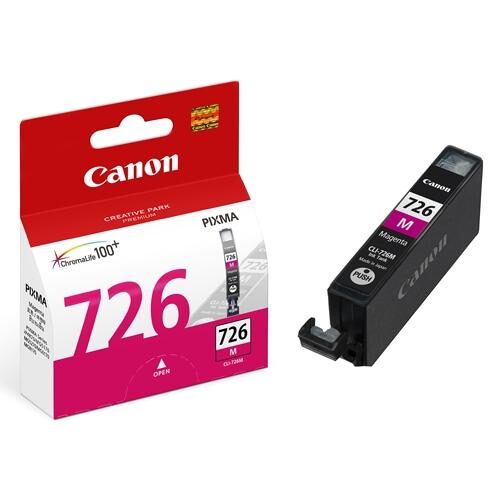
Canon PIXMA CLI-726 Yellow Ink Cartridge – Genuine Canon Colour Ink
The Canon PIXMA CLI-726 Yellow Ink Cartridge is an original Canon dye-based ink tank designed for vibrant yellow colour reproduction, detailed photographic prints, and dependable everyday colour printing. Featuring a 9 ml ink capacity and Canon’s ChromaLife100+ photographic ink technology, this genuine Canon cartridge supports the production of colourful photographs, business graphics, presentations, and creative documents.
Developed for selected Canon PIXMA iP, MG, MX, and iX series inkjet printers, the Canon CLI-726Y supplies the dedicated yellow ink required within the printer’s individual ink tank system.
Yellow is one of the essential colours used in inkjet colour reproduction. It contributes to bright yellow shades, natural greens, warm oranges, golden highlights, and numerous intermediate colours when combined with other inks.
Whether printing family photographs, colourful landscapes, school assignments, marketing materials, office presentations, or creative artwork, the Canon PIXMA CLI-726 Yellow Ink Cartridge provides the manufacturer-specified ink formulation for supported printers.
The cartridge uses an individually replaceable ink tank design, allowing customers to replace Yellow without automatically purchasing the complete ink set.
For home users, students, photographers, designers, and small businesses seeking original Canon consumables, the CLI-726Y provides a reliable, clearly identifiable replacement.
Genuine Canon PIXMA CLI-726 Yellow Ink Cartridge
The Canon CLI-726 Yellow Ink Cartridge is an original equipment manufacturer consumable developed specifically for compatible Canon PIXMA inkjet printers.
Genuine Canon ink cartridges are manufactured according to the operating requirements of the printers for which they are designed. This includes cartridge construction, ink formulation, and compatibility with the printing system.
The CLI-726Y provides the original yellow ink intended for the designated cartridge position within supported PIXMA printers.
Unlike an unspecified compatible replacement, the genuine Canon product has an identifiable model designation and manufacturer product code.
The cartridge belongs to Canon’s CLI-726 individual ink tank family, which includes Black, Cyan, Magenta, Yellow, and Grey for printers supporting the corresponding ink configuration.
Each ink colour serves a particular function within the printer’s colour reproduction system.
The Yellow cartridge must be installed in its designated position and is not interchangeable with Cyan, Magenta, Black, or Grey.
Customers seeking genuine Canon replacement ink can choose the CLI-726Y to maintain the manufacturer’s specified ink system.
Advanced Canon ChromaLife100+ Ink Technology
The Canon PIXMA CLI-726 Yellow Ink Cartridge forms part of Canon’s ChromaLife100+ photographic ink system.
ChromaLife100+ technology combines genuine Canon dye-based inks with compatible photographic papers and Canon printing technology.
The system is designed to support vibrant photographic colours and improved print longevity when the appropriate printing media and storage conditions are used.
Yellow is an important part of this photographic ink arrangement because it contributes to bright tones and various colours created through combinations with Cyan and Magenta.
Photographs containing warm lighting, sunlight, landscapes, flowers, clothing, and decorative objects frequently include yellow-related colour regions.
The CLI-726Y supplies the manufacturer’s intended yellow ink for reproducing these areas.
The quality of a finished photograph also depends on the original image, printer settings, paper selection, and environmental conditions.
Using original Canon ink provides the correct formulation for the printer’s designed ChromaLife100+ system.
Vibrant Yellow Colour Reproduction
Yellow plays a significant role in colour printing because it is one of the fundamental colours used to reproduce a broad range of images.
The Canon CLI-726 Yellow Ink Cartridge contributes to bright yellow shades and mixed colours such as greens and oranges.
When combined with Cyan, yellow helps reproduce different green tones.
When combined with Magenta, yellow contributes to orange and warm red regions.
The printer controls the combination and placement of its inks according to the content being printed.
For example, a photograph of a garden may contain yellow flowers, green leaves, and warm sunlight.
A landscape photograph may include golden fields, orange sunsets, and brightly illuminated objects.
The Canon CLI-726Y provides the dedicated yellow ink required to reproduce these colours within the printer’s capabilities.
The actual appearance depends on suitable media, image quality, and the selected printing settings.
Original 9 ml Dye-Based Yellow Ink
The Canon PIXMA CLI-726 Yellow Ink Cartridge contains approximately 9 ml of genuine Canon dye-based yellow ink.
This capacity is intended for the printer’s individual yellow ink position.
Dye-based inks are commonly used for photographic printing because they support vibrant colour reproduction and smooth colour transitions on suitable printing media.
The CLI-726Y works alongside the printer’s other ink colours to reproduce detailed graphics and photographs.
Actual yellow ink consumption depends on the characteristics of the document or image.
A photograph dominated by bright yellow flowers or warm landscapes may consume yellow ink differently from a photograph featuring mostly blue or grey areas.
Likewise, a business chart with large yellow sections may use more yellow ink than a document containing only a small coloured logo.
Customers should therefore treat the 9 ml capacity as the cartridge’s ink volume rather than as a guarantee of a particular number of prints.
Canon CLI-726 Yellow Ink Cartridge Page Yield
The Canon CLI-726 Yellow Ink Cartridge has model-specific document and photographic yields.
For the Canon PIXMA MG5370, Canon specifies an approximate yield of 525 A4 colour document pages and 199 standard 4 × 6-inch photographs.
For the Canon PIXMA MG5270, the manufacturer lists approximately 515 A4 colour document pages and 202 standard 4 × 6-inch photographs.
For the Canon PIXMA MG6270 and MG8270, Canon’s published test figures include approximately 466 A4 colour document pages and 301 standard 4 × 6-inch photographs.
These differences arise from the manufacturers’ testing conditions and printer configurations.
Actual ink consumption varies according to image content, paper type, printer maintenance, and print settings.
For purchasing and inventory planning, customers should consult the yield associated with their exact printer model.
The published yield provides a reference rather than a guaranteed number of printed pages.
Compatible with Canon PIXMA iP4870 and iP4970
The Canon CLI-726 Yellow Ink Cartridge is compatible with the Canon PIXMA iP4870 and iP4970 printers.
These printers use an individual ink tank system that includes the CLI-726 colour ink family.
The CLI-726Y supplies the yellow dye-based ink required for printing colourful documents, photographs, and graphical materials.
Home users can use these printers for photographs, assignments, letters containing graphics, and everyday documents.
Small offices may print business presentations, reports, and product information sheets.
When the printer indicates that the Yellow cartridge requires replacement, users should select the genuine Canon CLI-726Y.
The printer also uses separate black and other colour ink tanks.
Customers should verify the exact cartridge designation before ordering, particularly when purchasing consumables for imported or regionally different PIXMA printer models.
Compatible with Canon PIXMA MG5170 and MG5270
The Canon PIXMA MG5170 and MG5270 multifunction printers support the Canon CLI-726 Yellow Ink Cartridge.
These devices use individually replaceable ink tanks for their colour printing systems.
The CLI-726Y contributes to colour photographs, graphics, charts, and everyday business documents.
The MG5270 has a published Canon yellow ink yield of approximately 515 A4 colour pages and 202 standard 4 × 6-inch photographs under the manufacturer’s testing conditions.
Actual results depend on the printing workload and operating environment.
Customers using these printers can replace the Yellow cartridge independently when necessary.
For reliable printing, the replacement should be installed in the correct colour position and the printer’s maintenance instructions should be followed.
The genuine Canon CLI-726Y provides the specified yellow ink for the supported printer models.
Compatible with Canon PIXMA MG5370
The Canon PIXMA MG5370 is another supported printer for the Canon CLI-726 Yellow Ink Cartridge.
The printer uses a five-ink configuration that includes Pigment Black, Photo Black, Cyan, Magenta, and Yellow.
The CLI-726Y supplies the dedicated yellow dye-based ink within this arrangement.
It contributes to colour photographs, educational diagrams, reports, presentation graphics, and creative documents.
Canon lists an approximate Yellow cartridge yield of 525 A4 colour document pages and 199 standard 4 × 6-inch photographs for this model.
These figures are measured under specified test conditions.
Customers printing frequently should monitor the actual cartridge consumption rather than assuming identical yields for every document.
The individual ink tank design allows Yellow to be replaced without automatically changing the other installed cartridges.
Compatible with Canon PIXMA MG6170 and MG6270
The Canon CLI-726 Yellow Ink Cartridge is compatible with the Canon PIXMA MG6170 and MG6270 printers.
These photo-oriented multifunction printers use a six-colour ink arrangement that includes a dedicated Grey cartridge.
The CLI-726Y supplies Yellow alongside Black, Cyan, Magenta, Grey, and the separate Pigment Black ink tank.
This arrangement supports detailed colour photographs and refined tonal reproduction.
Yellow contributes to warm tones, natural greens, and various mixed colours within photographs.
The dedicated Grey cartridge serves a different photographic purpose and is not interchangeable with Yellow.
For users printing family portraits, landscapes, creative artwork, or colour documents, the original CLI-726Y helps maintain the printer’s intended colour ink configuration.
Compatible with Canon PIXMA MG8170 and MG8270
The Canon PIXMA MG8170 and MG8270 also use the Canon CLI-726 Yellow Ink Cartridge.
These models feature an individual ink tank system designed for photographic and general printing applications.
The CLI-726Y provides the original yellow dye-based ink required within the printing process.
It contributes to reproducing landscapes, portraits, artistic photographs, colourful graphics, and decorative images.
Canon’s published MG8270 test figures include an approximate yield of 466 A4 colour document pages and 301 standard 4 × 6-inch photographs for the Yellow cartridge.
Actual printing output may vary depending on image content and settings.
Users should replace the Yellow cartridge according to the printer’s ink status information.
Maintaining genuine ink in every designated position helps preserve the manufacturer’s intended printing configuration.
Compatible with Canon PIXMA MX886 and MX897
The Canon CLI-726 Yellow Ink Cartridge is also compatible with the Canon PIXMA MX886 and MX897 multifunction printers.
These printers are used for everyday printing requirements, including documents, reports, photographs, and colour graphics.
The CLI-726Y supplies the designated yellow ink within their printing systems.
Businesses using these models may print customer information sheets, financial reports, coloured charts, and promotional documents.
Yellow contributes to colourful illustrations and highlights in these materials.
Its individually replaceable design allows users to replenish the required colour without automatically replacing the entire ink set.
For offices that operate different Canon printers, accurate model identification is important.
Customers should confirm that the installed printer requires CLI-726Y before purchasing a replacement.
Compatible with Canon PIXMA iX6560 and iX6570
The Canon CLI-726 Yellow Ink Cartridge is compatible with the Canon PIXMA iX6560 and regionally designated iX6570.
The PIXMA iX family includes inkjet printers used for documents and larger-format printing applications, depending on the model.
The CLI-726Y supplies the yellow ink required for producing colour images and graphics within the supported printing system.
Users may print presentations, larger-format charts, photographs, illustrations, and business documents according to the printer’s capabilities.
The cartridge works alongside the compatible printer’s other colour and black ink tanks.
Its genuine Canon formulation provides the original manufacturer-specified yellow ink.
Customers should verify their region’s exact printer model and supported cartridge codes before ordering.
Bright and Detailed Photo Printing
The Canon PIXMA CLI-726 Yellow Ink Cartridge supports colour photographic printing with compatible Canon PIXMA printers.
Its dye-based yellow ink contributes to reproducing bright highlights, colourful scenery, and natural-looking warm tones.
Photographs may contain a wide range of colours, including yellow flowers, orange sunsets, green vegetation, and golden lighting.
The printer combines the installed inks to reproduce these areas according to the original digital image.
Yellow contributes to many mixed shades rather than appearing only in obviously yellow objects.
For example, natural green landscapes may require combinations of yellow and cyan.
The finished print depends on source image quality, photographic paper, printer settings, and colour management.
The CLI-726Y provides the genuine Canon yellow ink intended for this photographic process.
Ideal for Landscape and Nature Photography
Landscape photography often contains extensive colour variation.
Images of forests, gardens, mountains, sunsets, fields, and natural scenery may include numerous shades derived partly from yellow ink.
The Canon CLI-726 Yellow Ink Cartridge contributes to these colour regions within compatible PIXMA printers.
For example, warm sunlight illuminating a landscape may introduce yellow and orange highlights.
Green leaves and grass also contain colour components that involve yellow within the printer’s reproduction process.
The CLI-726Y supplies the designated yellow ink for such photographs.
For photographers seeking detailed results, suitable image preparation and appropriate photo paper are important.
The cartridge does not independently determine colour accuracy, but it provides the original Canon formulation used by the printer.
Suitable for Portrait and Family Photography
Portrait photographs contain complex combinations of skin tones, clothing colours, backgrounds, and lighting.
Yellow ink contributes to the reproduction of warmer colour regions within these images.
The Canon CLI-726Y works alongside Cyan, Magenta, and the printer’s other inks to produce photographic output.
In family portraits, yellow may contribute to warm lighting and certain skin-tone components.
In studio photographs, it may also support colourful clothing, decorations, and background details.
The final appearance depends on exposure, image editing, photographic paper, and printer settings.
For consistent results, photographers should use suitable source images and maintain the printer’s correct ink configuration.
The original CLI-726Y provides the yellow ink intended for supported Canon PIXMA photo printers.
Colourful Business Presentations and Reports
Businesses frequently print documents that use colour to present information clearly.
Charts, graphs, illustrations, and presentation materials may include yellow and other mixed colours.
The Canon CLI-726 Yellow Ink Cartridge supplies the yellow dye-based ink required by compatible Canon printers.
Yellow may be used to highlight important data, distinguish sections, or contribute to printed company graphics.
For example, a sales report may use yellow bars to identify a product category, while a presentation may contain coloured diagrams or photographs.
The CLI-726Y helps the printer reproduce these document elements.
For professional-looking results, businesses should use readable text, suitable paper, and appropriate print settings.
The original Canon cartridge supports the printer’s intended colour printing system for these everyday applications.
Useful for Educational Charts and School Projects
The Canon CLI-726 Yellow Ink Cartridge is suitable for educational printing applications with supported PIXMA printers.
Students and teachers may print colourful charts, diagrams, maps, illustrations, and assignments.
Yellow can help distinguish different sections in educational graphics.
For example, a science project may use yellow to highlight a particular component, while geography materials may contain colourful maps and illustrations.
The printer combines Yellow with other inks to reproduce the required colours.
Students preparing portfolios or creative projects may also print photographs and artwork.
Actual ink consumption depends on the amount of colour used in each document.
For efficient printing, users should review print previews and select suitable output settings before producing multiple copies.
Creative Artwork and Graphic Printing
Creative users may use compatible Canon PIXMA printers to reproduce illustrations, decorative graphics, photographs, and personal artwork.
The Canon CLI-726 Yellow Ink Cartridge contributes to the bright and warm colours used in these designs.
Yellow is particularly relevant to artwork featuring sunlight, flowers, colourful objects, abstract compositions, and graphical patterns.
When combined with other inks, it helps produce additional shades required by the original image.
The printer applies its colour printing process according to the selected file and media settings.
Artists should consider image resolution, paper type, and colour management when evaluating finished prints.
The genuine Canon CLI-726Y provides the intended yellow ink for supported creative printing applications.
Canon CLI-726 Yellow vs Canon CLI-726 Magenta
The Canon CLI-726 Yellow and Canon CLI-726 Magenta cartridges belong to the same ink family but supply different colours.
The Yellow cartridge is identified as CLI-726Y, while the Magenta cartridge is identified as CLI-726M.
Both contain dye-based ink and are individually replaceable.
Yellow contributes to bright yellow shades, green combinations, and warm orange tones.
Magenta contributes to pink, purple, red, and related mixed colours.
The printer uses these inks together to reproduce the colours required by the image.
However, the cartridges have separate designated positions and are not interchangeable.
Customers should check the exact colour indicated by the printer before ordering a replacement.
For stock management, each cartridge should have its own product record and manufacturer code.
Canon CLI-726 Yellow vs Canon CLI-726 Cyan
The Canon CLI-726 Yellow and CLI-726 Cyan cartridges work together within the colour printing system.
Yellow is used in reproducing bright yellow and warm shades, while Cyan contributes to blue-green colour regions.
Combinations of Yellow and Cyan help produce different green tones.
This is especially relevant to landscapes, nature photography, diagrams, and illustrations containing foliage or other green subjects.
Each cartridge contains a different dye-based ink formulation.
Although both belong to the CLI-726 series, they should never be substituted for each other.
Customers should select the colour specified by the printer’s ink status information.
Using the correct original cartridge ensures that the printer has the intended colour available.
Canon CLI-726 Yellow vs CLI-726 Grey
The Canon CLI-726 Yellow and CLI-726 Grey cartridges have different functions within compatible Canon printing systems.
The Yellow cartridge contributes to colour reproduction, including yellow, green, and orange shades.
The Grey cartridge supports neutral tones and refined monochrome photographic gradations.
Not every printer using CLI-726 Yellow also uses CLI-726 Grey.
The Grey cartridge is restricted to selected six-colour Canon PIXMA models, including MG6170, MG6270, MG8170, and MG8270.
Customers should therefore check the exact ink configuration of their printer.
The Yellow cartridge remains the appropriate replacement when the printer identifies CLI-726Y as the required consumable.
Original Canon Ink vs Compatible Cartridges
Customers purchasing ink may encounter original Canon cartridges and third-party compatible alternatives.
The Canon CLI-726 Yellow Ink Cartridge described here is a genuine Canon product.
It contains the manufacturer’s specified dye-based yellow ink for compatible PIXMA printers.
Third-party cartridges may use different ink formulations, materials, or cartridge components.
Their performance can vary depending on the manufacturer and product.
Customers who prefer original consumables can select the genuine CLI-726Y for the manufacturer’s intended compatibility.
For photography and colour-sensitive printing, maintaining a consistent ink formulation can be useful.
Customers should inspect the retail packaging and verify the product model when purchasing original Canon ink.
Individually Replaceable Yellow Ink Tank
The Canon CLI-726 Yellow Ink Cartridge is an individual ink tank.
This means Yellow can be replaced separately from Cyan, Magenta, Photo Black, and other installed cartridges.
Different colours may be consumed at different rates depending on the printed documents and photographs.
For example, a business printing charts with extensive yellow backgrounds may consume Yellow differently from a photographer printing mainly dark landscapes.
The individually replaceable design allows users to replenish the colour that requires replacement.
This can simplify consumable purchasing and inventory management.
Users should rely on their printer’s ink status information to determine when a replacement is necessary.
The CLI-726Y must be installed in its designated yellow ink position.
How to Install Canon CLI-726 Yellow Ink Cartridge
Installing the Canon CLI-726 Yellow Ink Cartridge should be carried out according to the instructions for the compatible Canon PIXMA printer.
First, ensure that the printer is powered on and ready for ink tank replacement.
Open the appropriate printer cover and allow the ink tank holder to move into the designated replacement position.
Identify the Yellow cartridge marked CLI-726Y.
Release and remove the used cartridge according to Canon’s procedure.
Unpack the new genuine Canon ink tank and remove the specified protective materials.
Avoid touching the ink outlet or electrical contacts unnecessarily.
Insert the cartridge into its correct yellow position and ensure it is securely seated.
Close the printer cover and allow the printer to complete any necessary checks.
If a recognition warning appears, verify the cartridge model and installation before attempting further troubleshooting.
Proper Storage and Handling Guidelines
The Canon CLI-726 Yellow Ink Cartridge should remain in its original packaging until installation is required.
Store unused ink cartridges in a cool, dry, well-ventilated environment, following Canon’s handling instructions.
Avoid prolonged exposure to excessive heat or direct sunlight.
For businesses maintaining replacement stock, the CLI-726Y should be clearly labelled and stored separately from other colours.
Before installation, inspect the packaging for signs of damage.
Avoid dismantling or modifying the cartridge.
Do not touch sensitive components unnecessarily.
Customers should follow the manufacturer’s packaging instructions and relevant safety recommendations.
Proper storage and handling help maintain the condition of unused original Canon consumables.
Choosing the Right Photo Paper
Paper selection can influence the appearance of photographs printed using the Canon CLI-726 Yellow Ink Cartridge.
Canon’s ChromaLife100+ technology is designed around the combination of genuine dye-based inks and compatible photographic media.
Different paper surfaces provide different levels of gloss, texture, and perceived contrast.
Glossy photo paper may emphasize colourful images, while certain matte or specialty papers can provide a different visual finish.
Users should select paper supported by their printer and choose the matching media settings.
For important photographic projects, test prints may help evaluate colour reproduction before producing multiple copies.
The original Canon CLI-726Y provides the manufacturer-specified yellow ink within this printing process.
Maintaining Consistent Colour Print Quality
A genuine ink cartridge is one component of a complete printing system.
The Canon CLI-726 Yellow Ink Cartridge supplies original yellow dye-based ink, but print quality also depends on the condition of the printer.
If printed colours appear faded, uneven, or incomplete, users should follow Canon’s troubleshooting instructions.
Depending on the printer model, maintenance functions may include nozzle checks, cleaning, and printhead alignment.
Repeated unnecessary cleaning should be avoided because it can consume additional ink.
If the printer indicates that the Yellow cartridge is empty or requires replacement, the correct CLI-726Y should be installed.
Other printing problems may have different causes and should be investigated according to the manufacturer’s recommendations.
Printing Costs and Ink Consumption
The Canon CLI-726 Yellow Ink Cartridge contains 9 ml of dye-based ink.
Actual printing costs depend on cartridge price, image coverage, paper type, printer maintenance, and individual usage patterns.
The approximate manufacturer page yield can provide a useful reference for consumable planning.
However, a page containing extensive yellow graphics may consume more yellow ink than a document with only a small coloured heading.
Photographs can also have different ink requirements depending on their colours and brightness.
Businesses that print frequently may benefit from tracking cartridge replacement intervals.
Because the CLI-726 uses separate ink tanks, Yellow can be replenished independently when necessary.
Inventory Management for Canon CLI-726 Cartridges
Businesses using compatible Canon PIXMA printers can maintain separate stock records for each CLI-726 cartridge colour.
The Yellow cartridge should be identified using its complete model designation, CLI-726Y, and manufacturer code family 4554B.
Regional part numbers should be checked against the actual packaging before being recorded.
A suitable inventory description is Canon CLI-726Y 9ml Yellow Original Ink Cartridge.
Separate inventory records should be maintained for Cyan, Magenta, Black, Grey, and Pigment Black cartridges.
This reduces confusion when multiple similar-looking products are stored together.
Stock records can include purchase dates, suppliers, quantities, and printer compatibility information.
Accurate product identification makes replacement purchasing easier for office staff and procurement teams.
Why Choose Canon PIXMA CLI-726 Yellow Ink Cartridge?
The Canon PIXMA CLI-726 Yellow Ink Cartridge combines genuine Canon manufacturing, a 9 ml dye-based ink formulation, and compatibility with selected Canon PIXMA inkjet printers.
Its ChromaLife100+ technology supports vibrant photographic output when combined with suitable Canon media and printing settings.
The cartridge contributes to bright yellow tones, natural greens, warm oranges, and detailed colour graphics.
It is suitable for photographers, home users, students, designers, and small businesses.
The individual cartridge design allows Yellow to be replaced independently of the other installed inks.
For customers seeking original manufacturer consumables, the genuine CLI-726Y provides the designated replacement for compatible printers.
Buy Canon PIXMA CLI-726 Yellow Ink Cartridge
The Canon PIXMA CLI-726 Yellow Ink Cartridge is an original Canon 9 ml dye-based ink tank developed for selected PIXMA iP, MG, MX, and iX series inkjet printers.
Whether printing family photographs, colourful reports, educational materials, presentation graphics, or creative artwork, the CLI-726Y supplies the yellow ink required by the printer.
Featuring ChromaLife100+ ink technology and convenient individual ink replacement, the cartridge provides a practical option for maintaining compatible Canon printing systems.
Customers should verify their printer model, regional manufacturer part number, and physical cartridge packaging before purchase.
The CLI-726Y is not interchangeable with other Canon ink cartridge families or different CLI-726 colours.
Choose the Canon PIXMA CLI-726 Yellow Ink Cartridge for genuine Canon compatibility, vibrant photographic colours, and dependable everyday colour printing.
Technical Specifications
| Specification | Details |
|---|---|
| Brand | Canon |
| Product name | Canon PIXMA CLI-726 Yellow Ink Cartridge |
| Model | CLI-726 Y |
| Series | CLI-726 |
| Ink colour | Yellow |
| Ink type | Dye-Based |
| Ink capacity | 9 ml |
| Ink technology | ChromaLife100+ |
| Printing technology | Inkjet |
| Cartridge type | Original individual ink tank |
| Weight | 0.05 kg |
|---|---|
| Brand | Canon |
| Color | Yellow |
| EAN / UPC Code | 4960999818665 |
| Model | CLI-726Y |
| Product Type | Ink Cartridges |

Reviews
There are no reviews yet.