

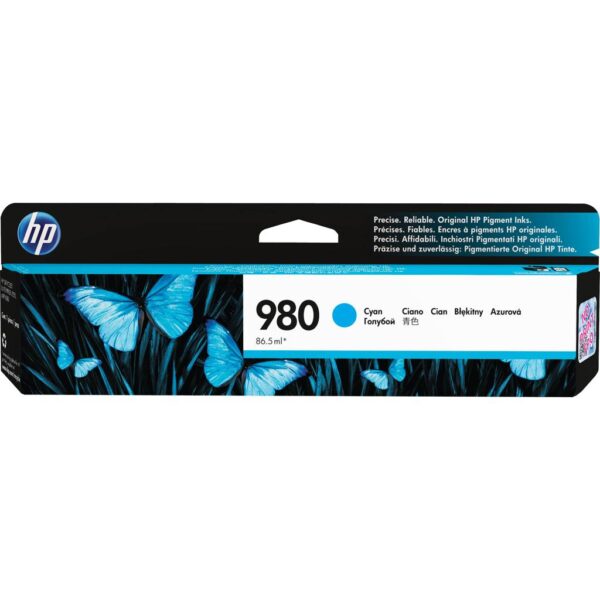
HP 980 Cyan Original Ink Cartridge (D8J07A)
The HP 980 Cyan Original Ink Cartridge (D8J07A) is a genuine HP ink cartridge designed for professional, high-volume colour printing. Featuring 86.5ml of pigment-based cyan ink and an approximate 6,600-page yield, this original HP cartridge produces vibrant colour graphics, clear business documents, and dependable printing output.
Engineered for compatible HP OfficeJet Enterprise Color X555 and X585 printers, the HP 980 Cyan Ink Cartridge is ideal for corporate offices, enterprises, educational institutions, administrative departments, and professional environments requiring frequent colour printing.
Key Features:
- Genuine HP 980 Cyan Original Ink Cartridge
- Manufacturer part number: D8J07A
- Approximately 6,600-page reference yield
- 86.5ml pigment-based cyan ink
- Original HP standard-capacity cartridge
- Vivid cyan colour for professional reports and graphics
- Designed for HP Thermal Inkjet and PageWide printing systems
- Compatible with HP OfficeJet Enterprise X555 and X585 printer series
- Suitable for reports, presentations, charts, and business documents
- Individually replaceable cyan cartridge
- Original HP manufacturer’s limited warranty, subject to applicable conditions
- Package includes one genuine HP 980 Cyan Ink Cartridge
Actual page yield varies according to printed content, printer settings, maintenance activity, and usage. Verify the complete printer model before ordering.
-
 Pick up from the Woodmart Store
To pick up today
Free
-
 Courier delivery
Our courier will deliver to the specified address
2-3 Days
From $40
-
 DHL Courier delivery
DHL courier will deliver to the specified address
1-2 Days
From $40
HP 980 Cyan Original Ink Cartridge (D8J07A)
The HP 980 Cyan Ink Cartridge (D8J07A) is a genuine HP original ink cartridge developed for professional, high-volume colour printing. Designed for compatible HP OfficeJet Enterprise printers, this cartridge delivers consistent cyan colour, detailed graphics, and dependable output for demanding business environments.
Featuring 86.5ml of pigment-based cyan ink and an approximate 6,600-page yield, the HP 980 Cyan Original Ink Cartridge is suitable for corporate offices, educational institutions, commercial organizations, administrative departments, and enterprises requiring regular colour document printing.
The cartridge is designed for the HP OfficeJet Enterprise Color X555 and X585 printer families, including supported multifunction configurations.
The HP 980 Cyan cartridge provides one of the four essential ink colours used in the printer’s colour printing system. Working alongside magenta, yellow, and black inks, cyan contributes to the reproduction of charts, illustrations, presentations, diagrams, and professional business documents.
1. Genuine HP 980 Cyan Ink Cartridge for Professional Printing
The HP 980 Cyan Ink Cartridge is an original HP printing supply designed for compatible OfficeJet Enterprise printing systems.
Original HP inks are developed to work with the manufacturer’s specified printer technology, ink delivery components, and electronic cartridge recognition system.
This coordinated design helps support consistent printing quality and dependable daily operation.
For businesses that frequently print important documents, using the correct cartridge is an essential part of managing their printing equipment.
The HP 980 Cyan cartridge supplies the cyan colour needed for reproducing blue, green, and other mixed-colour graphics.
The product is identified by manufacturer part number D8J07A, providing a clear reference for purchasing, inventory control, and product verification.
2. Approximately 6,600-Page Printing Yield
The HP 980 Cyan Original Ink Cartridge has a published reference yield of approximately 6,600 pages.
This substantial capacity makes the cartridge suitable for organizations with regular colour printing requirements.
HP calculates its published colour yield using continuous composite cyan, magenta, and yellow printing under specified test conditions.
The reference yield helps businesses estimate cartridge replacement requirements and compare printing supplies.
Actual printing capacity can vary considerably depending on document content, cyan ink coverage, printer settings, and maintenance activity.
For example, a text-based report containing a small coloured chart generally consumes less cyan ink than a document with large blue backgrounds.
The published yield should therefore be treated as an estimate rather than a guaranteed number of printed pages.
3. 86.5ml Pigment-Based Cyan Ink Capacity
The HP 980 Cyan Ink Cartridge contains 86.5ml of pigment-based cyan ink.
This ink volume is intended for compatible HP OfficeJet Enterprise printing systems.
Pigment-based ink contains fine colour particles dispersed in a liquid carrier.
The formulation helps support clear document graphics, readable coloured information, and consistent colour reproduction.
Cyan ink is essential for many shades of blue and green used in business documents.
The 86.5ml capacity is useful for workplaces that frequently print presentations, diagrams, performance reports, and other colour-enhanced documents.
Businesses can use the cartridge’s capacity together with the published page yield to plan their consumables purchases.
4. Designed for HP OfficeJet Enterprise Printers
The HP 980 Cyan Original Ink Cartridge is developed specifically for compatible HP OfficeJet Enterprise printers.
These printers are designed for professional office environments requiring efficient document production.
The HP 980 family includes separate supplies for black, cyan, magenta, and yellow ink.
The cyan cartridge provides the cyan ink required by the printer’s colour system.
Using the manufacturer-specified cartridge helps maintain compatibility and correct installation.
For organizations operating multiple printer models, it is important to identify the exact supplies required for each device.
The HP 980 Cyan cartridge is not intended for ordinary HP DeskJet, Smart Tank, or DesignJet printers unless their official specifications expressly support the product.
5. HP PageWide Printing Technology
Compatible HP OfficeJet Enterprise X555 and X585 printers use HP PageWide printing technology.
This system features a stationary printhead spanning the printable width of the paper.
Instead of moving a narrow printhead repeatedly across the page, the printer moves paper beneath the printhead.
This design enables efficient document production in supported business printers.
The HP 980 Cyan cartridge supplies cyan ink for the printing process.
Its original HP formulation is designed to operate with the supported printer’s ink delivery system.
For offices requiring frequent printing, PageWide technology can help support productive workflows.
The cartridge itself is an ink supply and does not replace the printer’s printhead or other mechanical components.
6. Vibrant Cyan Colour for Professional Documents
Cyan is a primary component of the CMYK printing process.
Alongside magenta, yellow, and black, cyan contributes to a broad range of printed colours.
The HP 980 Cyan Ink Cartridge supplies the cyan component required by compatible HP OfficeJet Enterprise printers.
Cyan is especially important for producing blue shades, turquoise tones, greens, and mixed-colour illustrations.
Many business documents use these colours for charts, diagrams, and branding.
For example, a company report may display departmental performance using blue and green graphics.
The HP 980 Cyan cartridge contributes to the accurate reproduction of these elements as part of the complete printing system.
7. Pigment Ink for Durable Business Output
The HP 980 Cyan cartridge uses original HP pigment-based ink.
HP develops its pigment inks to provide consistent printing results and durable documents when used with suitable paper.
Such inks are appropriate for reports, business correspondence, charts, and professional documents that may be handled regularly.
The ink formulation supports clear colour graphics and resistance to certain forms of smearing and water exposure under specified testing conditions.
However, actual print durability depends on paper selection, environmental conditions, printing settings, and handling.
For important documents, users should select appropriate printing media.
The original HP cartridge provides the ink formulation specified for compatible OfficeJet Enterprise printing equipment.
8. Compatible with HP OfficeJet Enterprise Color X555dn
The HP OfficeJet Enterprise Color X555dn is one of the supported printers for the HP 980 Cyan Original Ink Cartridge.
This printer is designed for office document production and uses HP PageWide technology.
The cartridge supplies cyan ink for colour documents containing charts, graphics, diagrams, and presentations.
Its approximately 6,600-page yield makes it suitable for regular office printing requirements.
Businesses operating this printer can use manufacturer part number D8J07A when purchasing a replacement cyan cartridge.
Before ordering, customers should check the existing cartridge label and printer documentation.
Correct product identification helps prevent purchasing mistakes.
9. Compatible with HP OfficeJet Enterprise Color X555xh
The HP 980 Cyan Ink Cartridge is also compatible with the HP OfficeJet Enterprise Color X555xh printer.
This printer belongs to HP’s enterprise colour printing family.
It is suitable for professional workplaces that print business reports, correspondence, charts, and other office documents.
The cyan cartridge supplies the cyan component required by the printer’s colour printing system.
For businesses where a printer is shared by several employees, maintaining replacement supplies can help reduce interruptions.
The D8J07A cartridge is the corresponding original HP cyan consumable.
Customers should always verify the printer’s full model number and existing cartridge requirements before purchasing.
10. Compatible with HP OfficeJet Enterprise Color MFP X585dn
The HP OfficeJet Enterprise Color MFP X585dn is a multifunction printing system designed for professional office use.
It combines printing with additional document-handling capabilities.
The HP 980 Cyan Ink Cartridge supplies the cyan ink required for its colour printing function.
The cartridge contributes to reproducing coloured graphs, illustrations, business presentations, and internal documents.
Its 86.5ml capacity is useful for environments with ongoing printing requirements.
For departments using the X585dn as a shared multifunction printer, tracking ink levels and maintaining suitable replacement stock can help keep the device available.
The cartridge does not replace scanning components or other printer maintenance parts.
11. Compatible with HP OfficeJet Enterprise Color MFP X585f
The HP 980 Cyan Original Ink Cartridge is also designed for the HP OfficeJet Enterprise Color MFP X585f.
This multifunction printer serves professional document-processing environments.
The original HP cyan cartridge provides ink for charts, diagrams, reports, illustrations, and everyday colour documents.
Its pigment-based formulation works within the printer’s supported printing system.
Businesses using the X585f for frequent office tasks can benefit from managing consumables according to actual usage.
The approximate 6,600-page yield provides a useful purchasing reference.
Customers should include the manufacturer part number D8J07A in purchase orders and supplier enquiries to ensure accurate product identification.
12. Compatible with HP OfficeJet Enterprise Color Flow MFP X585z
The HP OfficeJet Enterprise Color Flow MFP X585z is another supported printer for the HP 980 Cyan cartridge.
The X585z is designed for professional offices with demanding document workflows.
The cyan cartridge supports the colour printing functionality of the printer.
It provides the ink used to produce blue and green graphic elements, coloured headings, and illustrations.
For enterprises that regularly distribute printed reports or presentation materials, consistent colour output is important.
The HP 980 Cyan Original Ink Cartridge is developed for the intended HP printing system.
Organizations should verify cartridge compatibility before placing bulk orders, particularly when managing several different enterprise printer models.
13. Ideal for Corporate and Enterprise Printing
Large organizations frequently depend on shared printers for routine document production.
Employees may need to print financial statements, departmental reports, presentations, training materials, and customer documents.
The HP 980 Cyan Ink Cartridge is suitable for compatible OfficeJet Enterprise printers handling these requirements.
Its substantial page yield can help offices manage recurring colour printing needs.
Cyan ink contributes to graphs, company branding, workflow diagrams, and other visual information.
For enterprise purchasing departments, the official manufacturer part number simplifies consumables identification.
Maintaining an appropriate stock of replacement cartridges can help organizations avoid delays when printers run low on ink.
14. Professional Business Reports and Financial Charts
Business reports frequently contain charts and graphical information designed to communicate performance clearly.
Examples include financial comparisons, departmental summaries, operational statistics, and customer analysis.
The HP 980 Cyan Ink Cartridge contributes to blue, green, and other mixed-colour elements used in these documents.
Colour-coded charts help distinguish categories and make information easier to interpret.
For example, a sales report may use blue bars to represent current results and green lines to identify changes.
The cyan cartridge provides one of the essential printing colours.
For professional results, users should select appropriate paper, printer settings, and document quality.
15. Suitable for Printed Presentations and Proposals
Printed presentation materials are useful during meetings, client discussions, and internal reviews.
These documents may include business graphics, charts, photographs, logos, and coloured headings.
The HP 980 Cyan Cartridge contributes to the reproduction of cyan and mixed-colour elements.
For example, a proposal may contain company branding, illustrated processes, and blue or green charts.
The original HP pigment ink formulation is designed to support professional document quality in compatible printers.
For customer-facing documents, selecting appropriate paper and printing settings can improve the finished appearance.
Businesses should review sample pages before producing large quantities of important presentation materials.
16. Useful for Marketing and Sales Departments
Sales and marketing departments often print product information sheets, customer presentations, internal brochures, and business proposals.
These documents frequently use colour to highlight product features or communicate important information.
The HP 980 Cyan Ink Cartridge contributes to the reproduction of blue and green design elements.
For example, an IT product presentation may include coloured diagrams, comparison charts, and company branding.
Cyan ink forms part of the printer’s colour reproduction system.
The cartridge is intended for professional office document printing rather than specialist large-format plotting or commercial offset printing.
For routine marketing documents, compatible OfficeJet Enterprise printers can provide a practical in-house printing solution.
17. Suitable for Educational Institutions
Schools, universities, colleges, and training centres often produce documents containing coloured diagrams and illustrations.
Examples include study materials, instructional handouts, classroom presentations, charts, and administrative reports.
The HP 980 Cyan Ink Cartridge supports these applications in compatible OfficeJet Enterprise printers.
Cyan ink is particularly useful for reproducing blue and green graphic elements.
The approximately 6,600-page reference yield can be relevant for educational institutions with frequent printing requirements.
Actual usage depends on the quantity and coverage of printed materials.
Institutions can monitor ink consumption and plan future purchases using their own printing records.
18. Useful for Administrative and HR Departments
Administrative and human resources departments frequently prepare printed information for employees and management.
These materials may include organizational charts, staff handbooks, schedules, training documents, internal notices, and departmental reports.
The HP 980 Cyan Ink Cartridge supports the colour graphics in these documents.
Blue and green colour coding can help distinguish categories and improve presentation clarity.
For offices with shared printing equipment, a reliable cyan ink supply is important for maintaining colour printing functionality.
The original HP cartridge provides the specified ink for compatible printers.
Purchasing teams can use the D8J07A part number to order the intended replacement.
19. Suitable for High-Volume Office Workgroups
Professional workgroups often share one printer among several employees.
This can result in substantial daily printing activity.
The HP 980 Cyan Ink Cartridge provides a published yield of approximately 6,600 pages, making it suitable for supported enterprise printers used regularly.
A cartridge with this reference yield can help reduce replacement frequency compared with lower-capacity supplies, where such alternatives exist.
However, HP classifies the HP 980 Cyan as a standard-capacity cartridge within its product family.
Businesses should use the official category rather than incorrectly advertising it as an XL or high-yield variant.
For accurate planning, actual ink consumption should be monitored over time.
20. Understanding HP 980 Cyan Page Yield
The HP 980 Cyan cartridge’s approximate 6,600-page yield is based on standardized continuous printing tests.
The reference figure is useful when comparing consumables or estimating operating expenses.
However, it does not guarantee that every customer will print exactly 6,600 pages.
The amount of ink used depends on document coverage and the types of colours present.
A document containing a large blue background may consume more cyan than a report with a small coloured chart.
Printer maintenance and printing settings can also affect consumption.
Organizations should consider the published yield as a reference and use actual printing records when forecasting replacement requirements.
21. Individual Cyan Cartridge Replacement
Compatible HP OfficeJet Enterprise printers use separate cartridges for black, cyan, magenta, and yellow ink.
This allows users to replace the individual colour supply when required.
The HP 980 Cyan Original Ink Cartridge replaces only the cyan supply.
It does not contain black, magenta, or yellow ink.
This individual replacement system can be convenient because different document types use colours at different rates.
For example, a business printing many blue charts may consume cyan ink faster than yellow.
The printer’s available ink-level information can help identify which cartridge needs attention.
Customers should purchase the correct replacement colour rather than automatically replacing every cartridge.
22. Complete HP 980 Original Ink Cartridge Family
The HP 980 cartridge family includes four original HP ink supplies for compatible OfficeJet Enterprise printers.
The related products are:
- HP 980 Cyan Original Ink Cartridge – D8J07A
- HP 980 Magenta Original Ink Cartridge – D8J08A
- HP 980 Yellow Original Ink Cartridge – D8J09A
- HP 980 Black Original Ink Cartridge – D8J10A
HP specifies approximately 6,600 pages for each of the cyan, magenta, and yellow cartridges.
The corresponding black cartridge has an approximate published yield of 10,000 pages.
Each cartridge is sold separately and contains the designated ink colour.
Customers purchasing multiple colours should verify every part number against the printer’s supported supplies.
23. Original HP Ink for Consistent Colour Output
Professional businesses often need multiple copies of reports, proposals, and presentations.
Consistent printing helps maintain a uniform appearance across these documents.
The HP 980 Cyan Original Ink Cartridge provides the cyan ink formulation specified for supported OfficeJet Enterprise printers.
Its pigment-based design contributes to the reproduction of clear graphics and colour information.
However, consistent output also depends on paper, printer settings, document design, and the condition of other printer components.
For important printing jobs, a sample page should be reviewed before producing the complete quantity.
Using genuine supplies and maintaining the printer properly helps support dependable document quality.
24. HP 980 Cyan Cartridge and Office Printing Costs
Printing cost is an important consideration for businesses and institutions.
The HP 980 Cyan Ink Cartridge provides a published yield that can be used for initial cost-per-page estimates.
A simple reference calculation divides the cartridge’s purchase price by its approximate 6,600-page yield.
This calculation provides an estimated ink cost per page under reference conditions.
Actual printing costs may differ because printed pages use different amounts of ink.
Other expenses, including paper, printer maintenance, and additional colour cartridges, should also be considered.
Businesses can improve purchasing decisions by reviewing their actual printing volumes and consumables consumption.
25. Genuine Cartridge Identification Using D8J07A
Correct product identification is essential when purchasing original HP consumables.
The official manufacturer part number for the HP 980 Cyan Ink Cartridge is D8J07A.
This code distinguishes the cyan cartridge from other HP 980 colour variants.
For example, D8J08A identifies the magenta cartridge, and D8J09A identifies yellow.
Companies should use the full manufacturer part number in purchase orders, quotations, inventory records, and online product listings.
A general description such as “HP cyan ink” may be insufficient because HP manufactures many different cyan cartridges.
The exact part number helps reduce ordering mistakes and ensures that the intended product is identified.
26. Installing the HP 980 Cyan Ink Cartridge
The HP 980 Cyan Cartridge should be installed according to the instructions for the compatible printer.
Before replacement, check the printer’s ink status and confirm that cyan requires attention.
Open the ink cartridge access door and release the existing cartridge according to HP’s procedure.
Carefully remove the depleted cartridge.
Prepare the original HP 980 Cyan replacement and avoid touching the gold-coloured electrical contacts.
Insert the cartridge into its designated position until it is correctly seated.
Close the cartridge access door and follow any instructions displayed by the printer.
If a compatibility error occurs, check the cartridge part number and consult HP support guidance.
27. Maintaining Professional Print Quality
Proper printer maintenance helps users obtain consistent results from original HP ink.
Employees should monitor ink levels and select suitable paper for the documents being printed.
If output shows streaks, missing colours, or unexpected colour changes, the printer’s recommended diagnostic procedure should be followed.
Such problems may result from depleted supplies, printhead conditions, printer settings, or other components.
Replacing a cyan cartridge will not automatically resolve every print-quality problem.
HP provides maintenance and troubleshooting instructions for the OfficeJet Enterprise X555 and X585 families.
Cleaning and other maintenance tasks should be performed only when appropriate.
A combination of genuine supplies and proper printer care supports dependable document production.
28. Proper Cartridge Storage and Handling
Unused HP 980 Cyan cartridges should remain in their original packaging until required.
Store them in a clean, suitable indoor environment protected from physical damage and unnecessary exposure to extreme conditions.
HP lists an operating temperature range of 5°C to 35°C and a storage temperature range of -40°C to 60°C for this cartridge.
For routine office inventory, ordinary controlled indoor storage is preferable.
Avoid opening the cartridge unnecessarily before installation.
Do not dismantle, modify, or attempt to refill the original cartridge.
Businesses maintaining multiple consumables should organize them by product code, ink colour, and purchase date.
29. Responsible Printing and Cartridge Recycling
Organizations can reduce unnecessary paper and ink consumption through efficient printing practices.
Employees should review documents before printing to avoid incorrect or duplicate output.
Double-sided printing, where supported, can help reduce paper consumption.
Choosing suitable print settings can also improve resource efficiency for ordinary internal documents.
After the HP 980 Cyan cartridge becomes depleted, customers can check available cartridge recycling options.
HP provides information about its Planet Partners recycling initiatives, with services varying by location.
Used cartridges should be handled according to applicable local disposal requirements.
For offices managing many printing supplies, an organized collection process may support responsible waste handling.
30. Suitable for Business Procurement and Inventory Management
Printer cartridges are recurring purchases for companies operating supported enterprise printing equipment.
The HP 980 Cyan Original Ink Cartridge provides clear manufacturer identification through part number D8J07A.
Purchasing departments can record the model, colour, capacity, and expected yield in inventory systems.
These details are useful when preparing quotations, purchase orders, and stock reports.
Businesses operating several printers should maintain a compatibility list for each device.
This helps staff select the correct supplies and reduces unnecessary purchasing mistakes.
Before placing bulk orders, organizations should confirm that every intended printer supports the HP 980 series.
31. Benefits of HP 980 Cyan Original Ink Cartridge
The HP 980 Cyan Ink Cartridge offers several practical features for professional printing environments.
Its main benefits include:
- Genuine HP original printing supply
- Approximately 6,600-page reference yield
- 86.5ml pigment-based cyan ink
- Professional graphics and colour document printing
- Designed for compatible HP OfficeJet Enterprise printers
- Suitable for reports, charts, diagrams, and presentations
- Separate cyan cartridge replacement
- Original HP standard-capacity classification
- Manufacturer part number D8J07A
- HP limited warranty under applicable terms
These features make the cartridge a suitable replacement for organizations using supported HP OfficeJet Enterprise X555 and X585 printers.
32. Buy HP 980 Cyan Original Ink Cartridge for Your Business
Choose the HP 980 Cyan Original Ink Cartridge (D8J07A) when your compatible HP OfficeJet Enterprise printer requires a genuine cyan replacement.
With 86.5ml of pigment-based cyan ink and an approximate 6,600-page reference yield, this original HP cartridge is designed to support professional colour document printing.
It is suitable for reports, financial charts, office presentations, training material, administrative documents, and other everyday business printing applications.
The cartridge is specifically intended for supported HP OfficeJet Enterprise Color X555 and X585 printers.
Before purchasing, verify the printer’s complete model number and the cartridge part number.
For manufacturer specifications, visit the official HP 980 Cyan Ink Cartridge page.
For genuine HP cartridges, corporate requirements, and bulk quotations, contact Aadinath Peripherals & Consumables.
HP 980 Cyan Original Ink Cartridge – Genuine HP pigment ink for dependable, professional business colour printing.
| Weight | 1 kg |
|---|---|
| Brand | HP |
| Color | Cyan |
| Model | D8J07A |

Reviews
There are no reviews yet.