


-
 Pick up from the Woodmart Store
-
 Courier delivery
-
 DHL Courier delivery
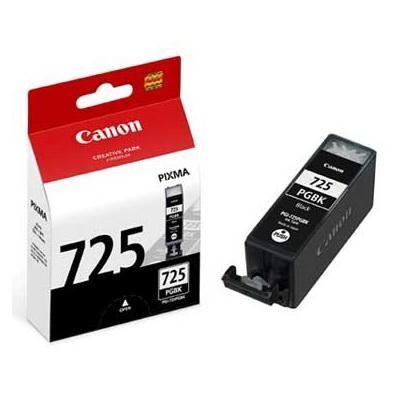
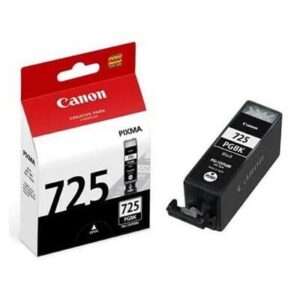
Canon PGI-725 Black Ink Cartridge – Genuine Pigment Black Ink for Canon PIXMA Printers
The Canon PGI-725 Black Ink Cartridge is an original Canon pigment black ink tank designed to deliver sharp text, clear document printing, and dependable performance with compatible Canon PIXMA inkjet printers. Featuring a 19 ml ink capacity, this genuine Canon cartridge is suitable for daily printing requirements in homes, offices, educational institutions, and business environments.
Designed for selected Canon PIXMA iP, MG, MX, and iX series printers, the Canon PGI-725 PGBK provides the dedicated pigment black ink required by these devices. It contributes to the reproduction of dark, readable text, defined document details, and consistent black output on suitable printing media.
Whether printing office reports, invoices, business letters, assignments, forms, or general documents, the Canon PGI-725 Black Ink Cartridge offers the manufacturer-specified ink formulation for supported printers.
Its individually replaceable design allows users to change the black ink tank independently of the printer’s other ink colours. This makes it a convenient replacement for customers who regularly print documents containing substantial black text.
For customers seeking genuine Canon consumables and reliable compatibility, the PGI-725 PGBK is an appropriate choice.
Genuine Canon PGI-725 Black Ink Cartridge
The Canon PGI-725 Black Ink Cartridge is an original equipment manufacturer consumable developed specifically for compatible Canon inkjet printing systems.
Original Canon ink tanks are manufactured to meet the requirements of their designated printers, including ink delivery, cartridge fit, and compatibility with the printer’s printing process.
The PGI-725 belongs to Canon’s pigment black ink family and should not be confused with dye-based photo black cartridges.
It is identified by the model designation PGI-725 PGBK, where PGBK refers to Pigment Black.
For customers ordering replacement consumables, this model designation is important because Canon offers numerous black ink cartridges with different capacities, formulations, and printer compatibility requirements.
The genuine Canon PGI-725 cartridge provides the intended pigment black ink for its supported printers.
This makes it suitable for customers who prefer manufacturer-specified consumables rather than unverified replacement formulations.
Advanced Pigment-Based Black Ink Technology
The Canon PGI-725 Black Ink Cartridge uses pigment-based black ink, which is particularly suitable for printing sharp text and document graphics.
Pigment ink contains colour-producing particles dispersed within a liquid formulation. These particles contribute to the formation of dark printed characters and clearly defined text.
Compared with the dye-based black ink used in certain photographic printing applications, pigment black ink is generally selected for document printing on suitable plain paper.
This makes the Canon PGI-725 PGBK useful for printing letters, reports, forms, assignments, and other documents where text clarity is important.
The ink is designed to work with the printer’s ink delivery system and the appropriate printhead technology.
The actual appearance of the printed page depends on the printer model, paper quality, printing settings, and condition of the printhead.
Using genuine Canon pigment black ink helps maintain the manufacturer’s intended document-printing system.
Sharp and Clear Black Text Printing
One of the primary purposes of the Canon PGI-725 Black Ink Cartridge is producing clear and readable text.
Documents frequently contain small characters, detailed tables, numbers, symbols, and important information that must remain easy to understand.
A well-functioning printer using the correct pigment black ink can reproduce these elements with defined edges and suitable contrast against the paper.
This is particularly valuable for business correspondence, office reports, invoices, contracts, spreadsheets, and educational documents.
The Canon PGI-725 PGBK supports these applications by providing the black ink specified for compatible Canon PIXMA printers.
For best results, customers should use suitable plain paper and select the appropriate printer settings.
Document clarity also depends on the original file, font size, printing resolution, and printhead condition.
The genuine Canon ink tank provides the intended consumable for this printing process.
19 ml Original Canon Ink Capacity
The Canon PGI-725 Black Ink Cartridge contains approximately 19 ml of genuine pigment black ink.
This capacity is intended for the cartridge’s designated position in compatible Canon PIXMA printers.
The individual ink tank design makes it possible to replace the pigment black ink without automatically replacing the other ink colours.
For customers who print mainly text documents, black ink consumption may differ substantially from the consumption of cyan, magenta, yellow, or photo black ink.
The 19 ml capacity provides a useful specification when identifying the replacement cartridge and comparing it with other Canon ink tank families.
However, ink capacity should not be interpreted as a fixed printing yield.
Actual cartridge life depends on the printed material, paper type, printer model, maintenance requirements, and operating conditions.
Customers should monitor the printer’s ink status and replace the cartridge according to the manufacturer’s instructions.
Canon PGI-725 Black Ink Cartridge Page Yield
The Canon PGI-725 Black Ink Cartridge provides a printer-dependent page yield rather than one identical yield across every compatible device.
Canon’s published figures for selected PIXMA models range from approximately 311 to 341 A4 document pages.
For example, Canon lists approximately 311 pages for certain MG6270 and MG8270 configurations, while the MG5370 and iP4970 are associated with an approximate 339-page yield.
Other supported models may have different values depending on their printing system and test conditions.
These figures are useful for understanding expected consumable usage but do not guarantee a specific number of printed pages.
A page containing only a few lines of text may consume less black ink than one containing dense text or large black graphics.
Ink used during maintenance operations can also affect the total number of pages obtained from a cartridge.
For accurate cost planning, businesses should evaluate their actual printing patterns.
Designed for Canon PIXMA Inkjet Printers
The Canon PGI-725 Black Ink Cartridge is designed for selected Canon PIXMA printers that use the PGI-725 and CLI-726 ink system.
Compatible printers include several PIXMA iP, MG, MX, and iX models.
These printers are designed for different printing requirements, including documents, colour graphics, photographs, and multifunction office use, depending on the model.
The pigment black cartridge is part of the printer’s ink system and supplies the black ink primarily associated with document printing.
The printer may also use separate dye-based ink tanks for colour and photographic output.
Customers should always verify the exact model number before purchasing replacement ink.
Canon printer series names can be similar even when their cartridge requirements differ.
The presence of the Canon logo or PIXMA branding alone does not guarantee compatibility with the PGI-725 cartridge.
Canon PGI-725 Black Ink for PIXMA iP Series
The Canon PGI-725 Black Ink Cartridge is compatible with the Canon PIXMA iP4870 and iP4970 printers in supported regional configurations.
These printers use individually replaceable ink tanks, including the PGI-725 pigment black cartridge.
The cartridge supports everyday document printing with dark, readable black text.
For home users and offices, this is useful when preparing assignments, letters, reports, invoices, and other paper documents.
When the printer indicates that the pigment black ink tank requires replacement, users can install the correct PGI-725 cartridge according to Canon’s instructions.
Other ink colours may remain installed if they still contain usable ink.
It is important to confirm the region-specific consumable designation before ordering, especially when a printer was imported from another country.
Using the correct original Canon ink tank helps maintain compatibility with the manufacturer’s printing system.
Compatible with Canon PIXMA MG Series
The Canon PGI-725 Black Ink Cartridge also supports selected Canon PIXMA MG series multifunction printers.
Compatible models include the MG5170, MG5270, MG5370, MG6170, MG6270, MG8170, and MG8270.
Depending on the specific model, these printers offer printing and other functions such as scanning or copying.
The pigment black ink tank supplies the designated black ink for document printing through the multifunction device.
For users who print or copy text-heavy documents, having the appropriate black cartridge available is important.
The Canon PGI-725 works as part of the printer’s complete ink system, which also includes separate colour cartridges.
Customers replacing an ink tank should check whether the printer requires PGI-725 PGBK rather than a CLI-726 dye black cartridge.
Although both cartridges contain black ink, they have different designated functions.
Canon PGI-725 Black Ink for PIXMA MX Printers
Selected Canon PIXMA MX series printers use the PGI-725 pigment black ink tank.
The Canon MX886 and MX897 are included in Canon’s regional compatibility information.
These multifunction printers were developed for document-oriented and general office printing applications.
The Canon PGI-725 Black Ink Cartridge supplies pigment black ink for supported printing operations.
For businesses that use an MX series printer for reports, customer correspondence, invoices, or document copies, the correct black ink tank is an important consumable.
Its individually replaceable design allows users to replenish the pigment black cartridge separately.
Before ordering, customers should verify their exact printer model and currently installed ink tank.
This is particularly important for businesses that operate different generations of Canon PIXMA multifunction printers.
Compatible with Canon PIXMA iX Series
The Canon PGI-725 Black Ink Cartridge is also listed for certain Canon PIXMA iX series printers, including the iX6560 and regionally designated iX6570.
The PIXMA iX family includes inkjet printers intended for document and larger-format printing applications, depending on the particular model.
For supported devices, the PGI-725 supplies the pigment black ink used in the printer’s ink system.
This makes it relevant for offices and creative workplaces preparing documents, business graphics, and other paper-based materials.
Actual print capabilities, supported paper sizes, and ink usage depend on the printer.
Customers should verify compatibility through the printer manual or Canon’s regional consumables information.
The Canon PGI-725 cartridge should not be considered compatible with every PIXMA iX model simply because it belongs to the same series.
Original Pigment Black vs Dye-Based Black Ink
The Canon PGI-725 Black Ink Cartridge contains pigment black ink, while the Canon CLI-726 BK cartridge contains dye-based black ink.
This distinction is important because many supported Canon PIXMA printers use both black cartridges.
Pigment black ink is primarily associated with document printing, especially sharp text on suitable plain paper.
Dye-based black ink is used within the printer’s colour and photographic printing system according to the selected settings and media.
The two cartridges are not interchangeable.
Their designated positions and ink formulations are different, even though both are described as black ink.
Customers ordering replacements should examine the exact model identification rather than selecting a cartridge only by colour.
A printer displaying a PGI-725 replacement warning requires the appropriate pigment black cartridge.
It should not be replaced with CLI-726 BK or another Canon black ink model.
Excellent for Office Document Printing
Offices regularly print documents that require consistent text clarity and professional presentation.
The Canon PGI-725 Black Ink Cartridge is suitable for supported Canon printers used to produce letters, forms, reports, quotations, and general office paperwork.
Pigment black ink helps provide dark characters on compatible plain paper, making it useful for routine document production.
For businesses, readable printed information is important because documents may contain customer details, transaction information, quantities, or technical specifications.
The genuine Canon cartridge provides the manufacturer’s intended black ink for these applications.
A dependable office printing workflow also requires suitable paper, properly configured printer settings, and routine maintenance.
When these factors are managed correctly, the PGI-725 can contribute to clear and usable documents.
Businesses should maintain appropriate replacement cartridge stock based on their actual printing requirements.
Suitable for Invoices and Financial Documents
Invoices and financial documents frequently contain important information such as product descriptions, quantities, rates, totals, addresses, and reference numbers.
These details must be printed clearly so that customers and office staff can read them without difficulty.
The Canon PGI-725 Black Ink Cartridge is suitable for printing such documents with a compatible Canon PIXMA printer.
Its pigment black formulation supports dark text and defined characters on suitable paper.
This can be useful for businesses producing sales invoices, purchase records, delivery acknowledgements, account statements, and other documents.
The overall accuracy of a printed invoice also depends on the original file and printing software.
The ink cartridge cannot correct mistakes in document formatting or numerical information.
However, using the correct genuine black ink helps maintain the intended printing capability of the supported printer.
Ideal for Students and Educational Institutions
Students, teachers, and educational institutions frequently require black-and-white document printing.
Assignments, notes, study materials, examination resources, worksheets, and administrative documents often contain substantial black text.
The Canon PGI-725 Black Ink Cartridge supports these applications when used in compatible Canon PIXMA printers.
Its pigment-based formulation is particularly appropriate for text-focused printing.
Students may use it for school assignments, college reports, project submissions, and reference documents.
Teachers and institutions may print notices, classroom materials, worksheets, and routine correspondence.
For customers with modest printing requirements, the individual cartridge design allows the black ink tank to be replaced when necessary.
Printing expenses depend on the type of document, page coverage, maintenance activity, and paper consumption.
Users should select suitable settings for their requirements while maintaining acceptable document readability.
Professional Printing for Small Businesses
Small businesses often rely on compact inkjet printers for routine administrative work.
The Canon PGI-725 Black Ink Cartridge provides original pigment black ink for supported PIXMA printers used in these environments.
Documents may include price lists, quotations, stock records, customer letters, product descriptions, and printed reference sheets.
Clear black text helps make these materials suitable for everyday business use.
For organizations that print documents periodically rather than operating a large production printer, maintaining the correct replacement ink is important.
The PGI-725 offers a clearly identified Canon consumable that can be included in purchasing and stock records.
Customers should check availability because this cartridge belongs to an older Canon printer generation.
When buying replacements, the manufacturer part number and supported printer model should be checked to prevent accidental ordering of a newer, incompatible cartridge.
Reliable Ink for Home Printing
Home users may need to print various documents throughout the year, including letters, forms, school materials, and personal records.
The Canon PGI-725 Black Ink Cartridge supports these requirements in compatible Canon PIXMA printers.
Its pigment black ink is designed for document printing where clear text is important.
The cartridge is also individually replaceable, allowing customers to change the black ink tank without purchasing all the other colours.
For households that use the printer occasionally, proper printer maintenance and storage conditions are especially important.
Inkjet printers should be operated according to the manufacturer’s recommendations to maintain suitable printing performance.
Customers should avoid leaving an empty cartridge installed indefinitely if replacement is required.
Using the genuine Canon PGI-725 helps ensure that the correct ink formulation is available for the printer’s pigment black position.
Crisp Reports, Tables and Spreadsheets
Reports and spreadsheets contain many small details that must be reproduced accurately.
Printed tables may include numerical values, product codes, dates, headings, and explanatory notes.
The Canon PGI-725 Black Ink Cartridge is suitable for these types of text-heavy documents.
Its pigment black formulation supports readable characters and defined lines when printed using a compatible Canon printer.
Businesses can use such printing for stock reports, financial summaries, product inventories, quotations, and administrative records.
The quality of a printed spreadsheet also depends on the document layout and print scaling.
If columns or text are too small, the printer cannot automatically make the information easy to read.
Users should choose suitable page settings and check the print preview before printing important documents.
The genuine PGI-725 provides the designated pigment black ink for the printing operation.
Genuine Canon Ink for Consistent Compatibility
Original Canon ink cartridges are designed for specific Canon printers.
The PGI-725 PGBK provides the manufacturer’s intended pigment black ink formulation for supported PIXMA models.
This is important because inkjet printers use controlled ink delivery and printing processes.
A cartridge’s design, ink properties, and compatibility can influence overall printing performance.
Customers who prefer original manufacturer consumables can select the Canon PGI-725 with greater confidence in its intended compatibility.
Third-party or refilled cartridges may differ in their construction and ink formulation.
This does not mean every alternative will necessarily fail, but the original Canon cartridge provides the manufacturer’s specified replacement.
For customers printing business documents, maintaining a consistent consumable specification can be useful.
Businesses should purchase from reputable suppliers and verify that the supplied packaging matches the correct cartridge model.
Individually Replaceable Ink Tank Design
The Canon PGI-725 Black Ink Cartridge is an individual ink tank.
Compatible printers use separate ink tanks for the different ink colours in their printing system.
This arrangement allows users to replace the PGI-725 pigment black cartridge independently when the printer indicates that replacement is required.
It is not necessary to replace all the other ink colours solely because the pigment black tank has run out.
For users who print mainly documents, pigment black ink may be consumed differently from the dye-based colour inks.
The individual ink tank design helps customers manage these differences.
Businesses can also maintain separate inventory records for the pigment black cartridge and the CLI-726 colour cartridges.
This makes replacement purchasing more straightforward and helps reduce confusion between similar-looking consumables.
Easy Canon PGI-725 Cartridge Identification
The Canon PGI-725 Black Ink Cartridge is identified by the model PGI-725 PGBK.
The abbreviation PGBK is especially important because it distinguishes the cartridge from the dye-based black ink used in the CLI-726 series.
The manufacturer’s base product code is 4531B.
Regional packaging may display extended part numbers, including 4531B003AA or other market-specific suffixes.
Customers should compare the complete product description and part number with the existing cartridge or printer documentation.
This is particularly useful when purchasing older Canon ink cartridges through online marketplaces.
Listings may occasionally use shortened names such as PGI-725 BK or Canon 725 Black.
While these descriptions may refer to the same cartridge family, the actual package and part number should still be verified.
Accurate identification helps avoid ordering errors and unnecessary returns.
How to Replace the Canon PGI-725 Black Ink Cartridge
Replacing the Canon PGI-725 Black Ink Cartridge should be carried out according to the printer’s user manual.
First, ensure the printer is powered on and ready for the ink replacement procedure.
Open the appropriate printer cover and wait for the printhead holder to move into its designated replacement position.
Identify the pigment black ink tank marked PGI-725 PGBK.
Release and remove the used cartridge according to the printer’s instructions.
Unpack the new genuine Canon PGI-725 cartridge and remove the protective materials specified by Canon.
Avoid touching sensitive ink outlet areas or electrical contacts.
Insert the cartridge into its designated position and ensure that it is properly seated.
Close the printer cover and allow the printer to complete any required checks.
If an ink recognition warning appears, verify the cartridge model and installation.
Always follow the exact replacement procedure for the printer model.
Understanding Ink Level Monitoring
Compatible Canon PIXMA printers provide ink status information that helps users identify when a cartridge is running low or requires replacement.
The Canon PGI-725 Black Ink Cartridge is monitored through the printer’s ink management system.
Users should pay attention to the printer’s warnings rather than relying only on an estimated page yield.
The cartridge may have different remaining ink levels depending on the types of documents printed and the frequency of maintenance operations.
For example, an office printing dense text reports may use pigment black ink differently from a household printing occasional short documents.
The remaining ink level displayed by the printer should be treated according to Canon’s guidance.
If the printer indicates that the pigment black cartridge must be replaced, customers should use the correct PGI-725 replacement.
Ignoring warnings or attempting unsupported modifications may create unnecessary printing problems.
Choosing the Right Paper for Pigment Black Ink
Paper selection can influence the clarity and appearance of documents printed with the Canon PGI-725 Black Ink Cartridge.
For routine text printing, suitable plain paper is commonly used.
The pigment black ink is designed to provide clear text output on compatible media.
However, paper quality, absorbency, surface finish, and thickness can affect the appearance of printed characters.
Very thin or unsuitable paper may not deliver the desired result.
For important reports or customer-facing documents, selecting good-quality paper can improve the overall presentation.
Users should also choose the appropriate paper type in the printer driver.
Different media settings can change how the printer processes and prints a document.
For photographic printing, the printer may use different combinations of its installed inks according to the selected media and settings.
The PGI-725 remains the designated pigment black ink tank in the compatible system.
Proper Storage of Genuine Canon Ink
The Canon PGI-725 Black Ink Cartridge should be stored according to the manufacturer’s handling instructions.
Keep unused cartridges in their original packaging until they are needed for installation.
Canon’s Safety Data Sheet recommends storing the product in a cool, dry, well-ventilated location away from direct sunlight and excessive heat.
Cartridges should be kept out of reach of children.
For businesses maintaining spare inventory, organized storage helps ensure that the correct cartridge is available when required.
Ink tanks should be labelled clearly by model and colour.
The PGI-725 pigment black cartridge should be stored separately from other Canon black cartridges to reduce the possibility of confusion.
Before opening the packaging, customers should inspect it for visible damage.
If the cartridge has been exposed to unsuitable storage conditions, consult Canon’s guidance before installation.
Canon PGI-725 Black Ink Cartridge Handling and Safety
The Canon PGI-725 Black Ink Cartridge is intended for normal operation within its compatible inkjet printer.
The ink tank should not be dismantled or modified.
Avoid unnecessary contact with the ink outlet and other sensitive cartridge components.
If ink is accidentally spilled, follow the cleanup recommendations in Canon’s Safety Data Sheet.
Canon advises avoiding contact with the eyes, skin, and clothing.
For accidental skin contact, wash the affected area with soap and water.
If ink enters the eyes, rinse thoroughly with water and seek medical advice where appropriate.
Users should avoid ingesting ink or allowing children to handle loose ink cartridges.
The product should be used only for its intended printing purpose.
Following the manufacturer’s instructions helps maintain safer handling and reduces the possibility of avoidable cartridge damage.
Printer Maintenance and Print Quality
Maintaining print quality involves more than replacing an ink cartridge.
The Canon PGI-725 Black Ink Cartridge provides the correct pigment black ink, but the condition of the printer’s printhead and ink delivery system also matters.
If black text appears faint, streaked, or incomplete, the printer may require maintenance.
Canon PIXMA printers generally provide maintenance functions such as nozzle checks and printhead cleaning, depending on the model.
Users should follow the printer’s troubleshooting instructions before repeatedly performing cleaning operations.
Unnecessary cleaning can consume additional ink.
The appropriate maintenance procedure depends on the particular printer and the symptoms observed.
When the printer indicates that the pigment black ink tank is empty or requires replacement, the genuine PGI-725 should be installed.
A properly maintained printer using suitable consumables is more likely to produce satisfactory documents.
Understanding Original vs Compatible Ink
Customers purchasing Canon ink cartridges may encounter original, compatible, and refilled product options.
The Canon PGI-725 Black Ink Cartridge described here is the original Canon consumable.
It is designed for supported PIXMA printers and contains the manufacturer’s designated pigment black ink formulation.
Compatible cartridges are manufactured by other companies and may differ in design or ink composition.
Refilled cartridges may use previously manufactured cartridge components with replacement ink.
The performance and compatibility of these products can vary.
Customers who specifically require genuine Canon consumables should verify the original packaging, supplier information, and manufacturer part number.
This is particularly important when purchasing cartridges for older printers because packaging styles and regional part numbers may differ.
Choosing the original Canon product provides the manufacturer’s specified ink tank for the designated printer position.
Printing Cost and Ink Consumption
Printing cost is an important consideration for both home users and businesses.
The Canon PGI-725 Black Ink Cartridge contains 19 ml of pigment black ink and has a printer-dependent document yield.
The approximate page yield should be used as a planning reference rather than a guaranteed number of printed pages.
Actual printing costs depend on the purchase price of the ink cartridge, page coverage, paper consumption, maintenance activity, and printer usage patterns.
For example, printing a short letter generally requires a different amount of ink from printing a dense report containing large black graphics.
Businesses that print frequently can track cartridge replacement dates and total printed pages to estimate their operating expenses.
Customers should also consider whether the printer remains suitable for their current printing requirements.
The PGI-725 is intended for users maintaining compatible Canon PIXMA printers.
Ideal for Regular Home and Office Use
The Canon PGI-725 Black Ink Cartridge is suitable for customers who need genuine black ink for a supported Canon PIXMA printer.
Its pigment formulation supports text-based printing, while its 19 ml capacity and individual tank design provide practical replacement characteristics.
The cartridge can be used for everyday documents in homes, small offices, schools, and commercial workplaces.
For businesses, it helps maintain printing capability for quotations, invoices, delivery notes, product lists, and internal records.
For students and home users, it supports assignments, forms, correspondence, and general document printing.
Customers should select the correct cartridge according to their exact printer model.
Because the PGI-725 belongs to an older printer generation, verifying genuine stock condition and compatibility is particularly important.
Using suitable paper and following Canon’s maintenance instructions supports reliable printer operation.
Professional Document Printing with Canon PIXMA
Professional-looking documents depend on clear text, appropriate layout, suitable paper, and consistent printing performance.
The Canon PGI-725 Black Ink Cartridge contributes to this process by supplying the pigment black ink required by supported Canon PIXMA printers.
For companies producing printed quotations and business correspondence, defined text and clean document formatting are important.
The cartridge is suitable for reports, invoices, product information sheets, and general business paperwork.
However, the ink cartridge alone does not determine the appearance of the finished document.
Customers should ensure that the source file has suitable resolution, readable typography, and properly configured margins.
Printing settings should also match the selected paper.
By combining correct document preparation with genuine Canon pigment black ink, users can maintain a practical document-printing workflow.
Inventory Management for Canon Ink Cartridges
Businesses maintaining several Canon printers should keep accurate records of the ink cartridges required by each machine.
The Canon PGI-725 Black Ink Cartridge can be recorded using its full model designation, colour, and manufacturer part number.
A suitable inventory description is Canon PGI-725 PGBK 19ml Original Black Ink Cartridge.
For historical Indian stock, 4531B003AA is a documented regional part number.
The purchasing team should verify the part number printed on the actual packaging before ordering.
Separate stock records should be maintained for the PGI-725 pigment black cartridge and the CLI-726 dye-based colour cartridges.
This helps prevent confusion when different departments request replacement consumables.
Tracking stock quantities and replacement frequency also supports more organized purchasing.
Customers should avoid unnecessary overstocking, especially when using older printers for which future replacement or service requirements may change.
Why Choose the Canon PGI-725 Black Ink Cartridge?
The Canon PGI-725 Black Ink Cartridge is an original pigment black ink tank designed for compatible Canon PIXMA printers.
Its genuine Canon formulation, 19 ml ink capacity, and clearly defined model designation make it suitable for customers seeking the correct replacement consumable.
The cartridge supports sharp black text and ordinary document printing on suitable paper.
Its individually replaceable design allows users to purchase the required pigment black ink without automatically changing every other colour cartridge.
The PGI-725 is compatible with selected PIXMA iP, MG, MX, and iX printers, making it relevant to a range of home and business printing applications.
Customers should verify their printer model, regional cartridge part number, and packaging details before purchase.
For users who prefer original manufacturer consumables, the Canon PGI-725 PGBK provides the designated black ink tank for supported printers.
Buy Canon PGI-725 Black Ink Cartridge for Reliable Document Printing
The Canon PGI-725 Black Ink Cartridge is a practical original Canon replacement for users maintaining compatible PIXMA inkjet printers.
Whether printing office reports, invoices, school assignments, business letters, spreadsheets, or general paperwork, its pigment-based ink formulation supports clear and readable black text.
The 19 ml ink tank is individually replaceable and is designed for installation in the printer’s designated pigment black position.
Customers should confirm compatibility with their specific printer model before ordering and distinguish PGI-725 PGBK from CLI-726 BK and other Canon black ink cartridges.
Genuine ink, suitable paper, appropriate printing settings, and routine printer maintenance all contribute to successful document output.
Choose the Canon PGI-725 Black Ink Cartridge for original Canon compatibility, sharp text printing, and dependable everyday document performance.
Technical Specifications
| Specification | Details |
|---|---|
| Brand | Canon |
| Product name | Canon PGI-725 Black Ink Cartridge |
| Model | PGI-725 PGBK |
| Series | PGI-725 |
| Ink colour | Pigment Black |
| Ink technology | Pigment-based inkjet |
| Ink capacity | 19 ml |
| Cartridge type | Original Canon ink tank |
| Cartridge capacity | Standard |
| Approximate A4 page yield | 311–341 pages, printer-dependent |
| Compatible printer families | Canon PIXMA iP, MG, MX, iX (selected models) |
| Individual cartridge | Yes |
| Integrated printhead | No |
| Pack quantity | 1 ink tank |
| Canon base product code | 4531B |
| Historical Indian MPN | 4531B003AA |
| Other regional MPN | 4531B003AC |
| Manufacturer | Canon Inc. |
| Country of origin | Japan (documented variants) |
| Weight | 0.05 kg |
|---|---|
| Brand | Canon |
| Color | Black |
| EAN / UPC Code | 4531B003AA |
| Model | PGI-725 PGBK |
| Product Type | Ink Cartridges |

Reviews
There are no reviews yet.