

-
 Pick up from the Woodmart Store
-
 Courier delivery
-
 DHL Courier delivery
Technical Specifications
| Specification | Verified Details |
|---|---|
| Brand | Canon |
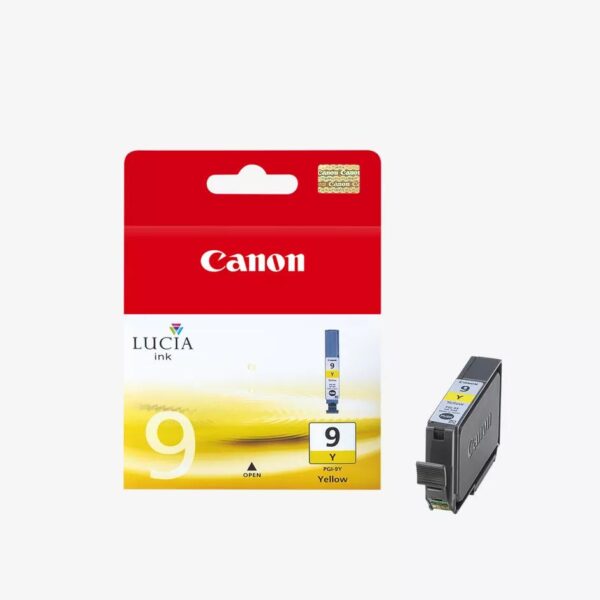
| Product Name | Canon PGI-9Y Yellow Ink Cartridge |
| Model Number | PGI-9Y |
| Series | PGI-9 |
| Manufacturer Part Number | 1037B001 |
| Product Code Family | 1037B |
| Product Type | Original Ink Tank |
| Printing Technology | Inkjet |
| Ink Colour | Yellow |
| Ink Type | Pigment-Based |
| Ink Technology | Canon LUCIA |
| Ink Capacity | 14 ml |
| Cartridge Type | Standard Yield |
| Photo Yield (10 × 15 cm) | Up to 560 photographs |
| Photo Yield (A3+) | Up to 121 photographs |
| Yield Testing Standard | ISO/IEC 24711 |
| Cartridge Configuration | Individual Ink Tank |
| Printer Family | Canon PIXMA |
| Package Contents | 1 × Canon PGI-9Y Yellow Ink Cartridge |
| EAN-13 | 4960999357218 |
Compatible Canon PIXMA Printers
| Printer Model | Compatibility |
|---|---|
| Canon PIXMA Pro9500 | Confirmed by Canon |
| Canon PIXMA Pro9500 Mark II | Confirmed by Canon |
| Canon PIXMA iX7000 | Confirmed by Canon |
| Canon PIXMA MX7600 | Listed in Canon’s printer manual |
Canon PGI-9Y Yellow Ink Cartridge – Genuine Canon LUCIA Pigment Ink for Professional Photo Printing
The Canon PGI-9Y Yellow Ink Cartridge is an original Canon ink tank designed for selected Canon PIXMA inkjet printers, including professional photographic printing models. Featuring a 14 ml capacity and Canon LUCIA pigment-based ink technology, this cartridge supplies rich yellow colour for detailed photographs, creative graphics, artwork and everyday colour printing.
Developed for Canon’s compatible multi-colour ink printing systems, the PGI-9Y contributes to accurate colour reproduction, natural tonal transitions and professional-looking photographic output.
Yellow plays an essential role in producing balanced colour images. It combines with other installed inks to create green, orange, warm highlights and other shades found in photographs and digital illustrations.
The Canon PGI-9Y Yellow Ink Cartridge is particularly suitable for users maintaining compatible Canon PIXMA Pro9500 and Pro9500 Mark II photo printers, as well as other supported PIXMA models.
Its individual ink tank design allows users to replace the yellow cartridge independently, supporting convenient consumable management for photographers, designers, offices and creative professionals.
Genuine Canon PGI-9Y Yellow Ink for Reliable Printing
Using a genuine Canon ink cartridge is an important consideration when maintaining the quality and performance of a compatible Canon PIXMA printer.
The Canon PGI-9Y Yellow Ink Cartridge is manufactured specifically for the printing systems identified by Canon.
Its original ink formulation is designed to operate with the supported printer’s ink delivery components and printhead technology.
For photographic printing, consistent ink behaviour is especially important because an image may contain numerous subtle changes in colour, brightness and shading.
A landscape photograph, for example, may include bright sunlight, golden highlights, green foliage and warm natural tones.
The yellow cartridge contributes to the reproduction of these colours as part of the printer’s complete ink system.
Choosing the correct manufacturer-specified cartridge helps users maintain the consumable configuration intended for their Canon equipment.
The cartridge should only be installed in printers that officially support the PGI-9Y ink tank.
Canon LUCIA Pigment Ink Technology
One of the most important features of the Canon PGI-9Y Yellow Ink Cartridge is its use of Canon LUCIA pigment ink technology.
The LUCIA ink family is developed for photographic applications requiring rich colours, detailed image reproduction and print longevity when used with suitable Canon printing equipment and media.
Unlike dye-based ink, pigment-based ink contains colour particles that contribute to the appearance of the printed image.
Canon’s professional pigment ink system is designed to deliver an attractive colour range and consistent photographic results.
The PGI-9Y supplies the yellow component of this system.
When combined with other compatible PGI-9 ink tanks, it supports the reproduction of photographs containing complex colours and fine visual details.
Print permanence depends on the ink, printer, selected media and storage or display conditions.
Users seeking the intended results should follow Canon’s printing recommendations and use suitable photo papers.
14ml Yellow Ink Capacity for Photographic Printing
The Canon PGI-9Y Yellow Ink Cartridge contains 14 ml of original Canon yellow pigment ink.
This is the manufacturer-specified capacity for the standard PGI-9Y cartridge.
Its capacity is designed for compatible Canon PIXMA printing systems that use individual ink tanks.
Photographic printing involves varying amounts of ink depending on the image being reproduced.
For example, a bright landscape photograph may consume yellow ink differently from an image dominated by darker blue or neutral tones.
Paper size, selected print quality, image coverage and printer maintenance can also affect consumption.
For this reason, cartridge capacity should not be treated as a fixed number of ordinary office pages.
Canon provides specific photographic yield estimates, making those figures more appropriate for understanding the expected output of this photo-oriented ink cartridge.
Print Up to 560 Photographs at 10 × 15cm
Canon specifies a photographic yield of up to 560 prints measuring 10 × 15 cm for the PGI-9Y Yellow Ink Cartridge.
This estimate is based on the manufacturer’s defined testing conditions.
The cartridge also has a rated output of up to 121 A3+ photographs.
These figures provide a useful reference for photographers and other users planning consumable replacement.
However, actual output depends on the image content, printer model, media selection, print settings and maintenance operations.
A photograph with substantial yellow coverage can consume ink differently from one containing limited yellow.
Similarly, different photographic paper types and print quality settings may influence ink usage.
The rated yield should therefore be used for comparison and planning rather than as a guaranteed number of photographs.
Vibrant Yellow Colour for Detailed Photo Prints
The Canon PGI-9Y Yellow Ink Cartridge contributes to the reproduction of yellow and other related colours in printed photographs.
Yellow is important for capturing the appearance of sunlight, warm lighting, flowers, natural landscapes and various graphical elements.
It also helps create many mixed colours when combined with cyan, magenta and other inks in the printer’s ink system.
In photographic printing, colour balance is essential.
An image containing natural foliage, for example, may require carefully controlled combinations of yellow and other colour inks.
The PGI-9Y supports this printing process by supplying the correct genuine yellow pigment ink.
The final appearance depends on the complete ink set, printer colour management, source image and selected media.
For users who require consistent photographic output, matching ink, printer and paper settings is an important part of the printing workflow.
Designed for Canon PIXMA Pro9500 Printers
The Canon PGI-9Y Yellow Ink Cartridge is compatible with the Canon PIXMA Pro9500 and PIXMA Pro9500 Mark II.
These Canon photographic printers use individual pigment ink tanks to support detailed colour printing.
The PGI-9Y supplies yellow ink as part of the printer’s multi-colour photographic ink configuration.
Such printers are suited to photographic work, artwork and other visual printing applications.
Their printing capabilities depend on the specific model and the media being used.
For photographers maintaining these printers, identifying the correct ink tank is important.
The PGI-9Y should not be confused with yellow cartridges from other Canon ink families, which may have different formulations, capacities or physical configurations.
Checking the cartridge code before purchase helps ensure the correct consumable is selected.
Suitable for Professional Photography Applications
Professional and enthusiast photographers often require accurate colour reproduction when creating physical prints from digital images.
The Canon PGI-9Y Yellow Ink Cartridge supports photographic output on compatible Canon PIXMA printers by supplying genuine yellow pigment ink.
The cartridge contributes to warm highlights, colour transitions and other image details.
Photographic applications may include portraits, landscapes, travel photographs, fine-art images and creative portfolios.
Images containing detailed lighting and subtle colour variations can benefit from a properly configured photographic ink system.
The Canon PGI-9Y forms one part of that system.
For the intended results, users should ensure that all required ink tanks are installed correctly and that the printer is operating in suitable condition.
Image preparation, printer settings, photo paper and colour management also influence the final printed result.
Accurate Yellow Tones and Natural Colour Transitions
Colour accuracy is important when printing photographs containing a wide range of hues.
The Canon PGI-9Y Yellow Ink Cartridge contributes to natural-looking colours by supplying yellow pigment ink to the supported printer.
Yellow is especially important in mixed shades such as orange, green and warm neutral tones.
When printing natural subjects, the printer combines different inks to reproduce the source image as closely as its hardware and settings allow.
A photograph of a garden, for example, may contain bright yellow flowers, several shades of green, dark shadows and subtle warm highlights.
These details depend on the coordinated operation of the full ink set.
The PGI-9Y provides the yellow component required by that system.
Consistent results are also influenced by paper profiles, printer settings and the quality of the digital image.
Professional Artwork and Creative Printing
The Canon PGI-9Y Yellow Ink Cartridge can support creative printing applications on compatible Canon PIXMA printers.
Artists, designers and photographers may need to reproduce illustrations, digitally created artwork or visual references.
Such images often contain colour gradients, detailed textures and carefully selected colour combinations.
Yellow may appear as a prominent colour or as a component of several mixed shades.
The Canon LUCIA pigment ink system is intended to support photographic and creative printing where colour quality is important.
Using the genuine PGI-9Y helps maintain the specified yellow ink component of this printing system.
The quality of reproduced artwork depends on the original file, media surface, printer configuration and other installed inks.
Users should select suitable print settings and appropriate paper for each project.
Individual Ink Tank for Convenient Replacement
The Canon PGI-9Y Yellow Ink Cartridge uses an individual ink tank design.
This means that yellow ink is supplied separately from the other colours installed in the compatible printer.
When the yellow cartridge becomes depleted, users can replace that specific tank instead of replacing the complete ink set.
This arrangement is useful because different photographs and graphics consume individual colours at different rates.
For example, a collection of landscape photographs may consume different quantities of yellow ink compared with portraits or monochrome images.
Individual replacement allows users to purchase the ink colour required by their actual printing activity.
This can make consumable management more practical for photographers, designers and printing departments.
Users should follow the printer’s instructions when removing and installing cartridges.
Canon PGI-9Y Yellow Ink for PIXMA iX7000
The Canon PIXMA iX7000 is among the printers identified by Canon as compatible with the PGI-9Y Yellow Ink Cartridge.
This printer uses a dedicated ink system designed for its supported document and graphics printing applications.
The PGI-9Y provides yellow ink for colour printing when installed in the appropriate cartridge position.
Applications can include charts, graphics, illustrations and other documents containing colour elements.
The presence of yellow ink is important because it participates in the reproduction of several colour combinations.
For users maintaining a PIXMA iX7000, choosing the correct cartridge designation helps ensure compatibility.
Always verify the printer model before purchasing because Canon has produced many different PIXMA printers that use unrelated ink families.
Colourful Documents and Presentation Graphics
Although the Canon PGI-9Y Yellow Ink Cartridge is strongly associated with photographic printing, it can also support colour document production on compatible devices.
Office users may need to print presentation graphics, visual reports, design layouts and colour illustrations.
Yellow is commonly used to highlight important information and distinguish categories within charts.
It may also contribute to the reproduction of business logos, illustrations and promotional designs.
The PGI-9Y supplies yellow pigment ink for the applicable printing process.
Its actual use depends on the printer’s supported functions and paper-handling capabilities.
The cartridge itself does not determine printing speed, maximum media size or other hardware features.
These characteristics belong to the printer model.
Canon PGI-9Y and the PGI-9 Ink Cartridge Family
The Canon PGI-9Y belongs to the Canon PGI-9 ink cartridge family.
Other cartridges in this family include cyan, magenta, photo cyan, photo magenta, red, green, grey, photo black and matte black variants.
Different compatible Canon printers may use different combinations of PGI-9 inks.
The PGI-9Y specifically supplies yellow pigment ink.
It is important not to confuse it with other Canon yellow cartridges such as CLI-series or newer PGI-series products.
Cartridges from different families may have different physical designs and ink formulations.
Even when two cartridges contain the same colour, they should not be treated as interchangeable without official compatibility confirmation.
For inventory management, the PGI-9Y designation and manufacturer part number provide useful identification.
Smooth Colour Reproduction on Suitable Photo Paper
Photo paper plays an important role in the appearance of a printed photograph.
The Canon PGI-9Y Yellow Ink Cartridge is designed for use within a compatible pigment ink printing system.
When used with appropriate media and printer settings, it contributes to detailed photographic output.
Glossy, semi-gloss, matte and fine-art media may produce different visual characteristics.
The way ink appears on the surface depends partly on the paper coating and its interaction with the printer’s ink system.
Users should consult Canon’s printer-specific media recommendations before selecting paper.
Professional printing often benefits from matching the printer driver settings to the chosen media.
Correct configuration helps the printer apply the intended ink delivery and printing behaviour.
Fine-Art Photography and Print Longevity
Canon’s LUCIA pigment ink system is developed for professional photographic output and longevity.
The PGI-9Y Yellow Ink Cartridge forms part of this pigment-based printing arrangement.
For photographers creating display prints, exhibitions or photographic portfolios, print durability can be an important consideration.
Canon’s pigment ink technology is designed to support photographs with attractive colour reproduction and resistance to certain forms of deterioration under specified conditions.
However, finished print longevity depends on factors such as paper selection, environmental exposure, storage and display conditions.
No universal lifespan should be assumed for every photograph.
Users seeking the intended results should combine genuine Canon ink with suitable media and proper print handling.
Consistent Printing for Design Studios
Design studios often need predictable colour reproduction when creating proofs, artwork samples and photographic presentations.
The Canon PGI-9Y Yellow Ink Cartridge provides the original yellow ink specified for compatible Canon PIXMA printing systems.
Using the correct cartridge helps maintain the manufacturer’s intended ink configuration.
A studio printing multiple versions of the same image may benefit from consistent settings, media and consumables.
Variations in printer configuration or paper can influence the appearance of repeated prints.
The PGI-9Y contributes to colour consistency as part of the full ink set.
Designers should also review colour management settings and ensure that their digital files are prepared appropriately for printing.
Convenient Identification for Printer Maintenance
The Canon PGI-9Y Yellow Ink Cartridge is identified by its model designation PGI-9Y.
The corresponding manufacturer part number is 1037B001 for the referenced regional retail product.
These identifiers are useful when preparing quotations, purchase orders or inventory records.
Printer consumables can look similar across product families, and ordering the wrong ink tank may create unnecessary delays.
By checking the complete model and part number, users can reduce confusion between the yellow cartridge and other PGI-9 variants.
This is particularly important for businesses maintaining multiple printers.
Accurate product identification helps purchasing teams obtain the correct original replacement cartridge.
Easy Installation in Compatible Canon Printers
The Canon PGI-9Y Yellow Ink Cartridge is intended for installation in compatible Canon PIXMA printers.
When the installed yellow ink tank requires replacement, users should follow Canon’s printer-specific instructions.
Before installation, confirm that the cartridge model matches the printer’s requirements.
The new ink tank should be handled carefully, and any protective materials should be removed only as directed by the manufacturer.
Users should avoid touching sensitive cartridge components unnecessarily.
After installation, the printer may perform normal cartridge recognition or ink preparation operations.
For troubleshooting, the relevant Canon printer manual remains the appropriate reference.
Correct cartridge handling contributes to dependable operation and helps prevent avoidable installation problems.
Reliable Consumable Management for Photographers
Photographers who regularly produce prints may benefit from monitoring their ink consumption.
The Canon PGI-9Y Yellow Ink Cartridge has a defined 14 ml capacity and manufacturer-specified photographic yield estimates.
However, actual ink usage depends on the photographs being printed.
Images containing extensive yellow or green areas may consume more yellow ink than other images.
Keeping replacement cartridges available can reduce interruptions during planned printing sessions.
For studios producing important photographic work, maintaining suitable stock of all required PGI-9 colours can be useful.
Inventory should be managed according to actual usage and the condition of unused cartridges.
Because different printers use different ink families, stock records should include the exact product model rather than only the colour name.
Original Canon Ink and Printer Performance
The Canon PGI-9Y Yellow Ink Cartridge is designed to work with compatible Canon printer hardware.
Its purpose is to supply the correct pigment-based yellow ink for the supported printing system.
Using genuine Canon ink helps maintain the consumable configuration specified by the manufacturer.
However, successful printing also depends on the condition of the printer, its printhead, media feed and other installed cartridges.
A new yellow cartridge cannot resolve every possible print quality issue.
Missing colours, banding or unexpected image defects may require printer maintenance or troubleshooting.
Users should follow Canon’s instructions for nozzle checks, cleaning and other printer-specific maintenance functions.
Cleaning operations may consume ink and should be performed only when appropriate.
Proper Storage and Handling of Canon PGI-9Y Ink
Unused Canon PGI-9Y Yellow Ink Cartridges should be stored in accordance with the manufacturer’s packaging instructions.
Keep unused cartridges in their original packaging until installation.
Avoid exposing ink tanks to unnecessary heat, direct sunlight or unsuitable storage conditions.
Before installing a cartridge, inspect the packaging and check that the product code matches the required printer consumable.
Cartridges should be handled carefully to avoid physical damage or contamination.
Users should also follow applicable local guidance for the disposal or recycling of used ink tanks.
For organisations maintaining printing supplies, proper stock rotation and clear product identification can support efficient inventory management.
Choosing the Correct Canon Yellow Ink Cartridge
Canon manufactures numerous yellow ink cartridges for different printer models.
The Canon PGI-9Y Yellow Ink Cartridge is not interchangeable with every other Canon yellow cartridge.
Its model designation identifies the yellow pigment ink tank used by supported Canon PIXMA printers.
Users should confirm the exact required ink code before purchase.
This is particularly important when purchasing cartridges for older photographic printers.
Matching the manufacturer part number, printer model and cartridge designation helps ensure the correct product is ordered.
For online product listings, including these details also helps customers identify suitable replacement consumables.
Why Choose the Canon PGI-9Y Yellow Ink Cartridge?
The Canon PGI-9Y Yellow Ink Cartridge is a suitable genuine replacement for users maintaining compatible Canon PIXMA photographic printers.
Its main features include original Canon LUCIA pigment ink, a 14 ml capacity, individual ink tank design and manufacturer-rated photographic yields.
The cartridge contributes to rich yellow tones, detailed colour graphics and photographic reproduction.
It is particularly useful for photographers, designers, creative professionals and other users who depend on compatible Canon equipment.
The individual cartridge arrangement allows users to replace yellow ink when required while retaining other usable ink tanks.
For the intended printing experience, users should combine the correct cartridge with suitable media and the printer’s recommended operating settings.
Conclusion – Canon PGI-9Y Yellow Ink Cartridge
The Canon PGI-9Y Yellow Ink Cartridge combines genuine Canon pigment-based yellow ink with LUCIA printing technology in a 14 ml individual ink tank.
Designed for selected Canon PIXMA printers, including the PIXMA Pro9500, Pro9500 Mark II and iX7000, it supports detailed photographic printing, artwork and colourful graphics.
With a rated yield of up to 560 photographs at 10 × 15 cm or 121 photographs at A3+ size, the PGI-9Y provides an original Canon replacement ink option for compatible printing equipment.
Always verify the printer model, cartridge designation and manufacturer part number before ordering.
Manufacturer and Internal Links
Official Canon Product Page: Canon PGI-9Y Yellow Ink Cartridge – Canon UK
Canon PGI-9 Series: Canon PGI-9 Ink Cartridge Family – Canon Australia
Canon India: Canon India Official Website
| Weight | 0.05 kg |
|---|---|
| Brand | Canon |
| Color | Yellow |
| EAN / UPC Code | 4960999357218 |
| Model | PGI-9Y-Yellow |
| Product Type | Ink Cartridges |

Reviews
There are no reviews yet.